ingress-nginx: Very slow response time
nginx-ingress-controller 0.9.0 beta-8 @ 10 req/s

traefik:latest @ 80 req/s
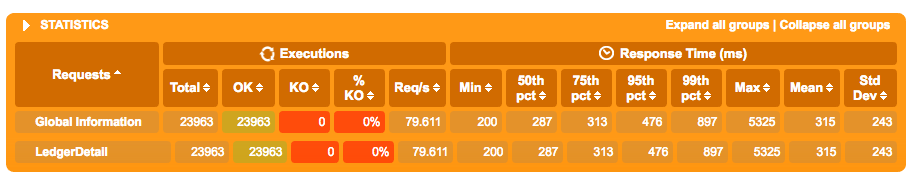
Not sure why this is but running the same service in kubernetes, traefik blows nginx ingress controller’s performance out of the water. Is this a normal response curve where 90+% of requests are slower then 1.2s? Seems like something is off.
- Kubernetes 1.6.4 with weave 1.9.7 (used Kops to create the cluster)
Below is the yaml config file for nginx:
---
apiVersion: v1
kind: ServiceAccount
metadata:
  name: ingress-nginx
  namespace: kube-ingress

---
kind: ClusterRole
apiVersion: rbac.authorization.k8s.io/v1beta1
metadata:
  name: ingress-nginx
rules:
- apiGroups: ["*"]
  resources: ["*"]
  verbs: ["*"]

---
kind: ClusterRoleBinding
apiVersion: rbac.authorization.k8s.io/v1beta1
metadata:
  name: ingress-nginx
subjects:
- kind: ServiceAccount
  name: ingress-nginx
  namespace: kube-ingress
roleRef:
  apiGroup: rbac.authorization.k8s.io
  kind: ClusterRole
  name: ingress-nginx

---
kind: ConfigMap
apiVersion: v1
metadata:
  name: ingress-nginx
  namespace: kube-ingress
  labels:
    k8s-addon: ingress-nginx.addons.k8s.io
data:
  use-proxy-protocol: "true"
  server-tokens: "false"
  secure-backends: "false"
  proxy-body-size: 1m
  use-http2: "false"
  ssl-redirect: "true"

---
kind: Service
apiVersion: v1
metadata:
  name: ingress-nginx
  namespace: kube-ingress
  labels:
    k8s-addon: ingress-nginx.addons.k8s.io
  annotations:
    service.beta.kubernetes.io/aws-load-balancer-proxy-protocol: "*"
    service.beta.kubernetes.io/aws-load-balancer-cross-zone-load-balancing-enabled: "true"
spec:
  type: LoadBalancer
  selector:
    app: ingress-nginx
  ports:
  - name: http
    port: 80
    targetPort: http
  - name: https
    port: 443
    targetPort: https
---
kind: HorizontalPodAutoscaler
apiVersion: autoscaling/v2alpha1
metadata:
  name: ingress-nginx
  namespace: kube-ingress
spec:
  scaleTargetRef:
    apiVersion: apps/v1beta1
    kind: Deployment
    name: ingress-nginx
  minReplicas: 4
  maxReplicas: 20
  metrics:
  - type: Resource
    resource:
      name: cpu
      targetAverageUtilization: 50
  - type: Resource
    resource:
      name: memory
      targetAverageUtilization: 50
---
kind: Deployment
apiVersion: extensions/v1beta1
metadata:
  name: ingress-nginx
  namespace: kube-ingress
  labels:
    k8s-addon: ingress-nginx.addons.k8s.io
spec:
  replicas: 4
  template:
    metadata:
      labels:
        app: ingress-nginx
        k8s-addon: ingress-nginx.addons.k8s.io
    spec:
      terminationGracePeriodSeconds: 60
      serviceAccountName: ingress-nginx
      containers:
      - image: gcr.io/google_containers/nginx-ingress-controller:0.9.0-beta.8
        name: ingress-nginx
        imagePullPolicy: Always
        resources:
          limits:
            cpu: 300m
            memory: 300Mi
        ports:
          - name: http
            containerPort: 80
            protocol: TCP
          - name: https
            containerPort: 443
            protocol: TCP
        readinessProbe:
          httpGet:
            path: /healthz
            port: 10254
            scheme: HTTP
          initialDelaySeconds: 5
          timeoutSeconds: 5
          periodSeconds: 5
        livenessProbe:
          httpGet:
            path: /healthz
            port: 10254
            scheme: HTTP
          initialDelaySeconds: 5
          timeoutSeconds: 5
          periodSeconds: 120
        env:
          - name: POD_NAME
            valueFrom:
              fieldRef:
                fieldPath: metadata.name
          - name: POD_NAMESPACE
            valueFrom:
              fieldRef:
                fieldPath: metadata.namespace
        args:
        - /nginx-ingress-controller
        - --default-backend-service=$(POD_NAMESPACE)/nginx-default-backend
        - --configmap=$(POD_NAMESPACE)/ingress-nginx
        - --publish-service=$(POD_NAMESPACE)/ingress-nginx
About this issue
- Original URL
- State: closed
- Created 7 years ago
- Reactions: 3
- Comments: 19 (9 by maintainers)
Just an update on this, we have found that there was a problem with weave registering/unregistering IP addresses for nodes when scaling (both up and down) which meant traffic was being routed to nodes that didnt exist any longer which lead to the timeouts and poor performance. I am not sure why Traefik didn’t suffer the same issues however with flannel I have not been able to observe these problems and nginx-ingress-controller has been working very well.
Create a cluster using kops in us-west
Create the echoheaders deployment
Create the nginx ingress controller
Run the tests*
Delete the cluster
Important:
@gugahoi can we close this issue?
@treacher the default is kubenet
@gugahoi what size are the nodes? how many? Can you post information about the application you are testing ? (or repeat the test using the echoheaders image so I can replicate this) Also please post the traefik deployment so I can use the same configuration
What application are you using to execute the test?