ingress-nginx: Unable to install multiple helm ingress-nginx releases for different namespaces

NGINX Ingress controller version: ingress-nginx-4.0.1

Kubernetes version (use kubectl version):

  • Client Version: v1.21.3

  • Server Version: v1.19.11

  • How was the ingress-nginx-controller installed: helm release

helm install banking-api-dev ingress-nginx/ingress-nginx --namespace development
  • output of helm ls -A image

  • If helm was used then please show output of helm -n <ingresscontrollernamepspace> get values <helmreleasename> image
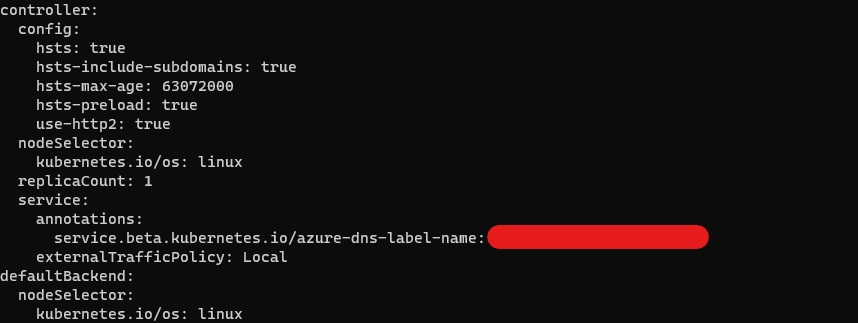
  • Current State of the controller: image

What happened: Trying to install ingress-nginx for certain services with different namespaces, the first release is installed successfully, but the second one is failing with the below error:

helm install banking-api-stg ingress-nginx/ingress-nginx --namespace staging
Error: rendered manifests contain a resource that already exists. Unable to continue with install: IngressClass "nginx" in namespace "" exists and cannot be imported into the current release: invalid ownership metadata; annotation validation error: key "meta.helm.sh/release-name" must equal "banking-api-stg": current value is "banking-api-dev"; annotation validation error: key "meta.helm.sh/release-namespace" must equal "staging": current value is "development"

About this issue

  • Original URL
  • State: closed
  • Created 3 years ago
  • Comments: 29 (10 by maintainers)

Most upvoted comments

Try this ;

Step1

kubecttl delete ingressclass staging

Step2

cat <<EOF | kubectl apply -f  -
apiVersion: networking.k8s.io/v1
kind: IngressClass
metadata:
  name: staging
  labels:
    app.kubernetes.io/component: controller
spec:
  controller: k8s.io/staging
EOF

Step3

helm -n staging delete banking-api-stg

Step4

helm --namespace staging install banking-api-stg ingress-nginx/ingress-nginx  \
--set controller.ingressClass=staging \
--set controller.replicaCount=1 \
--set controller.nodeSelector."kubernetes\.io/os"=linux \
--set defaultBackend.nodeSelector."kubernetes\.io/os"=linux \
--set controller.config.hsts='"true"' \
--set controller.config.hsts-include-subdomains='"true"' \
--set controller.config.hsts-preload='"true"' \
--set controller.config.use-http2='"true"' \
--set controller.config.hsts-max-age='"63072000"' \
--set controller.service.externalTrafficPolicy=Local --debug \
--set controller.ingressClassResource.name=staging \
--set controller.ingressClassResource.controllerValue= "k8s.io/staging"

And update results with commands and outputs together copy/pasted

@mohamma-faud, I tried to install 2 nginx controllers with the above steps and they do not work. First ingress is fine and shows the load balance ip, but the second ingress never get the load balancer ip, it always shows pending

1st ingress:

helm install nginx-ingress ingress-nginx/ingress-nginx –namespace ingress-basic –set controller.replicaCount=1 –set controller.ingressClass=nginx1 –set controller.ingressClassResource.name=nginx1 –set controller.ingressClassResource.controllerValue=“k8s.io/nginx1” –set controller.ingressClassResource.enabled=true –set controller.ingressClassResource.default=true –set controller.IngressClassByName=true –set controller.nodeSelector.“beta.kubernetes.io/os”=linux –set defaultBackend.nodeSelector.“beta.kubernetes.io/os”=linux –set controller.admissionWebhooks.patch.nodeSelector.“beta.kubernetes.io/os”=linux –set controller.service.loadBalancerIP=“X.X.X.X” –set controller.service.annotations.“service.beta.kubernetes.io/azure-dns-label-name”=“test-services”

2ns ingress: helm install nginx-ingress2 ingress-nginx/ingress-nginx –namespace ingress-basic –set controller.replicaCount=1 –set controller.ingressClass=nginx2 –set controller.ingressClassResource.name=nginx2 –set controller.ingressClassResource.controllerValue=“k8s.io/nginx2” –set controller.ingressClassResource.enabled=true –set controller.IngressClassByName=true –set controller.nodeSelector.“beta.kubernetes.io/os”=linux –set defaultBackend.nodeSelector.“beta.kubernetes.io/os”=linux –set controller.admissionWebhooks.patch.nodeSelector.“beta.kubernetes.io/os”=linux –set controller.service.loadBalancerIP=“X.X.X.X” –set controller.service.annotations.“service.beta.kubernetes.io/azure-dns-label-name”=“test2-services”

Can you please help here ?

I was able to resolve it, actually i had to edit the tag in the public ip resources in the azure to fix it. Thanks

Thanks @mohammed-fuad and no need to explicitly define ingressClassName yaml?

No, that’s the responsibility of helm chart.

Hi @mohammed-fuad can you explain how it worked ? i mean we dont need to create the ingressClass manually right? just use it in helm install and refer it in your ingress file? helm --namespace staging install banking-api-stg ingress-nginx/ingress-nginx –set controller.ingressClass=staging \

Using –set controller.ingressClass=staging only not enough, ingressClassResource.name and ingressClassResource.controllerValue must be set

--set controller.ingressClass=staging \
--set controller.ingressClassResource.name=staging \
--set controller.ingressClassResource.controllerValue= "k8s.io/staging"

at your ingress definition you must define the ingressClassName as:

apiVersion: networking.k8s.io/v1
kind: Ingress
metadata:
  name: test-api
  namespace: staging
spec:
    ingressClassName: staging

mybad … i edited it later so sorry about that

@longwuyuan It works finally without creating ingressClass manually, I deleted all the classes and re-installed helm as you recommended.

Thanks for your support.
