autoscaler: Autoscaler doesn't recognize instances as part of a node group
We are using the cluster autoscaler on AWS. It worked once, but right now, it doesn’t seem to recognize our nodes as part of any node group and is skipping them. Logs look like this:
1 static_autoscaler.go:366] Calculating unneeded nodes
1 utils.go:543] Skipping ip-10-0-1-104.eu-central-1.compute.internal - no node group config
And the same for all other nodes as well. As I said, it worked with the same configuration for us, but for context. We have cluster autoscaler deployed via helm, currently in chart version 6.2.0, which installs app-version 1.14.6. This should be fairly current. Our AWS Nodegroups are setup using eksctl and running Kubernetes 1.15, they are tagged with k8s.io/cluster-autoscaler/name: owned (and k8s.io/cluster-autoscaler/enabled: “true”). An eksctl get nodegroups does still succeed As values we have setup autoDiscovery.enabled true and .clusterName to the same name as our EKS is named, alongside cloudProvider aws. The logs do not otherwise look problematic or different from what we’re used to.
About this issue
- Original URL
- State: closed
- Created 4 years ago
- Reactions: 12
- Comments: 27 (2 by maintainers)
I just solved it for me: I forgot to set the AWS region. With the awsRegion parameter in my Helm values the combination above works fine.
Is that helm chart specific thing? I don’t see that env is mentioned anywhere in docs.
Our ec2 instances have correct tags
Still seeing exact same error.
Edit: I finally found my error. There was a mismatch in my cluster autoscaler’s
--node-group-auto-discoveryflag.I just had the same issue, and discovered this: #4934
You might double-check the the Deployment generated by the Helm chart. If it renders an env: block with AWS_REGION, it should be the correct one. If no AWS_REGION env var is set, the IAM serviceaccount is used to detect the local region.
I’m seeing the exact same error as shinebayar-g, and the tags are set correctly, but can’t figure out why this happens
@skadem07 try assigning them to the nodes, but ensure that the config on the k8s side matches the tags EXACTLY. Ensure the tags on the AWS side don’t have any whitespace, etc.
In the case that you use EC2 Auto Scaling groups, you will need to add the following tags (replace example-cluster-name with the name of the cluster):
k8s.io/cluster-autoscaler/example-cluster-name owned Yes k8s.io/cluster-autoscaler/enabled true Yes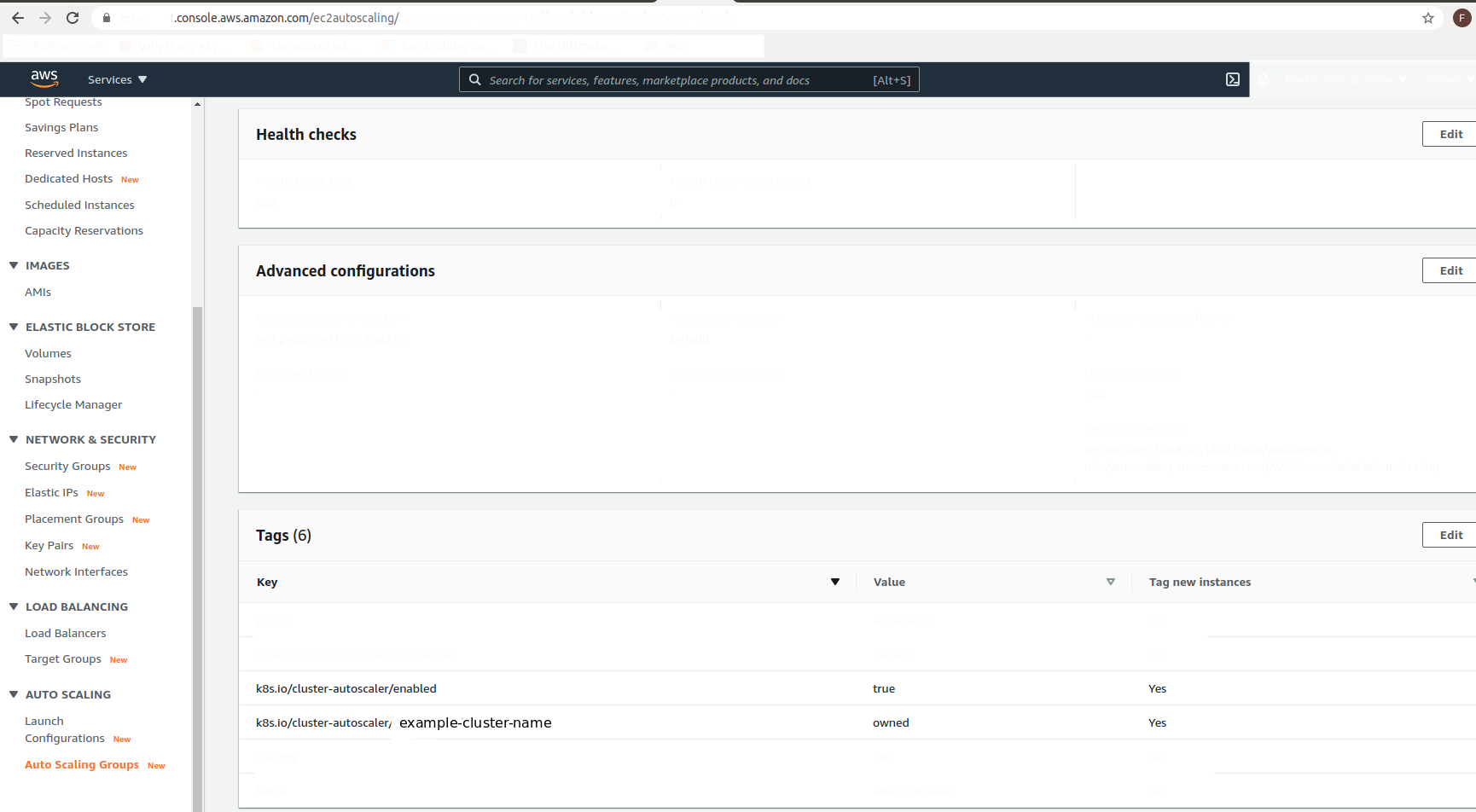
If you use terraform add this to your aws_autoscaling_group config
resource “aws_autoscaling_group” “example-eks-nodes-” { … tag { key = “k8s.io/cluster-autoscaler/example-cluster-name” value = “owned” propagate_at_launch = true }
tag { key = “k8s.io/cluster-autoscaler/enabled” value = “true” propagate_at_launch = true }
I hope it helps. Regards.
Looking into this a bit more, it appears thatfetchAutoAsgNamesinauto_scaling_groups.gomay not be returning any values (due togetAutoscalingGroupNamesByTagsinauto_scaling.go), which is strange. This would indicate to me that there’s either an issue with the AWS API (e.g. IAM permissions), the autoscale tag is somehow misconfigured on the nodes themselves, or the AWS SDK is somehow returning empty results when filtering by tag key.If this were an IAM issue I would expect to see an error in the logs, which I do not, so I’m a bit perplexed without any deeper way to debug this.It seems to work fine when I specify the node group (ASG) explicitly, via the--nodesflagOK I realize the problem… 🤦x100. The ASG tag
k8s.io/cluster/dev-eks-clusteractually had a whitespace character that I missed. This seems to be working properly once that was removed.A minor suggestion would have better error (or warning) logging when
getAutoscalingGroupNamesByTagsreturns no ASGs. When this function returnsnil, to me it seems to indicate that somebody provided tags they expect to be on ASGs, but the AWS API could not find them.Seeing the rather cryptic
no node group configmessage took a bit of digging into the code to realize exactly what was going on.When you combine CA 1.17.1 with EKS 1.15, I don’t even get until that issue because the CSINode API group changed:
Failed to list *v1.CSINode: the server could not find the requested resourceThe documentation states that you need to use the same autoscaler minor version as your Kubernetes, means you need to run cluster autoscaler v1.15.6. However, I still get this issue using the latest chart (7.2.2) with the latest 1.15 autoscaler (1.15.6):