pipelines: External volume deletion stuck in infinite loop
What steps did you take:
[A clear and concise description of what the bug is.] I ran MNIST example to train and predict results heres the code:
import kfp
import sys
import kfp.dsl as dsl
import kfp.components as comp


def train(data_path, model_file):
    '''
        This definition contains MNIST training steps:
            * Data Import
            * Data Preprocessing
            * Keras model creation
            * Model optimizer : adam
            * Training with specified epoch
            * Print test accuracy
            * Save the model
    '''
    import pickle
    import tensorflow as tf
    from tensorflow.python import keras

    # Load dataset
    fashion_mnist = keras.datasets.fashion_mnist
    (train_images, train_labels), (test_images, test_labels) = fashion_mnist.load_data()

    # Normalize dataset
    train_images = train_images / 255.0
    test_images = test_images / 255.0

    # Define the model using keras
    model = keras.Sequential([
        keras.layers.Flatten(input_shape=(28, 28)),
        keras.layers.Dense(128, activation='relu'),
        keras.layers.Dense(10)

    ])

    model.compile(optimizer='adam', loss=keras.losses.SparseCategoricalCrossentropy(
        from_logits=True), metrics=['accuracy'])
    model.fit(train_images, train_labels, epochs=10)
    test_loss, test_acc = model.evaluate(test_images, test_labels, verbose=2)
    print('Test accuracy', test_acc)

    # IMP this specifies the path inside the Docker container where our model will be saved
    model.save(f'{data_path}/{model_file}')

    # Save test data pickle file
    with open(f'{data_path}/test_data', 'wb') as f:
        pickle.dump((test_images, test_labels), f)


def predict(data_path, model_file, image_number):

    # func_to_container_op requires packages to be imported inside of the function.
    import pickle

    import tensorflow as tf
    from tensorflow import keras

    import numpy as np

    # Load the saved Keras model
    model = keras.models.load_model(f'{data_path}/{model_file}')

    # Load and unpack the test_data
    with open(f'{data_path}/test_data','rb') as f:
        test_data = pickle.load(f)
    # Separate the test_images from the test_labels.
    test_images, test_labels = test_data
    # Define the class names.
    class_names = ['T-shirt/top', 'Trouser', 'Pullover', 'Dress', 'Coat',
                   'Sandal', 'Shirt', 'Sneaker', 'Bag', 'Ankle boot']

    # Define a Softmax layer to define outputs as probabilities
    probability_model = tf.keras.Sequential([model,
                                            tf.keras.layers.Softmax()])

    # See https://github.com/kubeflow/pipelines/issues/2320 for explanation on this line.
    image_number = int(image_number)

    # Grab an image from the test dataset.
    img = test_images[image_number]

    # Add the image to a batch where it is the only member.
    img = (np.expand_dims(img,0))

    # Predict the label of the image.
    predictions = probability_model.predict(img)

    # Take the prediction with the highest probability
    prediction = np.argmax(predictions[0])

    # Retrieve the true label of the image from the test labels.
    true_label = test_labels[image_number]

    class_prediction = class_names[prediction]
    confidence = 100*np.max(predictions)
    actual = class_names[true_label]


    with open(f'{data_path}/result.txt', 'w') as result:
        result.write(" Prediction: {} | Confidence: {:2.0f}% | Actual: {}".format(class_prediction,
                                                                        confidence,
                                                                        actual))

    print('Prediction has be saved successfully!')

# Glue together training function to the docker container
train_op = comp.func_to_container_op(train, base_image='tensorflow/tensorflow:latest-gpu-py3')
predict_op = comp.func_to_container_op(predict, base_image='tensorflow/tensorflow:latest-gpu-py3')


# define pipeline metadata like name, description etc.
@dsl.pipeline(
    name='MNIST Pipeline',
    description='Pipeline that trains MNIST models on GPU'
)
# define virtual HDD space that the pipeline will take to run
def mnist_container_pipeline(data_path='/mnt', model_file='mnist_model.h5'):
    vop = dsl.VolumeOp(
        name='create_volume',
        resource_name='data-volume',
        size='1Gi',
        modes=["ReadWriteOnce"]
        #modes=dsl.VOLUME_MODE_RWM
    )

# We have already created a volume and a Glued component(Docker+Python script). This Glued component needs
# to communicate with the volume so lets attach a volume to Glued component
    mnist_training_container = train_op(data_path, model_file) \
        .add_pvolumes({data_path: vop.volume})

# Create MNIST prediction component.
    mnist_predict_container = predict_op(data_path, model_file, image_number=0) \
                                    .add_pvolumes({data_path: mnist_training_container.pvolume})


# Print the result of the prediction
    mnist_result_container = dsl.ContainerOp(
        name="print_prediction",
        image='library/bash:4.4.23',
        pvolumes={data_path: mnist_predict_container.pvolume},
        arguments=['cat', f'{data_path}/result.txt']
    )

    delete_vop = dsl.ResourceOp(
        name="delete-volume",
        k8s_resource=vop.k8s_resource,
        action="delete"
    ).after(mnist_result_container)

# pass these paths inside the volume that we made
pipeline_func = mnist_container_pipeline
#experiment_name = 'fashion_mnist_kubeflow_training2'
experiment_name = sys.argv[0]
run_name = pipeline_func.__name__ + ' run'


if __name__ == '__main__':
    kfp.compiler.Compiler().compile(pipeline_func, __file__ + '.yaml')
What happened:
The experiment Ran but the attached volume to this experiment is not getting deleted.
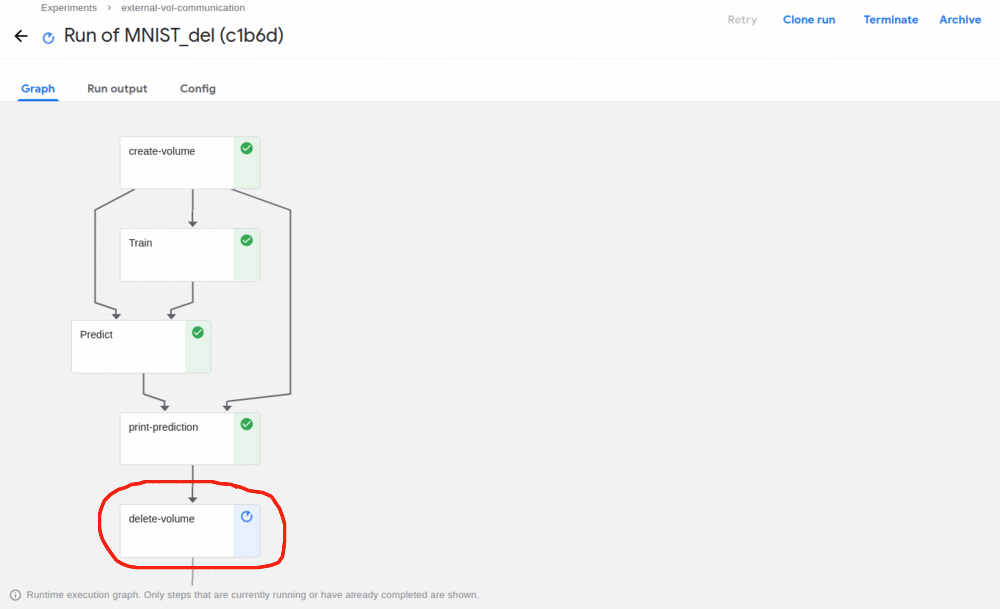
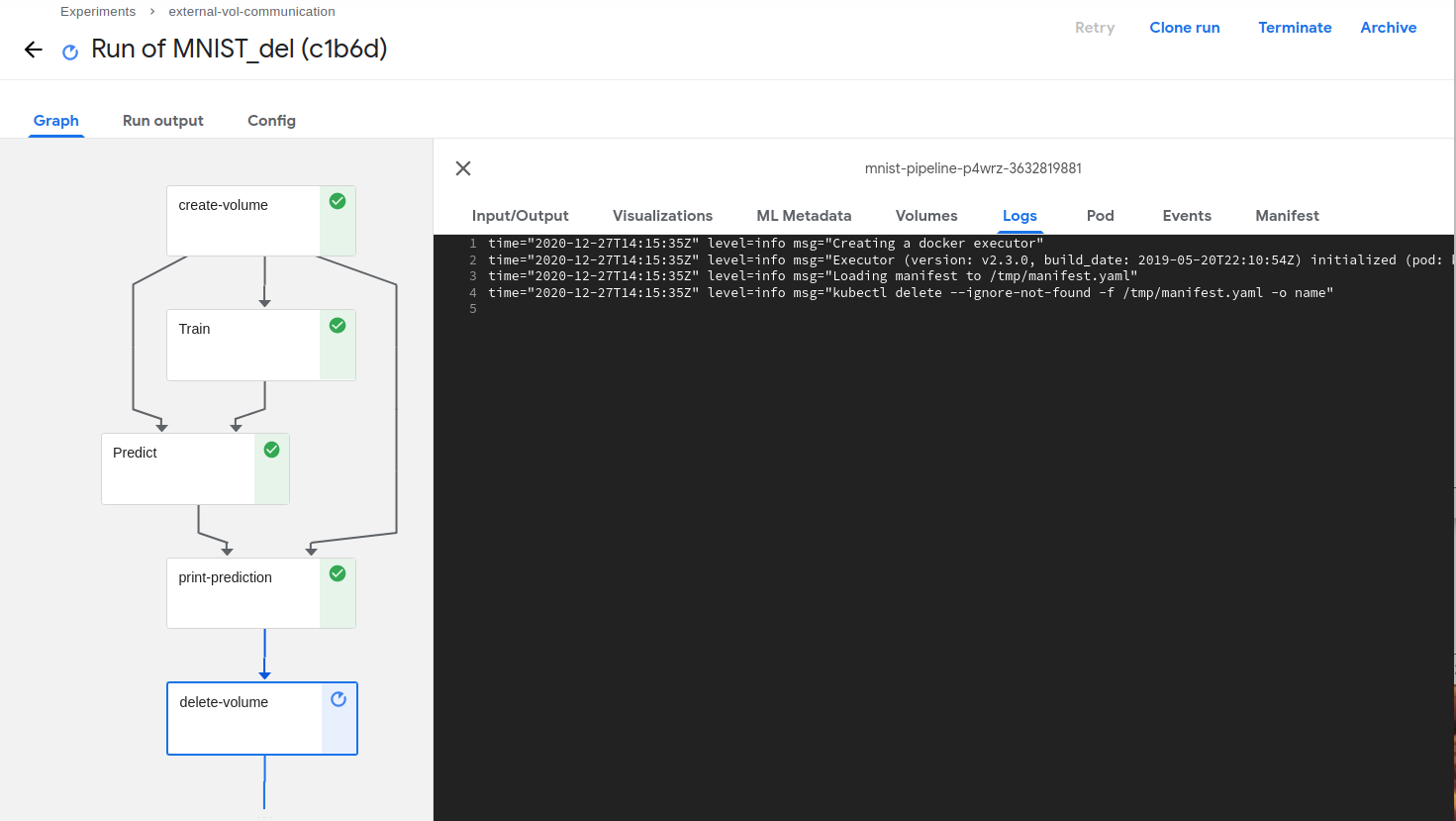
What did you expect to happen:
The attached volume should get deleted.
Environment:
How did you deploy Kubeflow Pipelines (KFP)? By converting above python script to -> yaml file and uploading this yaml file to Kubeflow dashboard
KFP version: 1.2
KFP SDK version:
kfp                                1.1.2
kfp-pipeline-spec                  0.1.2
kfp-server-api                     1.1.2rc1
Anything else you would like to add:
[Miscellaneous information that will assist in solving the issue.]
How do I delete this volume ?
/kind bug
About this issue
- Original URL
- State: closed
- Created 4 years ago
- Comments: 17 (8 by maintainers)
Current bug is still there with kf1.3 and minikube. Even deleting the pvc manually from command line kubectl delete PersistentVolumeClaim myvolume -n myuser --wait=false --output name cause it to get struck into Terminating state, without really deleting it. e.g. Status: Terminating (lasts 23m)