WeasyPrint: Memory leak problem
Hello, we encountered a memory leak when using weasyprint. The phenomenon is that once the memory goes up, it can’t go down again.
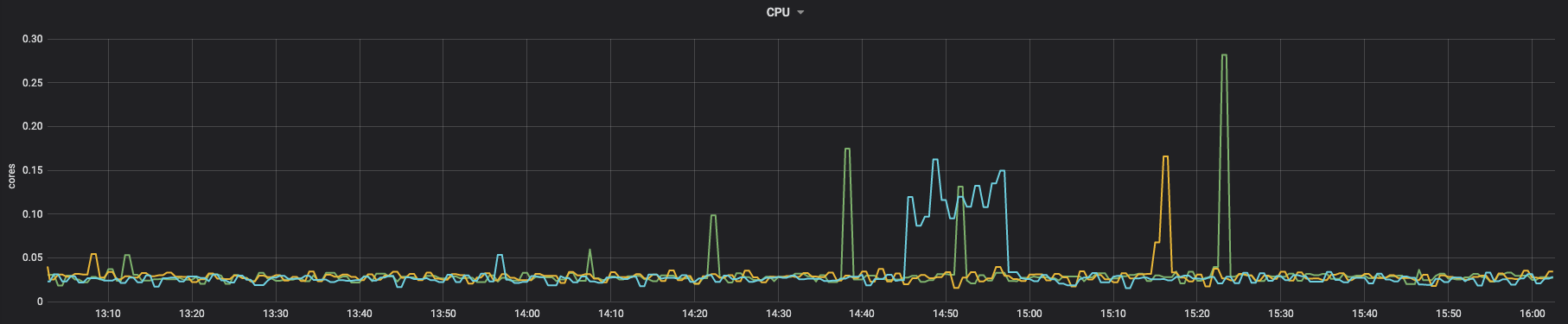
Prometheus monitoring screenshot:
cpu:
 memory:
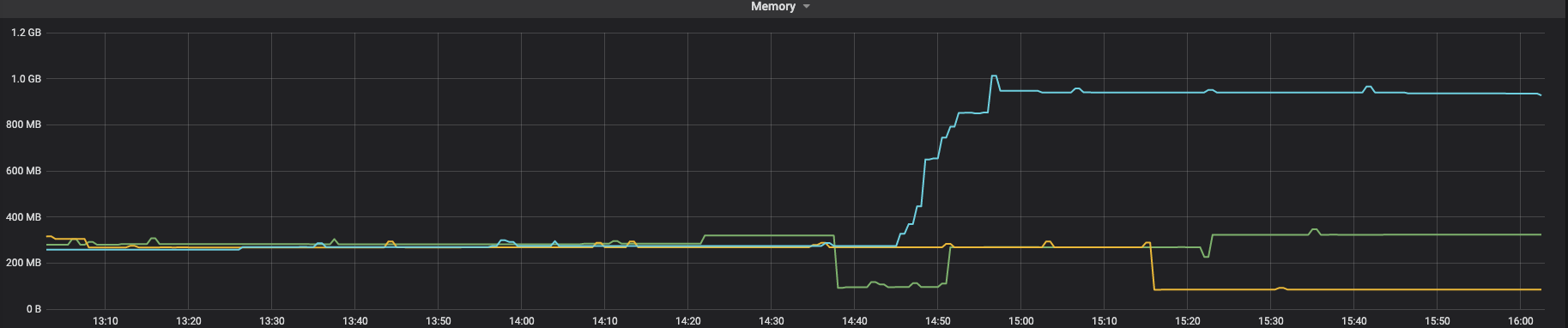 You can see that CPU will drop, but memory will never drop.
We use custom fonts, a lot of pictures and SVG. I don’t know if it will be related to them.
Problem recurrence steps
We are running in docker: dockerfile:
FROM python:3.8-bullseye

RUN apt-get update

RUN apt-get install -y python3-cffi python3-brotli libpango-1.0-0 libpangoft2-1.0-0 --no-install-recommends

RUN mkdir ~/.fonts

RUN cp SourceHanSerifCN-Light.ttf ~/.fonts/
SourceHanSerifCN-Light.ttf We used the latest weasyprint:
pip freeze

aliyun-python-sdk-core==2.13.35
aliyun-python-sdk-kms==2.15.0
amqp==2.6.1
bayua==0.0.3
billiard==3.6.4.0
blinker==1.4
Brotli==1.0.9
cachetools==4.2.4
cachext==1.1.1
celery==4.4.7
certifi==2021.10.8
cffi==1.15.0
charset-normalizer==2.0.7
coast==1.4.0
crcmod==1.7
cryptography==35.0.0
cssselect2==0.4.1
elastic-apm==5.10.1
fonttools==4.28.1
grpcio==1.37.1
grpcio-tools==1.37.1
html5lib==1.1
idna==3.3
Jinja2==3.0.3
jmespath==0.10.0
kombu==4.6.11
MarkupSafe==2.0.1
oss2==2.15.0
pendulum==2.1.2
Pillow==8.4.0
protobuf==3.19.1
protos-py==0+untagged.247.gbb6fa5f
pycparser==2.21
pycryptodome==3.11.0
pydyf==0.1.2
PyMuPDF==1.19.1
pyphen==0.11.0
python-dateutil==2.8.2
pytz==2021.3
pytzdata==2020.1
redis==3.5.3
requests==2.26.0
sea==2.3.1
SensorsAnalyticsSDK==1.10.3
sensorsdata-ext==1.0.2
sentry-sdk==1.4.3
six==1.16.0
tinycss2==1.1.0
urllib3==1.26.7
vine==1.3.0
weasyprint==53.4
webencodings==0.5.1
zopfli==0.1.9
Running code
import tempfile

from weasyprint import CSS, HTML
from weasyprint.text.fonts import FontConfiguration

font_config = FontConfiguration()
css = CSS(
    string="""
    @font-face {
        font-family: SourceHanSerifCN-Light;
        src: url("SourceHanSerifCN-Light.ttf");
    }""",
    font_config=font_config,
)

html_url = ""

temp_pdf_file = tempfile.NamedTemporaryFile(mode="w", suffix=".pdf")
HTML(html_url).write_pdf(
    temp_pdf_file.name, stylesheets=[css], font_config=font_config
)
temp_pdf_file.close()
HTML page to be converted (this is just a demo, which is actually much larger than it): https://media-zip1.baydn.com/storage_media_zip/zonyme/182d435ec35fabee217b868a5d2b1e94.49ea39443dfa775bc73b0292a088c88b.html
At first, I thought HTML was too big, so I split HTML into several sub HTML, then converted it into PDF, and finally spliced the PDF, but it would leak memory
like this:
import tempfile

from weasyprint import CSS, HTML
from weasyprint.text.fonts import FontConfiguration

font_config = FontConfiguration()
css = CSS(
    string="""
    @font-face {
        font-family: SourceHanSerifCN-Light;
        src: url("SourceHanSerifCN-Light.ttf");
    }""",
    font_config=font_config,
)

html_url = []

for item in html_url:
  temp_pdf_file = tempfile.NamedTemporaryFile(mode="w", suffix=".pdf")
  HTML(item).write_pdf(
      temp_pdf_file.name, stylesheets=[css], font_config=font_config
  )
 temp_pdf_file.close()
....
merge pdf
I really hope you can see this problem and help fix it
About this issue
- Original URL
- State: closed
- Created 3 years ago
- Reactions: 8
- Comments: 28 (13 by maintainers)
@liZe I’m getting the same issue in Django:
https://weasyprint-mem.herokuapp.com/
…and in Flask:
https://weasyprint-mem-flask.herokuapp.com/
I’ve also tried:
waitressinstead ofgunicorngc.collect()in between requests…all with the same result. This says to me this is either an issue with Weasyprint itself, or something more fundamentally with Python, or something with Heroku. In any of those cases one would think this issue would have arisen before, which is what makes it so strange.
Our app generates a one-page PDF report for users. It contains a few small SVG and PNG icons, and 4 big textual tables. The PDF is generated once, after which it is put in a storage bucket for subsequent retrieval.
The app is Django 4.1.6, Weasyprint 57.2, running on Heroku (heroku-22). We’re not having any issues retrieving previously-generated PDFs, but each time it generates a new PDF (filesize 38kb) the app’s memory RSS increases by 20 - 40mb, as reported by Heroku. This memory usage doesn’t go down until the server is restarted.
Even after removing all images, fonts, and CSS (filesize 32kb) each generation still increases the memory RSS by about 17mb.
If we remove everything from the report template, leaving just
<!DOCTYPE html><html lang="en"><head><title>Test</title><body></body></html>(filesize 863b), each generation increases the memory RSS by about 1.3mb.Unfortunately Heroku doesn’t automatically restart the server until both memory RSS and swap exceed the 512mb limit, so once RSS is used up we start getting a lot of pings about OOM errors and have to manually restart it.
There probably isn’t much you can diagnose from this, unless maybe it’s something to do with the 4 big textual tables?