juliaup: Julia launcher can't find other versions in VS-Code
The “julia” launched by vscode (Julia Language Server) can’t find other versions of julia. The version seems stuck in 1.6.2 for the version release and juliaup update release doesn’t fix it. The terminal of vscode does launch the correct version:
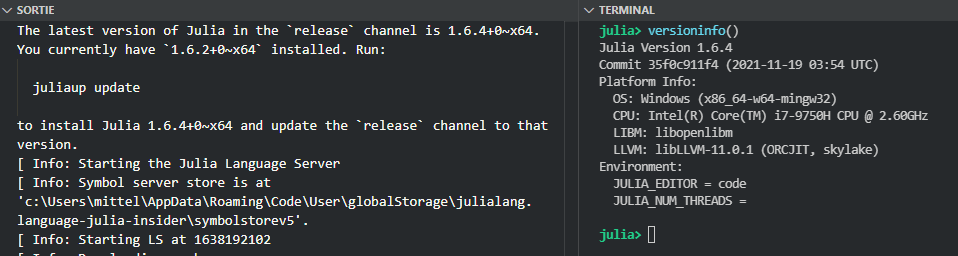
Also, when trying to specify a version different than the default juliaup profile, the version seems to be parsed correctly but not found:

It kinda looks like I might have 2 juliaups installed but I only downloaded it from the windows store so I don’t think it’s the case
I have only one julia in my PATH:
PS C:\Program Files\WindowsApps> where.exe julia
C:\Users\mittel\AppData\Local\Microsoft\WindowsApps\julia.exe
About this issue
- Original URL
- State: closed
- Created 3 years ago
- Comments: 23
Confirmed from my side: VSCode v.1.63.2 (Windows_NT x64 10.0.19044) & Julia extension 1.5.8 --> everything ok. Hopefully it’s ok for the OP, too. @MarcMush?
Does it work if you just leave
julia.executablePathempty entirely? I think I actually understand why it doesn’t work if you have some value in that field, but I think the version that ships right now should work if you just leave that configuration setting empty.I think what I’ll have to do is actually add another configuration setting to the extension called
julia.channelthat allows one to specify a channel to be used for the Juliaup scenario…Yes, a bug in the extension. It is fixed on
Masterand will hopefully ship soon.I’ll test it when I get back on my work PC in january
I think this should now be fixed with the latest VS Code extension release, can we close this issue? Would be great if someone who had this problem could confirm that things are OK now.
@davidanthoff thanks for the update, and, since I’m at it, thank you (and all other contributors, of course) for all the great work you’ve done and keep doing, and all the time and effort you’ve put into juliaup and the VSCode extension and everything.