vscode-solidity: Visual Studio Code: The Solidity Language Server server crashed 5 times in the last 3 minutes. The server will not be restarted
I am working on Win10 and getting this error from VSCode after installing the Solidity extension and then opening a .sol file:
[Error - 14:16:07] (node:10264) UnhandledPromiseRejectionWarning: Unhandled promise rejection (rejection id: 2): TypeError: Path must be a string. Received null
[Error - 14:16:07] (node:10264) DeprecationWarning: Unhandled promise rejections are deprecated. In the future, promise rejections that are not handled will terminate the Node.js process with a non-zero exit code.
C:\Users\user\.vscode\extensions\JuanBlanco.solidity-0.0.27\node_modules\solc\soljson.js:1
(function (exports, require, module, __filename, __dirname, process, global, Buffer) { return function (exports, require, module, __filename, __dirname) { var Module;if(!Module)Module=(typeof Module!=="undefined"?Module:null)||{};var moduleOverrides={};for(var key in Module){if(Module.hasOwnProperty(key)){moduleOverrides[key]=Module[key]}}var ENVIRONMENT_IS_WEB=typeof window==="object";var ENVIRONMENT_IS_WORKER=typeof importScripts==="function";var ENVIRONMENT_IS_NODE=typeof process==="object"&&typeof require==="function"&&!ENVIRONMENT_IS_WEB&&!ENVIRONMENT_IS_WORKER;var ENVIRONMENT_IS_SHELL=!ENVIRONMENT_IS_WEB&&!ENVIRONMENT_IS_NODE&&!ENVIRONMENT_IS_WORKER;if(ENVIRONMENT_IS_NODE){if(!Module["print"])Module["print"]=function print(x){process["stdout"].write(x+"\n")};if(!Module["printErr"])Module["printErr"]=function printErr(x){process["stderr"].write(x+"\n")};var nodeFS=require("fs");var nodePath=require("path")

TypeError: Path must be a string. Received null
    at assertPath (path.js:7:11)
    at Object.join (path.js:468:7)
    at createPackage (C:\Users\user\.vscode\extensions\JuanBlanco.solidity-0.0.27\out\src\projectService.js:12:35)
    at createProjectPackage (C:\Users\user\.vscode\extensions\JuanBlanco.solidity-0.0.27\out\src\projectService.js:87:26)
    at Object.initialiseProject (C:\Users\user\.vscode\extensions\JuanBlanco.solidity-0.0.27\out\src\projectService.js:33:26)
    at SolcCompiler.compileSolidityDocumentAndGetDiagnosticErrors (C:\Users\user\.vscode\extensions\JuanBlanco.solidity-0.0.27\out\src\solcCompiler.js:108:87)
    at validate (C:\Users\user\.vscode\extensions\JuanBlanco.solidity-0.0.27\out\src\server.js:36:52)
    at Timeout.setTimeout [as _onTimeout] (C:\Users\user\.vscode\extensions\JuanBlanco.solidity-0.0.27\out\src\server.js:125:26)
    at ontimeout (timers.js:365:14)
    at tryOnTimeout (timers.js:237:5)
[Error - 14:16:09] Connection to server got closed. Server will not be restarted.
About this issue
- Original URL
- State: closed
- Created 7 years ago
- Comments: 76 (43 by maintainers)
Commits related to this issue
- #28 Allow server to validate and compile single solidity docs (no path) — committed to juanfranblanco/vscode-solidity by juanfranblanco 7 years ago
@jsjoeio Ahh now I understand, also I missed the link!! (doh!) Thanks
This is happening again with vscode@1.45.1 and vscode-solidity@0.0.73 on my macOS@10.15.4:
My settings:
Hey @jsjoeio dont worry, language server error can mean anything. So here is a good place. Have you got some sample code, that you can share? Ill test it with Open VSX
THANK VERY MUCH! Muchas gracias, saludos desde Peru!
whoa! pure magic! i made all the steps you proposed and it works like a charm on all files. BUT those settings were exactly as mine but for one thing: “solidity.enableLocalNodeCompiler”: false was in the end of the settings file. i don’t think this should matter though. also, the failure was in different workspaces so i believe it also doesn’t have to do anything with the workspace settings. maybe it is cache problem or something, i don’t have any other explanation. i’ve also tried to break it changing settings forth and back - no way, it is stable now. so many thanks to you @juanfranblanco !
can you do me a favor and use this as your settings (global) and remove the workspace ones.
and use this contract only
also what version of the extension you have it should be 102. edit you will need to restart… but you should not be getting any errors.
Closing this, now although something will cause the server to crash in the future.
@gitpusha I never use that as I work with vscode + visual studio, so no idea.
It seems that you are trying to apply a setting without opening the right folder. You can apply it globally that is normally the case.
@gitpusha you need to provide the full version of the compiler. Like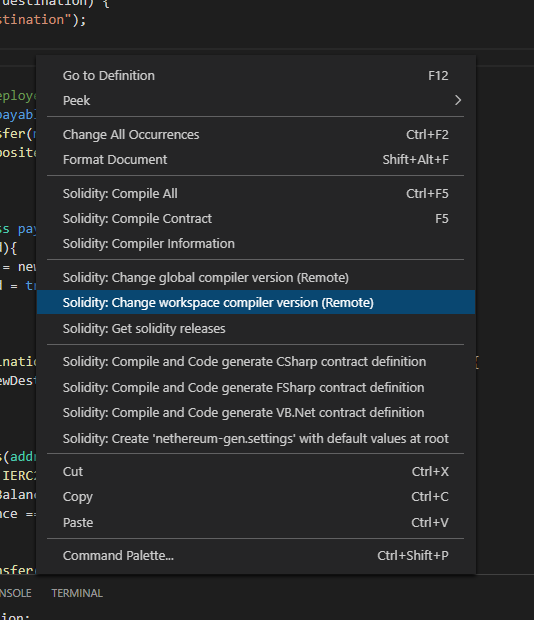
"solidity.compileUsingLocalVersion": "v0.5.17+commit.d19bba13"The best thing is to change it using the context menu, select workspace (current project) or global (all projects)Thanks Toca, it’s working fine now. Thanks for your prompt reply too!
Hi Juan (tocayo!),
To compile using the local version you need to provide a full path to the compiler file. Mainly this is used when you have downloaded a version of solc js, and kept in your hard drive.
Thanks is the plugins section in solhint that is causing the crash, I will be releasing a new version today which checks for this.
Hi! Experiencing issue with VSC 1.42.1 & solididy extension 0.0.70 in linux machine when: File > Add Folder to workspace . Notice folder contains several other folders and files.
After restarting VSC message no longer appears.
Workaround: open a folder, instead of just a file. (Thanks)