streetmerchant: npm ERR! missing script: start
Description
re installed everything and now this message
npm ERR! missing script: start
npm ERR! A complete log of this run can be found in:
npm ERR!     C:\Users\...
------------------------------------------------------------------
package.json

{
  "name": "nvidia-snatcher",
  "description": "🔮 For all your Nvidia needs",
  "main": "src/index.ts",
  "scripts": {
    "all": "npm run build && npm run lint",
    "build": "tsc",
    "lint": "xo",
    "lint:fix": "xo --fix",
    "start": "npm run build && node build/index.js",
    "start:dev": "nodemon --config nodemon.json",
    "test:notification": "npm run build && node build/__test__/notification-test.js"
  },
  "repository": {
    "type": "git",
    "url": "git+https://github.com/jef/nvidia-snatcher.git"
  },
  "keywords": [],
  "author": "jef",
  "license": "MIT",
  "bugs": {
    "url": "https://github.com/jef/nvidia-snatcher/issues"
Possible solution
About this issue
- Original URL
- State: closed
- Created 4 years ago
- Comments: 30 (14 by maintainers)
Thank you! I think I figured out what happened, For people in the future what happened was that my brain was turned off and I was saving the .env file in the wrong place. I had to go to the nvidia-snatcher file inside of the current nvidia snatcher file I was already in. Here is a picture so you can see what file to get to:
Edit; This happened to me because I was an idiot and saved the snatcher file inside the currently existing snatcher files.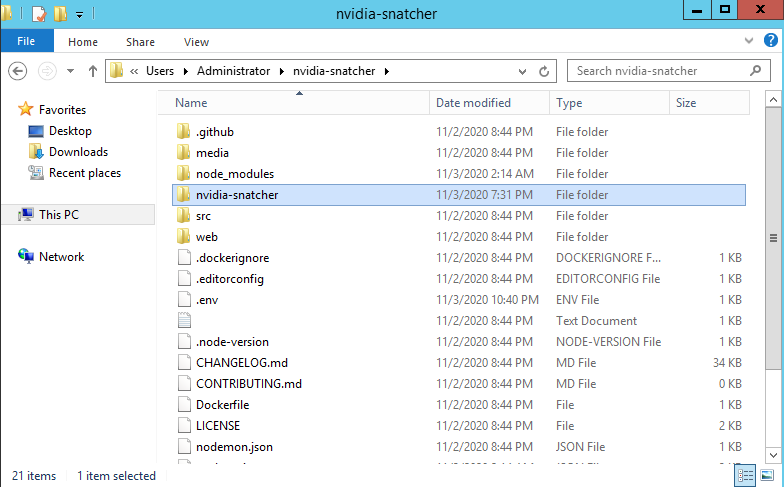
I deleted the other things that I wasnt using. That didnt seem to be the issue before though.
Glad to hear it’s finally working.
Could be relevant to https://github.com/jef/nvidia-snatcher/issues/658
Overall, it looks pretty good. One thing I would suggest is getting the
idfor theDISCORD_NOTIFY_GROUP, but that’s outside of your problem.Oh thing I would do is get your user agent.
Next thing I would do is copy this
.env, back it up on your desktop or something, then use something like this:and see if you get more than nvidia.
Sounds good! Unfortunately I’m not well versed in Windows side of things, only use it to play games mostly. Let me know if it ends up working. Otherwise, we could try to figure out what’s going on.
Oh ok. Thank you! Im just trying to think of whats causing the issue. Ill try to re install everything again from scratch.