react-select: React-select is slow when you have more than 1000 items

Low performance on large sets of options

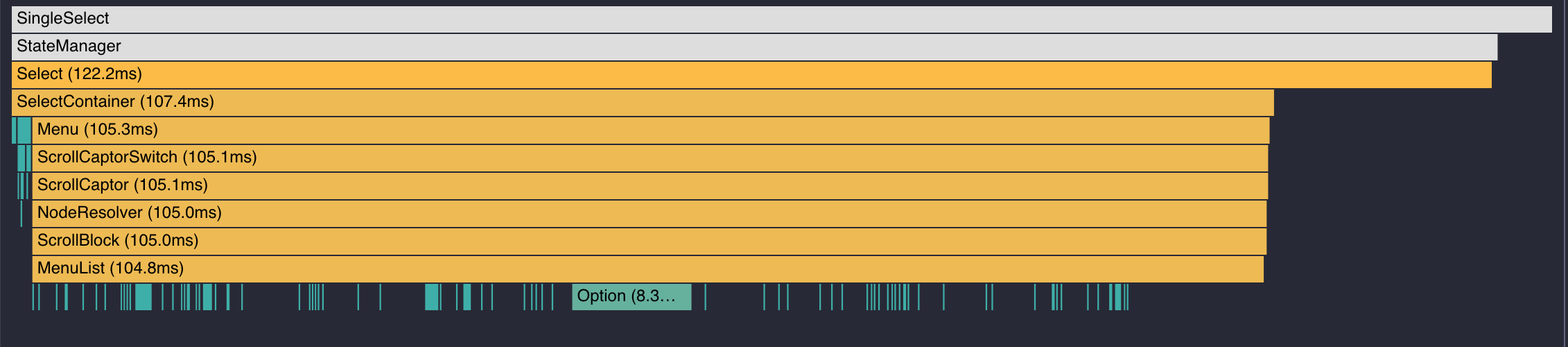
React-select slows down when you have a huge array of data. Mouse screenshot 2018-10-19 at 15 29 43 screenshot 2018-10-19 at 15 51 21
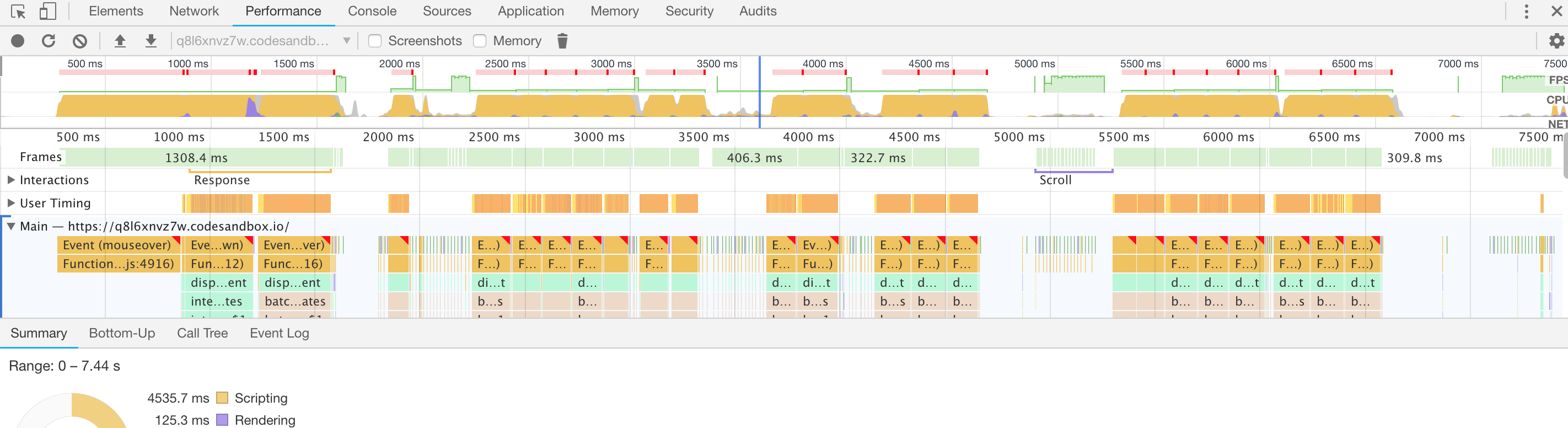
FPS drops so low on mouseover, that i can barely use it. In my real case, where i have 1010 items, which i need to show(and i can’t load them as user types) - i cannot do anything at all.

You can find a simple example in codesandbox.

https://codesandbox.io/s/q8l6xnvz7w

[Violation] 'mouseover' handler took 346ms
[Violation] 'mouseover' handler took 184ms
[Violation] 'mouseover' handler took 197ms
[Violation] 'mouseover' handler took 172ms
[Violation] 'mouseover' handler took 161ms
[Violation] 'mouseover' handler took 150ms
[Violation] 'mouseover' handler took 167ms
[Violation] 'mouseover' handler took 172ms
[Violation] 'mouseover' handler took 156ms
[Violation] 'mouseover' handler took 166ms

React-select version: 2.1.0

About this issue

  • Original URL
  • State: closed
  • Created 6 years ago
  • Reactions: 102
  • Comments: 87 (1 by maintainers)

Commits related to this issue

Most upvoted comments

Two things to look into that may help with your issues, we also had some issues regarding large lists.

filterOption={createFilter({ignoreAccents: false})}

Take a look at this reported bug https://github.com/JedWatson/react-select/issues/2850

There’s two examples using React-Window, which greatly improves the performance.

https://codesandbox.io/s/lxv7omv65l

If it’s the typing lag that you’re bumping on (I was) then it’s actually the filterOption={createFilter({ignoreAccents: false})} suggestion by @M1K3Yio that’s the gem.

Using this massively reduces the lag when you’re typing into the select. I’ve got a sandbox here that illustrates: https://codesandbox.io/s/zn70lqp31m?fontsize=14

And I’ve blogged it too

Based on the responses above, I came up with this:

import { MenuListComponentProps } from 'react-select/lib/components/Menu'
import { FixedSizeList } from 'react-window'
import { OptionProps } from 'react-select/lib/components/Option'
import { components } from 'react-select'
import React from 'react'

export const optimizeSelect = {
  components: {
    MenuList: OptimizedMenuList,
    Option: OptimizedOption,
  },
}

function OptimizedMenuList(props: MenuListComponentProps<SelectOption>) {
  const { options, children, maxHeight, getValue } = props
  if (!children || !Array.isArray(children)) return null

  const height = 35
  const selectedValues = getValue() as SelectOption[]
  const initialOffset = selectedValues[0] ? options.indexOf(selectedValues[0]) * height : 0

  return (
    <FixedSizeList
      width={''}
      itemSize={height}
      height={maxHeight}
      itemCount={children.length}
      initialScrollOffset={initialOffset}
    >
      {({ index, style }) => (
        <div className="option-wrapper" style={style}>
          {children[index]}
        </div>
      )}
    </FixedSizeList>
  )
}

function OptimizedOption(props: OptionProps<SelectOption>) {
  delete props.innerProps.onMouseMove
  delete props.innerProps.onMouseOver
  return <components.Option {...props}>{props.children}</components.Option>
}

// SelectOption is specific to this example
// and may not work with other projects
type SelectOption = {
  value: string
  label: string
  [key: string]: string
}

Then, whenever I have to optimize a <Select /> I pass a couple of extra props, ie.:

<Select
  {...theOtherProps}
  filterOption={createFilter({ ignoreAccents: false })}
  components={optimizeSelect.components}
/>

Given the required dependencies are installed, others using typescript should be able to create a file for the optimizeSelect and use it as in the example above.

Summarized and working for me:

  • custom option component to remove laggy onMouseMove / onMouseHover
  • deactivating ignoreAccents to speed up search
  • custom css hover
  • isFocused false for every option such that no option is getting the standard highlight class of react-select
import React from 'react';
import Select, {createFilter, components} from 'react-select';

class YourComponent extends React.Component{
    constructor(props){
    super(props);
    }
    render(){
    return <>
                    <Select options={yourOptions}                            
                        filterOption={createFilter({ignoreAccents: false})}
                        components={{Option: CustomOption}}/>
    </>;
    }
}

class CustomOption extends React.Component {
    constructor(props) {
        super(props);
    }

    render() {
        const {innerProps, isFocused, ...otherProps} = this.props;
        const {onMouseMove, onMouseOver, ...otherInnerProps} = innerProps;
        const newProps = {innerProps: {...otherInnerProps}, ...otherProps};
        return (
            <components.Option {...newProps} className="your-option-css-class">{this.props.children}
            </components.Option>
        );
    }
}

and your css file:

.your-option-css-class:hover {
     background-color: green;
}

Hope somebody can make use of this too. I’d still prefer a fix.

Is there any reason why virtualization isn’t built into react-select? I personally cannot think of a reason why it shouldn’t be.

        const MenuList = function MenuList(props) {
            const children = props.children;

            if (!children.length) {
                return (<div className="myClassListName">{children}</div>);
            }

            return (
                    <div className="myClassListName">
                        {children.length && children.map((key, i) => {
                            delete key.props.innerProps.onMouseMove; //FIX LAG!!
                            delete key.props.innerProps.onMouseOver;  //FIX LAG!!

                            return (
                                <div className="myClassItemName" key={i}>{key}</div>
                            );
                        })}
                    </div>
            );
        };

    <Select
           components={{
                            MenuList
                        }}
         />

Probably not the best approach. But it’s working for me. If anyone has suggestions for improvement, I would be grateful.

I have a quick work around fix: Pass your own MenuList component, iterate through the childs and remove this props below. It stops lagging then. But you need to add styles for hover via css then.

delete key.props.innerProps.onMouseMove; delete key.props.innerProps.onMouseOver;

hm, this component was praised as “the best solution” and it cannot handle a couple thousand entries?

after I click, it takes seconds to render the drop down and in the console I have

Warning: React instrumentation encountered an error: RangeError: Maximum call stack size exceeded

a bit disappointed, honestly.

neither ignoreAccents={false} nor filterOption={createFilter({ignoreAccents: false})}

seems to help we have 9k entries

my whole browser freezes and stutters, it’s absolutely unusable

Hi everyone! I spent a few days solving the dropdown list freezing issue. I tried using the above described methods of creating MenuList using react-window. I also added a custom Option component, removing props onMouseMove and onMouseOver. Seems this fixed my problem.

Example with react-window codesandbox.

Update:

Example with react-virtuoso codesandbox.

MenuList

import React from "react";
import { FixedSizeList as List } from "react-window";

const OPTION_HEIGHT = 40;
const ROWS = 6;

const MenuList = ({
  options,
  children,
  getValue
}) => {
  const [value] = getValue();
  const initialOffset =
    options.indexOf(value) !== -1
      ? Array.isArray(children) &&
        children.length >= ROWS
        ? options.indexOf(value) >= ROWS
          ? options.indexOf(value) *
              OPTION_HEIGHT -
            OPTION_HEIGHT * 5
          : 0
        : 0
      : 0;

  return Array.isArray(children) ? (
    <List
      height={
        children.length >= ROWS
          ? OPTION_HEIGHT * ROWS
          : children.length * OPTION_HEIGHT
      }
      itemCount={children.length}
      itemSize={OPTION_HEIGHT}
      initialScrollOffset={initialOffset}
    >
      {({ style, index }) => {
        return (
          <div style={style}>
            {children[index]}
          </div>
        );
      }}
    </List>
  ) : (
    <div>{children}</div>
  );
};

export default MenuList;

Option

import React from "react";
import cx from "classnames";

const Option = ({
  children,
  isSelected,
  innerProps
}) => (
  <div
    className={cx("react-select__option", {
      "react-select__option_selected": isSelected
    })}
    id={innerProps.id}
    tabIndex={innerProps.tabIndex}
    onClick={innerProps.onClick}
  >
    {children}
  </div>
);

export default Option;

ReactSelect

import React from "react";
import Select from "react-select";

import MenuList from "./MenuList";
import Option from "./Option";

const ReactSelect = ({
  options,
  value,
  onChange,
  placeholder
}) => {
  return (
    <Select
      options={options}
      value={value && [value]}
      onChange={onChange}
      classNamePrefix="react-select"
      placeholder={placeholder}
      components={{
        MenuList,
        Option
      }}
    />
  );
};

export default ReactSelect;

I was bashing my head against the wall with this performance issue. Then, after watching user behavior, I’ve noticed that users don’t scroll huge lists – they’re using exclusively search. So we’ve published a version that shows only a portion of options but searches through all of them:

CodeSandbox

import escapeRegExp from "lodash/escapeRegExp";
import React, { useState, useMemo } from "react";
import ReactDOM from "react-dom";
import Select from "react-select";

import "./styles.css";

const MAX_DISPLAYED_OPTIONS = 500;

const options = [];
for (let i = 0; i < 10000; i = i + 1) {
  options.push({ value: i, label: `Option ${i}` });
}

function App() {
  const [inputValue, setInputValue] = useState("");

  const filteredOptions = useMemo(() => {
    if (!inputValue) {
      return options;
    }

    const matchByStart = [];
    const matchByInclusion = [];

    const regByInclusion = new RegExp(escapeRegExp(inputValue), "i");
    const regByStart = new RegExp(`^${escapeRegExp(inputValue)}`, "i");

    for (const option of options) {
      if (regByInclusion.test(option.label)) {
        if (regByStart.test(option.label)) {
          matchByStart.push(option);
        } else {
          matchByInclusion.push(option);
        }
      }
    }

    return [...matchByStart, ...matchByInclusion];
  }, [inputValue]);

  const slicedOptions = useMemo(
    () => filteredOptions.slice(0, MAX_DISPLAYED_OPTIONS),
    [filteredOptions]
  );

  return (
    <Select
      options={slicedOptions}
      onInputChange={(value) => setInputValue(value)}
      filterOption={() => true} // disable native filter
    />
  );
}

ReactDOM.render(<App />, document.getElementById("root"));

Performance issues are gone and nobody noticed that some options are missing (since all options are searchable by typing). It’s not a perfect solution but I hope my experience is helpful for someone

i love how this thread is still going after all this time.

just ask GPTChat to write your implementation.

Or paste (a simplified version) of your implementation into GPTChat and ask it to correct. Tell it what’s wrong. Show it where it hurts. It will help you.

🤖🤖🤖

const Option = ({ children, ...props }) => {
  const { onMouseMove, onMouseOver, ...rest } = props.innerProps;
  const newProps = Object.assign(props, { innerProps: rest });
  return (
    <components.Option
      {...newProps}
    >
      {children}
    </components.Option>
  );
};

Example of @shunfan solution

If it’s the typing lag that you’re bumping on (I was) then it’s actually the filterOption={createFilter({ignoreAccents: false})} suggestion by @M1K3Yio that’s the gem.

Using this massively reduces the lag when you’re typing into the select. I’ve got a sandbox here that illustrates: https://codesandbox.io/s/zn70lqp31m?fontsize=14

And I’ve blogged it too

This did the trick. Thanks man

I’d remove Jossnaz’s comment above ☝️ . It’s just not useful at all and this person clearly doesn’t understand how hard it is to build a component like this. Try using a native browser’s dropdown and tell me how far you get in functionality!

Just wanted to say that I found this issue while trying to debug some performance problems I was having and found all the discussion very enriching. I’m using react-virtualized as well and my selects start to lag around 500 elements.

I only wanted to ask two things: 1- Is there any loss in functionality if I remove the mouse handlers? 2- Would it be useful to have a wiki entry explaining this? (edit: I would volunteer for this if that’s the case) Like many others, my use case is to provide search in a large dataset, so, knowing this in advance (by referencing this issue in the docs) would be very helpful to plan ahead.

Thanks for the work!

The performance penalty for filter each option in a quite large set of data is insanely slow on force reconciliation a new react-select , as https://github.com/JedWatson/react-select/issues/3128#issuecomment-431397942 suggested must be disabled, I even would recommend the author disable it by default.

 <Select filterOption={null}

In my case, I am dealing with a set of 2000 items and I do not need to filter, so I disable the whole thing, the speed bost quite a lot, check the time just the filter method takes.

Screenshot 2019-03-12 at 16 35 38

Furthermore, following the recommendation of https://github.com/JedWatson/react-select/issues/2850 I’m using react-window with a custom MenuList for only large datasets. Here the implementation in Typescript.

import React, { Component, ReactNode } from "react";
import { FixedSizeList as List } from "react-window";
// <= IOption is my custom interface for each option
import { IOption } from "./FormSelect";
import { MenuListComponentProps } from "react-select/lib/components/Menu";
import { ValueType } from "react-select/lib/types";

const height: number = 35;
class MenuList extends Component<MenuListComponentProps<IOption>> {
    public render(): React.ReactElement<HTMLElement> {
        const { options, children, maxHeight, getValue } = this.props;
        // @ts-ignore
        const [value]: ValueType<IOption> = getValue();
        const initialOffset: number = options.indexOf(value) * height;
        const childrenOptions: React.ReactChild[] = React.Children.toArray(children);

        return (
            <List
                height={maxHeight}
                itemCount={childrenOptions.length}
                itemSize={height}
                initialScrollOffset={initialOffset}
            >
                {this.rendersomething(children)}
            </List>
        );
    }

    public rendersomething = (children: ReactNode): any => {
        return (props: any): React.ReactChild => {
            const { index, style } = props;

            return <div style={style}>{children[index]}</div>;
        };
    }
}

export default MenuList;

I hope that helps, this is still a workaround, but it works for me pretty well.

Removing the mouse events from Option and providing your own hover styling via CSS improves performance considerably, but it means the isFocused prop doesn’t get updated on hover, which results in multiple elements being highlighted when you hover (assuming you have a highlight style set for isFocused

Even a list with relatively few items is very slow with the mouse events enabled, I have a list with <100 items and running my mouse up and down the list is super laggy. I’m not sure what the solution could be here, removing styling for isFocused makes the component impossible to use with the keyboard. Another option might be to make use of React.memo and possibly useCallback or other memoization tricks in order to prevent so many re-renders. In theory when focus changes only two options should need to be updated: the option that is going from not focused to focused, and the option that’s going from focused to not focused. I tried the super naive approach of just:

export default React.memo(Option, (prevProps: any, nextProps: any) => {
  return prevProps.isFocused === nextProps.isFocused;
});

But there are definitely more props than just those changing as subsequent focus changes after the first one don’t cause any elements to re-render.

Hi everyone! I spent a few days solving the dropdown list freezing issue. I tried using the above described methods of creating MenuList using react-window. I also added a custom Option component, removing props onMouseMove and onMouseOver. Seems this fixed my problem.

Example with react-window codesandbox.

Update:

Example with react-virtuoso codesandbox.

MenuList

import React from "react";
import { FixedSizeList as List } from "react-window";

const OPTION_HEIGHT = 40;
const ROWS = 6;

const MenuList = ({
  options,
  children,
  getValue
}) => {
  const [value] = getValue();
  const initialOffset =
    options.indexOf(value) !== -1
      ? Array.isArray(children) &&
        children.length >= ROWS
        ? options.indexOf(value) >= ROWS
          ? options.indexOf(value) *
              OPTION_HEIGHT -
            OPTION_HEIGHT * 5
          : 0
        : 0
      : 0;

  return Array.isArray(children) ? (
    <List
      height={
        children.length >= ROWS
          ? OPTION_HEIGHT * ROWS
          : children.length * OPTION_HEIGHT
      }
      itemCount={children.length}
      itemSize={OPTION_HEIGHT}
      initialScrollOffset={initialOffset}
    >
      {({ style, index }) => {
        return (
          <div style={style}>
            {children[index]}
          </div>
        );
      }}
    </List>
  ) : (
    <div>{children}</div>
  );
};

export default MenuList;

Option

import React from "react";
import cx from "classnames";

const Option = ({
  children,
  isSelected,
  innerProps
}) => (
  <div
    className={cx("react-select__option", {
      "react-select__option_selected": isSelected
    })}
    id={innerProps.id}
    tabIndex={innerProps.tabIndex}
    onClick={innerProps.onClick}
  >
    {children}
  </div>
);

export default Option;

ReactSelect

import React from "react";
import Select from "react-select";

import MenuList from "./MenuList";
import Option from "./Option";

const ReactSelect = ({
  options,
  value,
  onChange,
  placeholder
}) => {
  return (
    <Select
      options={options}
      value={value && [value]}
      onChange={onChange}
      classNamePrefix="react-select"
      placeholder={placeholder}
      components={{
        MenuList,
        Option
      }}
    />
  );
};

export default ReactSelect;

Works perfectly! Btw styling can be done inside the MenuList component like this:

<div style={{ ...style, height: 80, padding: 10, cursor: "pointer" }}>
      {children[index]}
</div>

or like this: (tailwind itc)

<div style={style} className="hover:bg-main p-2 cursor-pointer">
       {children[index]}
</div>

Just wanted to build on the existing solutions – this was the one I ended up on. Initial implementation was built off of the solution provided by @badwarlock https://github.com/JedWatson/react-select/issues/3128#issuecomment-847149453

I wanted to have something more keyboard navigable, but it turns out I needed to make it into a controlled component in order to get that to happen.

import React, { useState, useEffect, useRef } from "react";
import Select, { components, createFilter } from 'react-select';
import { Virtuoso } from 'react-virtuoso';


const InnerItem = React.memo(({ children }) => {
  return <>{children}</>;
});

const NUMBER_ITEMS_VISIBLE = 6;
const ITEM_HEIGHT = 60;

const getListHeight = (length) => {
  return length < NUMBER_ITEMS_VISIBLE ?
    length * ITEM_HEIGHT :
    NUMBER_ITEMS_VISIBLE * ITEM_HEIGHT;
};

const CustomMenuList = ({ options, children, getValue, hasValue, focusedOption, ...rest }) => {
    const virtuosoRef = useRef(null);
    const [initialFocus, setInitialFocus] = useState(false);
    const [option] = getValue();

    useEffect(() => {
        let wasSetTrue = false;
        if (virtuosoRef?.current) {
            let selectedOptionIndex = 0;
            // scroll to the selected option
            if (option && !initialFocus) {
                selectedOptionIndex = options.findIndex((item) => item.value === option.value);
                wasSetTrue = true;
            //scroll to the focused option
            } else if (initialFocus && focusedOption) {
                selectedOptionIndex = options.findIndex((item) => item.value === focusedOption.value);
            }
            virtuosoRef.current.scrollToIndex({
                index: selectedOptionIndex,
                align: "center",
                behavior: "auto",
            });
        }
        return () => {
            // Component update to track that we can now scroll to whatever receives focus as opposed to the currently selected option
            if (wasSetTrue) setInitialFocus(true);
        }
    }, [children, virtuosoRef, options, option, getValue, focusedOption, initialFocus]);

    return Array.isArray(children) ? (
        <Virtuoso
            ref={virtuosoRef}
            overscan={{ main: 12, reverse: 12 }}
            style={{ height: `${getListHeight(children.length)}px` }}
            totalCount={children.length}
            itemContent={(index) => <InnerItem children={children[index]} />}
        />
    ) : (
        <div>{children}</div>
    );
};

const CustomOption = ({ children, ...props }) => {
    // Remove the niceties for mouseover and mousemove to optimize for large lists
    // eslint-disable-next-line no-unused-vars
    const { onMouseMove, onMouseOver, ...rest } = props.innerProps;
    const newProps = { ...props, innerProps: rest };
    return (
        <components.Option
            {...newProps}
            className="custom-option"
        >
            {children}
        </components.Option>
    );
};

/**
 * BigSelect
 */
const BigSelect = React.memo((props) => {
    const ref = useRef(null);
    const { value, onChange, ...rest } = props;
    return (
        <Select
            ref={ref}
            {...rest}
            classNamePrefix="big-select"
            components={{
                Option: CustomOption,
                MenuList: CustomMenuList,
            }}
            captureMenuScroll={false}
            filterOption={createFilter({ ignoreAccents: false })}
            value={value}
            onChange={(...args) => {
                onChange(...args);
                if (ref.current) ref.current.setState({ focusedOption: args[0] });
            }}
        />
    );
});

export default BigSelect;

CSS:

.custom-option.big-select__option {
    transition: background 60ms;
    min-height: 60px;
    display: flex;
    align-items: center;
}
.custom-option:hover {
    transition-delay: 60ms;
    background: #e2e6eb;
}
.custom-option.big-select__option--is-focused {
    background: #e2e6eb;
}
.custom-option.big-select__option--is-selected {
    background: #26c2ff;
}

Every time I move my mouse over an option, this component runs filterOption() as if something could possibly have changed other than focus.

I am genuinely perplexed by this performance issue and the maintainers’ apparent apathy toward it. If performance tanks with 100+ items, it doesn’t belong anywhere near a production environment… Virtualizing the list of options is like using a jackhammer to mount a poster to a wall — a bit much, to say the least.

I guess we need to find an alternative. Pretty infuriating that I’m noticing this issue long after having implemented this component into our design system.

Follow-up: Writing my own Option component that strips out onMouseOver and onMouseMove props seems to work without breaking keyboard functionality. Maybe I’m missing something, but this thing still behaves the same without those props on my Options, which only further confuses me as to why they’re on there in the first place 🤔 Thanks to @shunfan and @kotvasili

It is insane that ignoreAccents’ default is set to true!

Setting this to false, in my case where I’m pairing react-select with react-virtualized, resulted in huge perforance boosts, with very little lag if any. Been looking for this solution for a long time. Thanks @endbay !

I have 50,000 items in my Select from react-select. I tried many things to improve performance: set ignoreAccents to false, disable onMouseMove and onMouseOver events and virtualization. But it’s still slow.

Taking up @lynxtaa 's idea, I found the react-select-async-paginate library which allows you to “paginate” the items, and to retrieve the ones you want with the search.

The library : https://www.npmjs.com/package/react-select-async-paginate Example: https://codesandbox.io/s/10r1k12vk7?file=/src/App.jsx:673-688

@aaronmw

The simple reality is that there is a lot of work to be done by what is essentially a handful of people who are doing so on their free time. Version 5 is still fairly recent and was a huge undertaking and it also forced the team to pause development to achieve parity between what was present in Flow translated into TypeScript. The last few weeks have been focused resolving issues found following the release.

Our next focus will likely be on addressing Menu behavior issues which I spent my weekend searching through open issues to identify and categorize. https://github.com/JedWatson/react-select/discussions/4864 We also would like to address the issues caused by Emotion with the hopes of creating an unstyled version that removes that dependency.

If you would like to contribute more, please feel free to open a discussion so we can talk about performance ideas in depth and in a holistic way that includes the full context of what’s being done and why. There are some performance PR’s that have been merged https://github.com/JedWatson/react-select/pull/4388 as well as others we’d like to revisit https://github.com/JedWatson/react-select/pull/4514, but our time is finite and would certainly welcome more collaboration.

You can use this library

https://github.com/jacobworrel/react-windowed-select

Implements both react-select and react-window. Also, you can use the same properties that are available with react-select (https://react-select.com/props)

@endbay It worked for me. Thanks!

const { onMouseMove, onMouseOver, ...newInnerProps } = props.innerProps

Yeah, well, I was brought here in search of a built-in option for virtualization, honestly, I believe that a library that handles select dropdowns should have that option built-in. The fact that this is still going since 2018 should already tell everyone that there’s real demand for it.

I’m pretty sure this project is accepting PRs

@aaronmw Come on, it’s not that much work to write a 20(ish)-line custom MenuList component:

import { List } from 'react-virtualized';

const MenuList = (props: any) => {
  const {
    width,
  } = props.selectProps;
  const rows = props.children;
  const rowRenderer = ({
    key, index, isScrolling, isVisible, style,
  }: rowRendererProps) => (
    <div key={key} style={style}>{rows[index]}</div>
  );

  return (
    <List
      width={width}
      height={Math.min(45 * (rows.length || 0), 315)}
      rowHeight={45}
      rowCount={rows.length || 0}
      rowRenderer={rowRenderer}
    />
  );
};

This is a wonderful project and we should respect the fact people are doing this for free, so they make our lives easier.

I was bashing my head against the wall with this performance issue. Then, after watching user behavior, I’ve noticed that users don’t scroll huge lists – they’re using exclusively search. So we’ve published a version that shows only a portion of options but searches through all of them:

CodeSandbox

import escapeRegExp from "lodash/escapeRegExp";
import React, { useState, useMemo } from "react";
import ReactDOM from "react-dom";
import Select from "react-select";

import "./styles.css";

const MAX_DISPLAYED_OPTIONS = 500;

const options = [];
for (let i = 0; i < 10000; i = i + 1) {
  options.push({ value: i, label: `Option ${i}` });
}

function App() {
  const [inputValue, setInputValue] = useState("");

  const filteredOptions = useMemo(() => {
    if (!inputValue) {
      return options;
    }

    const matchByStart = [];
    const matchByInclusion = [];

    const regByInclusion = new RegExp(escapeRegExp(inputValue), "i");
    const regByStart = new RegExp(`^${escapeRegExp(inputValue)}`, "i");

    for (const option of options) {
      if (regByInclusion.test(option.label)) {
        if (regByStart.test(option.label)) {
          matchByStart.push(option);
        } else {
          matchByInclusion.push(option);
        }
      }
    }

    return [...matchByStart, ...matchByInclusion];
  }, [inputValue]);

  const slicedOptions = useMemo(
    () => filteredOptions.slice(0, MAX_DISPLAYED_OPTIONS),
    [filteredOptions]
  );

  return (
    <Select
      options={slicedOptions}
      onInputChange={(value) => setInputValue(value)}
      filterOption={() => true} // disable native filter
    />
  );
}

ReactDOM.render(<App />, document.getElementById("root"));

Performance issues are gone and nobody noticed that some options are missing (since all options are searchable by typing). It’s not a perfect solution but I hope my experience is helpful for someone

Thank you!

People coming from Material-UI, follow @LukasMueller187 solution. It’s the most comprehensive one.

Can I apply filterOption={createFilter({ignoreAccents: false})} to <AsyncCreatable/> ?

Actually, I did that but it won’t work now.

If I put a filtering logic into loadOptions function, then I correctly filtered.

For me filterOption didn’t work, so i added ignoreAccents={false} on the <Select /> component.

Soo for example:

import Select from 'react-select';

<Select options={yourOptions} ignoreAccents={false} />

Facing slowness too for only 250 items making the widget a no-go for us in production. I’m on version 3.0.4. I tried destructing innerProps to remove the hover props as @endbay and @kotvasili suggested but it still didn’t work for me.

I’ve used the ignore accents when calling the ReactSelect, that worked for me, give it a try…!

<ReactSelect className="react-select" styles={customStyles} ignoreAccents={false} {...props} />

@chadlavi-casebook I used react-virtuoso. That works pretty nicely for varying height options.

We’ve tried using the react-window solution suggested above, but that solution requires that you know the rendered height of each option. When options in a select are from user-generated content and the menu may be virtually any width, we have to calculate that on the fly every time.

Anyone know a virtualization lib that can be used that doesn’t require you to know the exact height as rendered in the browser of every item in the list?

Can anyone give an example to fix this for grouped MenuList? When I use this https://github.com/JedWatson/react-select/issues/3128#issuecomment-576809096 example it overlaps groups on top of each other.

Two things to look into that may help with your issues, we also had some issues regarding large lists.

filterOption={createFilter({ignoreAccents: false})}

Take a look at this reported bug #2850

There’s two examples using React-Window, which greatly improves the performance.

https://codesandbox.io/s/lxv7omv65l

THIS WORKED PERFECTLY FOR ME, comment link

Solution for Typescript users:

import * as React from "react";
import { MenuListComponentProps, OptionTypeBase } from "react-select";
import { FixedSizeList } from "react-window";

...

export default class OptimizedMenuList extends React.Component<MenuListComponentProps<OptionTypeBase>> {
    private readonly height = 40;

    public render() {
        const { options, children, maxHeight, getValue } = this.props;
        const selectedValues = getValue();
        const initialOffset = selectedValues && selectedValues[0] ? options.indexOf(selectedValues[0]) * this.height : 0;

        return(
            <FixedSizeList
                height={maxHeight}
                itemCount={children!["length"]}
                itemSize={this.height}
                initialScrollOffset={initialOffset}
                width={""} // 100% width
            >
                {({ index, style }) => <div className="option-wrapper" style={style}>{children![index]}</div>}
            </FixedSizeList>
        );
    }
}
import * as React from "react";
import { components, OptionTypeBase, OptionProps } from "react-select";

...

export default class OptimizedOption extends React.Component<OptionProps<OptionTypeBase>> {

    public render() {
        delete this.props.innerProps.onMouseMove;
        delete this.props.innerProps.onMouseOver;

        return (
            <components.Option
                {...this.props}
            >
                {this.props.children}
            </components.Option>
        );
    }
}
import * as React from "react";
import AutoComplete, { createFilter } from "react-select";
import OptimizedMenuList from "./OptimizedMenuList";
import OptimizedOption from "./OptimizedOption";

...

<AutoComplete
    ...
    components={{MenuList: OptimizedMenuList, Option: OptimizedOption}}
    filterOption={createFilter({ignoreAccents: false})}
    ...
/>

@gydotitulaer Thanks for your response. I intended to focus on async select components such as <AsyncSelect/>, <AsyncCreatable/> which should be along with loadOptions prop.

However, the problem I mentioned previously came out because I made a mistake with importing wrong function createFilter while I tried some sort of ways.

After I imported correct createFilter function from react-select, then it worked.

TLDR;

The following code worked as expected.

import {AsyncCreatable, createFilter} from 'react-select'

loadOptionsAsyncWithoutFiltering = () => {
    // ...
    return Promise.resolve([...someArrays])
}

// ...
render() {
    return (
    // ...
    <AsyncCreatable {...otherProps} filterOption={createFilter({ignoreAccents: false})}
        loadOptions={this.loadOptionsAsyncWithoutFiltering}
    />
    )
}

Just as a reference for anyone else who might encounter this problem, the solution using filterOption works like magic: filterOption={createFilter({ ignoreAccents: false })}

@dtaub thanks, that suggestion looks great. Bonus that it’s already written in typescript as well.

Based on the responses above, I came up with this:

import { MenuListComponentProps } from 'react-select/lib/components/Menu'
import { FixedSizeList } from 'react-window'
import { OptionProps } from 'react-select/lib/components/Option'
import { components } from 'react-select'
import React from 'react'

export const optimizeSelect = {
  components: {
    MenuList: OptimizedMenuList,
    Option: OptimizedOption,
  },
}

function OptimizedMenuList(props: MenuListComponentProps<SelectOption>) {
  const { options, children, maxHeight, getValue } = props
  if (!children || !Array.isArray(children)) return null

  const height = 35
  const selectedValues = getValue() as SelectOption[]
  const initialOffset = selectedValues[0] ? options.indexOf(selectedValues[0]) * height : 0

  return (
    <FixedSizeList
      width={''}
      itemSize={height}
      height={maxHeight}
      itemCount={children.length}
      initialScrollOffset={initialOffset}
    >
      {({ index, style }) => (
        <div className="option-wrapper" style={style}>
          {children[index]}
        </div>
      )}
    </FixedSizeList>
  )
}

function OptimizedOption(props: OptionProps<SelectOption>) {
  delete props.innerProps.onMouseMove
  delete props.innerProps.onMouseOver
  return <components.Option {...props}>{props.children}</components.Option>
}

// SelectOption is specific to this example
// and may not work with other projects
type SelectOption = {
  value: string
  label: string
  [key: string]: string
}

Then, whenever I have to optimize a <Select /> I pass a couple of extra props, ie.:

<Select
  {...theOtherProps}
  filterOption={createFilter({ ignoreAccents: false })}
  components={optimizeSelect.components}
/>

Given the required dependencies are installed, others using typescript should be able to create a file for the optimizeSelect and use it as in the example above.

This solution has improved the performance for common browsers like Chrome, Firefox and Safari significantly. For IE, there still seems to be some lagging for large dataset(9563 records). Have you had the same issue?

I think delegation might help. Instead of subscribing every option element to mouseMove and mouseOver events we can subscribe only the parent element.

I have almost the same issue, but I’m displaying more than 3.000 elements. What i did was the to use React useMemo and customize the MenuList and the Option component. At start the display list takes 3.6s (3872 items) and later everything takes 2.5s. It’s not a huge improvement but it’s something. I think you could gain some ms using a normal for loop (well done) instead of a map function and display div instead of the <components.Option /> but that depends of the requirements

import Select, { components } from 'react-select';

function MenuList(props) {
  const makeOptions = useMemo(
    () => props.children.map(child => {
      const { onMouseMove, onMouseOver, ...rest } = child.props.innerProps;
      const tempProps = { ...child.props, ...{ innerProps: rest } };

      return <components.Option {...tempProps} key={rest.id} />;
    }),
    [props.options]
  );

  return <components.MenuList {...props}>{makeOptions}</components.MenuList>;
}

<Select
  components={MenuList}
  options={opt}
  value={value}
/>

Two more hints that may help someone (I hope), that helped me after struggling with even react-modal-solution being a bit laggy. Deadly lags appeared while hovering and “mouseovering” the dropdown elements, with even “poor” 250 options. So hints that may help:

  • Deactivate browser’s extensions. Maybe incognito tab may help to do it easily. Noticed that one of “Violation” warnings came from something like “content.js” from one of extensions.
  • Close developer tools. Seriously, it’s like twice more fps with them closed xD

The performance penalty for filter each option in a quite large set of data is insanely slow on force reconciliation a new react-select , as #3128 (comment) suggested must be disabled, I even would recommend the author disable it by default.

 <Select filterOption={false}

In my case I am dealing with set of 2000 items and I do not need to filter, so I disable the whole thing, the speed bost quite a lot, check the time just the filter method takes.

There is no interest of autocomplete without filtering the options. It’s just a simple select otherwise.