nnn: Terminal display is broken after mounting a remote folder with rclone
Environment details
[x] Operating System: Solus 4
[x] Desktop Environment: Budgie Desktop
[x] Terminal Emulator: Tilix and Gnome terminal
[x] Shell: Bash
[ ] Custom desktop opener (if applicable):
[x] Issue exists on nnn master: yes
Exact steps to reproduce the issue
- Mount a remote folder using
c, thenrfor rclone and type relevant user1@ip and password. - See the terminal display being broken, with text disappearing and issues with refreshing text.
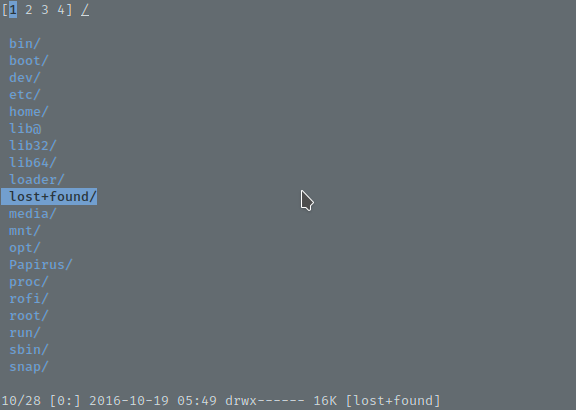
Before:
After:
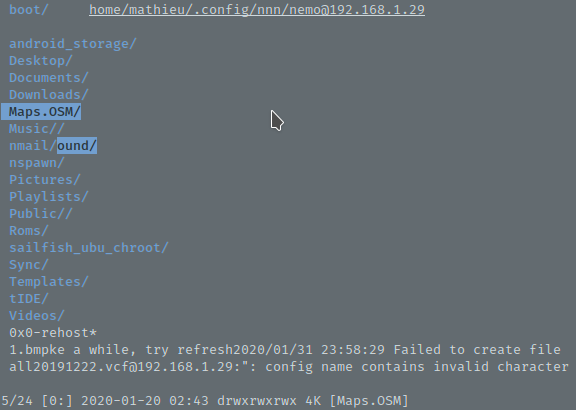
Note the white text at the bottom that won’t disappear unless I enter a folder with more text to cover it and refresh those lines. Note also that one folder and part of another one are highlighted in the second screenshot. The contexts are also hidden by some text that will not be refreshed.
It happens for both Tilix and Gnome terminal on my computer.
About this issue
- Original URL
- State: closed
- Created 4 years ago
- Comments: 28 (13 by maintainers)
I can repro it. Just pass an invalid remote name and an error occurs.
Copy the diff as
file.patchinsrcdir.Then within
nnndirectory: patch -p1 < src/file.patchI’ll take a look. None of my machines have
rcloneand I can’t get it tested atm (machine crashed earlier this week, and I’m dealing with other issues).Is anyone else capable to reproducing this? I’ve had similiar bugs appear before, and to my understanding it is usually related to a
CLIapp being run as aGUI@Kabouik If you do get a chance to try
mastertry also applying this patch and see if it helps:Edit: mixed cli vs gui