oh-my-posh: UNABLE TO OPEN CONFIG after upgrading to oh-my-posh 3
Prerequisites
- [ X ] I have read and understand the
CONTRIBUTINGguide - [ X ] I looked for duplicate issues before submitting this one
Description
Getting this “Unable to open config” on the command line…
This is my PROFILE content:
Import-Module oh-my-posh
Set-PoshPrompt -Theme jandedobbeleer
Environment
- Oh my Posh version: V 3.149.0
- Theme: jandedobbeleer
- Operating System: Win 10 21H1 (OS Build 19043.985)
- Shell: PowerShell 7.1.3
- Terminal: Windows Terminal Preview 1.8.1032.0
Steps to Reproduce
Opening the Windows Terminal with this custom command:
C:\Users\leniel\AppData\Local\Microsoft\WindowsApps\wt.exe nt -d C:\Path\Folder\Project1 --tabColor #FFB6C1; nt -d C:\Path\Folder\Project2 --tabColor #00B2EE; nt -d C:\Path\Folder\Project3
works but then I see at the end “UNABLE TO OPEN CONFIG” as shown in the following screenshot… I was using V2 without a problem. Not sure what’s going on.

Expected behavior: No message informing Unable to open config.
Actual behavior: Unable to open config message is showing on the command line.
About this issue
- Original URL
- State: closed
- Created 3 years ago
- Comments: 16 (8 by maintainers)
Commits related to this issue
- fix(pwsh): get filesystem path for configs resolves #715 — committed to JanDeDobbeleer/oh-my-posh by JanDeDobbeleer 3 years ago
- feat: hide rprompt when the prompt is too large relates to #715 — committed to JanDeDobbeleer/oh-my-posh by JanDeDobbeleer 3 years ago
- feat: hide rprompt when the prompt is too large relates to #715 — committed to JanDeDobbeleer/oh-my-posh by JanDeDobbeleer 3 years ago
- feat: hide rprompt when the prompt is too large relates to #715 — committed to JanDeDobbeleer/oh-my-posh by JanDeDobbeleer 3 years ago
- feat: hide rprompt when the prompt is too large relates to #715 — committed to JanDeDobbeleer/oh-my-posh by JanDeDobbeleer 3 years ago
- feat: hide rprompt when the prompt is too large relates to #715 — committed to JanDeDobbeleer/oh-my-posh by JanDeDobbeleer 3 years ago
@JanDeDobbeleer just updated and now we can see the error:
As you can see, the file does exist here:
@leniel I’m pretty sure that path will be the culprit. The good news is I also have parallels set up so I should be able to reproduce this.
@leniel I implemented hiding
rpromptwhen the current prompt is too large. Can be I need to provide a fix for people using a right aligned block followed by a left aligned one as that could in theory still hide too eager, but not sure if there’s anyone out there doing that.Nice work! Thank you!
That’s an issue with the first prompt (left one) being too long. Your branch name is rather exotic it seems. We don’t have logic in place just yet to see if the right prompt should be hidden based on the current length.
@leniel the latest version should now display the actual error too.
Okay update!!! I have a shared setting to use all disks with Parallels.
Y:\maps to~in windows andZ:\maps to/with this configuration.I was able to get the theme to work properly by using the drive letter mapping!!
Update: Downside is this will not work with an elevated prompt as the drive path mapping is only available to the current user and not an elevated Administrator user. In addition the virtual
\\Macisn’t as well. This may be a limitation or intentional on the part of Parallels (Corel Corp). I ended up copying the file to~\.oh-my-posh\themes\folder & changed the entry in$PROFILEto use that location instead.Parallels shared configuration:
And now Windows Terminal is back to it’s beautiful self w/ Oh My Posh!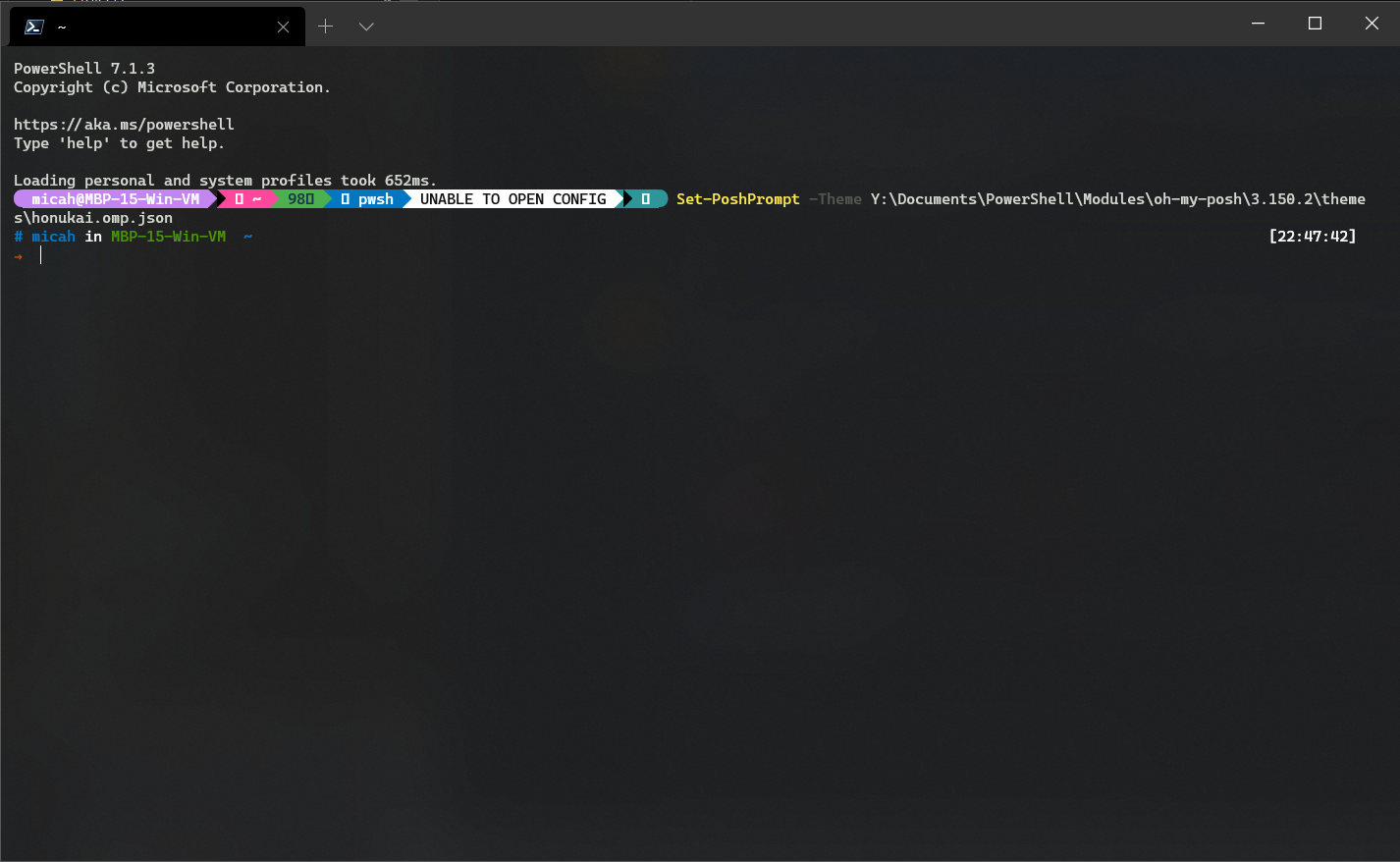
Just upgraded myself and came across this same issue (Parallels on macOS 11.3.1) - the module base for me is
\\Mac\Home\Documents\PowerShell\Modules\oh-my-posh\3.150.2.It’s nice to see other w/ the same setup.