oh-my-posh: Line breaks ?
Code of Conduct
- I agree to follow this project’s Code of Conduct
What happened?
I’ve used for months now the same Posh config file for Cmd, Pwsh, Msys2 Bash, Git Bash, Fish and Zsh. But after I updated from v6.43.0 to v7.27.0 several issues popped that I was able to fix, but an important \n line break stopped working:
{
  "type": "text",
  "style": "plain",
  "properties": {
	"prefix": "",
	"postfix": "",
	"text": "{{if .Env.PROMPT_PRE_LNBR}}\n{{end}}"
  }
},
How it should be (v6.43.0) vs. how it currently is (v7.27.0):
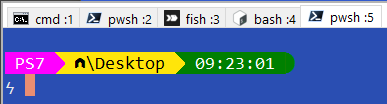
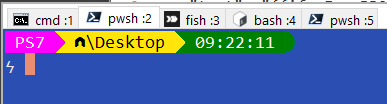
It seems the \n is no longer recognized… Is this a bug? an intended change?.. If so, how can I conditionally add a line break ?
The variable $PROMPT_PRE_LNBR is pre-set on every shell when is needed, so for example, a line break is added only to Pwsh and Bash, but not to Cmd. I can’t use the “newline” parameter because it would then apply to every shell.
This prompt had been working great in every shell for months now, since I found out about OhMyPosh; but it broke after updating to v7.27.0 today. I did manage to fix most issues (mostly spacing and variables) but this line break issue remains.
Can anyone comment?
Theme
No theme. My own custom prompt.
What OS are you seeing the problem on?
Windows
Which shell are you using?
other (please specify)
Log output
Version: 7.27.0
Segments:
ConsoleTitle(false) - 0 ms -
text(false) - 1 ms -
text(true) - 1 ms - PS7
path(true) - 0 ms - \Desktop
time(true) - 1 ms - 07:00:25
text(false) - 0 ms -
git(false) - 17 ms -
text(true) - 0 ms - ϟ
Run duration: 21.0007ms
Cache path: C:\Users\USERNAME\AppData\Local/oh-my-posh
Logs:
2022/02/28 07:00:25 Args duration: 0s, args:
2022/02/28 07:00:25 Args duration: 0s, args:
2022/02/28 07:00:25 Args duration: 0s, args:
2022/02/28 07:00:25 Shell duration: 20.7267ms, args:
2022/02/28 07:00:25 debug: Getenv
2022/02/28 07:00:25 Getenv duration: 0s, args: OMP_CACHE_DISABLED
2022/02/28 07:00:25 debug: Pwd
D:\USERNAME\Desktop
2022/02/28 07:00:25 Pwd duration: 0s, args:
2022/02/28 07:00:25 debug: Home
D:\USERNAME
2022/02/28 07:00:25 PathSeparator duration: 0s, args:
2022/02/28 07:00:25 PathSeparator duration: 0s, args:
2022/02/28 07:00:25 PathSeparator duration: 0s, args:
2022/02/28 07:00:25 PathSeparator duration: 0s, args:
2022/02/28 07:00:25 PathSeparator duration: 0s, args:
2022/02/28 07:00:25 PathSeparator duration: 0s, args:
2022/02/28 07:00:25 PathSeparator duration: 0s, args:
2022/02/28 07:00:25 PathSeparator duration: 0s, args:
2022/02/28 07:00:25 PathSeparator duration: 0s, args:
2022/02/28 07:00:25 debug: Pwd
D:\USERNAME\Desktop
2022/02/28 07:00:25 Pwd duration: 0s, args:
2022/02/28 07:00:25 debug: Home
D:\USERNAME
2022/02/28 07:00:25 Root duration: 0s, args:
2022/02/28 07:00:25 Shell duration: 0s, args:
2022/02/28 07:00:25 ErrorCode duration: 0s, args:
2022/02/28 07:00:25 IsWsl duration: 0s, args:
2022/02/28 07:00:25 debug: Pwd
D:\USERNAME\Desktop
2022/02/28 07:00:25 Pwd duration: 0s, args:
2022/02/28 07:00:25 debug: Home
D:\USERNAME
2022/02/28 07:00:25 PathSeparator duration: 0s, args:
2022/02/28 07:00:25 PathSeparator duration: 0s, args:
2022/02/28 07:00:25 PathSeparator duration: 0s, args:
2022/02/28 07:00:25 PathSeparator duration: 0s, args:
2022/02/28 07:00:25 PathSeparator duration: 0s, args:
2022/02/28 07:00:25 PathSeparator duration: 0s, args:
2022/02/28 07:00:25 PathSeparator duration: 0s, args:
2022/02/28 07:00:25 PathSeparator duration: 0s, args:
2022/02/28 07:00:25 PathSeparator duration: 0s, args:
2022/02/28 07:00:25 User duration: 0s, args:
2022/02/28 07:00:25 Host duration: 0s, args:
2022/02/28 07:00:25 GOOS duration: 0s, args:
2022/02/28 07:00:25 TemplateCache duration: 0s, args:
2022/02/28 07:00:25 debug: Pwd
D:\USERNAME\Desktop
2022/02/28 07:00:25 Pwd duration: 0s, args:
2022/02/28 07:00:25 debug: Home
D:\USERNAME
2022/02/28 07:00:25 TemplateCache duration: 0s, args:
2022/02/28 07:00:25 debug: Pwd
D:\USERNAME\Desktop
2022/02/28 07:00:25 Pwd duration: 0s, args:
2022/02/28 07:00:25 debug: Home
D:\USERNAME
2022/02/28 07:00:25 debug: Pwd
D:\USERNAME\Desktop
2022/02/28 07:00:25 Pwd duration: 0s, args:
2022/02/28 07:00:25 Args duration: 0s, args:
2022/02/28 07:00:25 debug: Home
D:\USERNAME
2022/02/28 07:00:25 GOOS duration: 0s, args:
2022/02/28 07:00:25 GOOS duration: 0s, args:
2022/02/28 07:00:25 GOOS duration: 0s, args:
2022/02/28 07:00:25 GOOS duration: 0s, args:
2022/02/28 07:00:25 GOOS duration: 0s, args:
2022/02/28 07:00:25 GOOS duration: 0s, args:
2022/02/28 07:00:25 GOOS duration: 0s, args:
2022/02/28 07:00:25 GOOS duration: 0s, args:
2022/02/28 07:00:25 GOOS duration: 0s, args:
2022/02/28 07:00:25 GOOS duration: 0s, args:
2022/02/28 07:00:25 GOOS duration: 0s, args:
2022/02/28 07:00:25 GOOS duration: 0s, args:
2022/02/28 07:00:25 GOOS duration: 0s, args:
2022/02/28 07:00:25 GOOS duration: 0s, args:
2022/02/28 07:00:25 GOOS duration: 0s, args:
2022/02/28 07:00:25 PathSeparator duration: 0s, args:
2022/02/28 07:00:25 GOOS duration: 0s, args:
2022/02/28 07:00:25 IsWsl duration: 0s, args:
2022/02/28 07:00:25 StackCount duration: 0s, args:
2022/02/28 07:00:25 TemplateCache duration: 0s, args:
2022/02/28 07:00:25 debug: Pwd
D:\USERNAME\Desktop
2022/02/28 07:00:25 Pwd duration: 0s, args:
2022/02/28 07:00:25 debug: Home
D:\USERNAME
2022/02/28 07:00:25 TemplateCache duration: 0s, args:
2022/02/28 07:00:25 debug: Pwd
D:\USERNAME\Desktop
2022/02/28 07:00:25 Pwd duration: 0s, args:
2022/02/28 07:00:25 debug: Home
D:\USERNAME
2022/02/28 07:00:25 TemplateCache duration: 0s, args:
2022/02/28 07:00:25 debug: Pwd
D:\USERNAME\Desktop
2022/02/28 07:00:25 Pwd duration: 0s, args:
2022/02/28 07:00:25 debug: Home
D:\USERNAME
2022/02/28 07:00:25 GOOS duration: 0s, args:
2022/02/28 07:00:25 HasCommand duration: 17.9995ms, args: git.exe
2022/02/28 07:00:25 debug: Pwd
D:\USERNAME\Desktop
2022/02/28 07:00:25 Pwd duration: 0s, args:
2022/02/28 07:00:25 error: HasParentFilePath
CreateFile D:\.git: The system cannot find the file specified.
2022/02/28 07:00:25 HasParentFilePath duration: 0s, args: .git
2022/02/28 07:00:25 debug: Pwd
D:\USERNAME\Desktop
2022/02/28 07:00:25 Pwd duration: 0s, args:
2022/02/28 07:00:25 debug: Home
D:\USERNAME
2022/02/28 07:00:25 TemplateCache duration: 0s, args:
2022/02/28 07:00:25 debug: Getenv
C:\Users\USERNAME\AppData\Local
2022/02/28 07:00:25 Getenv duration: 0s, args: LOCALAPPDATA
2022/02/28 07:00:25 CachePath duration: 0s, args:
About this issue
- Original URL
- State: closed
- Created 2 years ago
- Comments: 20 (11 by maintainers)
Commits related to this issue
- fix(engine): only count non-space characters resolves #1837 — committed to JanDeDobbeleer/oh-my-posh by JanDeDobbeleer 2 years ago
- fix(engine): only count non-space characters resolves #1837 — committed to JanDeDobbeleer/oh-my-posh by JanDeDobbeleer 2 years ago
@mdnava
It seems that MSYS fish cannot recognize a Windows-style path as MSYS bash does, so the command will fail without a
--strictflag. 😆I think this was fixed since v8.35.2 (via #2716). 😃