MediaPlugin: Camera crashing taking photos - Android
Issue - camera crashing and causing app to close or return to root page. Only tested on android for a android only app. Crashing with the sample as well
Not happening all the time but enough to make it annoying and whats making this really hard to figure out is there is no crash report happening and the logcat is spitting out a tone of information most of which not applicable either but have attached something to bottom to indicate the crash section I think
Bug Information
Version Number of Plugin: 4.0.1.1 Device Tested On: 2 (Android 7.1.1 and 5.1.1) Simulator Tested On: None tested Version of VS: 15.7.5 Version of Xamarin: 3.1.0.637273
Steps to reproduce the Behavior
Start the camera TakePhotoPicker(). Take photo. Tap “Use photo” … crashes.
Expected Behavior
Should not crash but simply return to page that invoked the camera
Actual Behavior
App is crashing and closing the app or sometimes returns to root page (restarting the app)
Code snippet
 if (CrossMedia.Current.IsCameraAvailable && CrossMedia.Current.IsTakePhotoSupported)
            {
                MediaFile file = await CrossMedia.Current.TakePhotoAsync(new StoreCameraMediaOptions
                {
                    Directory = "laundry",
                    SaveToAlbum = true,
                    CompressionQuality = 80,
                    CustomPhotoSize = 50,
                    PhotoSize = PhotoSize.MaxWidthHeight,
                    MaxWidthHeight = 2500,
                    DefaultCamera = CameraDevice.Rear
                }).ConfigureAwait(true);

                if (file != default(MediaFile))
                {
                    byteArrayImages.Add(Utilities.ReadToEnd(file.GetStream()));
                    AddPhotosInPhotoGrid();
                }
                else
                {

                }
            }
            else
            {
                UserDialogs.Instance.Toast("Camera not supported");
            }
Logcat
I might have narrowed down in the logcat to this snippet: https://gist.github.com/LeoJHarris/135be65438a8b264edf7029cc6326f96
On line 33 you’l see where the project is being killed:
07-17 10:58:40.171: I/ActivityManager(2022): Process com.test.laundryapp (pid 13504) has died
Also see attached of gif of sample project from this repo, I have speed up 2x

About this issue
- Original URL
- State: closed
- Created 6 years ago
- Reactions: 2
- Comments: 57 (7 by maintainers)
The issue with the LG G6 Camera Crashing has to do with the intent.PutExtra in the UseFrontCamera and UseBackCamera. The LG G6 allows only the following call for the back camera intent.PutExtra(“android.intent.extras.CAMERA_FACING”, 0);
You can do an if condition but for my implementation I have all android above 7.0 and accept the CAMERA_FACING extra with 0 for back and 1 for front to work.
A great way to allow this to be fixed for the LG and still work with the other phones would be to allow the DefaultCamera property to be -1 and change the if condition on the MediaPickerActivity to skip the UseFrontCamera and the UseBackCamera if the value is -1.
@mscott161 suggestion to do PR, it would be great to see this issue finally fixed 👍
I get the
...mipmap/icon with resource ID #0x7f030000Error with a Pixel XL running Android 9 (front and rear camera).The camera activity itself is running and I can take a photo, but the rest of the app has already crashed and it’s not possible to select the photo and return it as a result.
@Eltee-Taiwo Ill win the lottery before that ever happens… nudge nudge Xamarin team.
Exact same problem here with LG G6 running oreo, Hockey App Crash report states: “ResourcesImpl.loadDrawableForCookie” android.content.res.Resources$NotFoundException: Drawable com.Apcurium.Alpha:mipmap/icon with resource ID #0x7f030000 Caused by: android.content.res.Resources$NotFoundException: File res/mipmap-anydpi-v26/icon.xml from drawable resource ID #0x7f030000
I think the 5.0 release solved it. At least for LG. On the LG you could not open camera at all.
There was a difference with how the file provider should be defined too for different vendors. If I can find the info tomorrow I’ll post. I’m on my phone right now.
Figured it out. If you set the Default camera to the front facing camera, you never call UseBackCamera and instead call UseFrontCamera.
Created a pull request to add the intent check there as well
Yes, your solution works, when I comment line: intent.PutExtra(extraUserFront, false); and run the demo it works well on the LG, but I’m not sure how it will work for other devices/android versions Did anyone make fixes here in the plugin?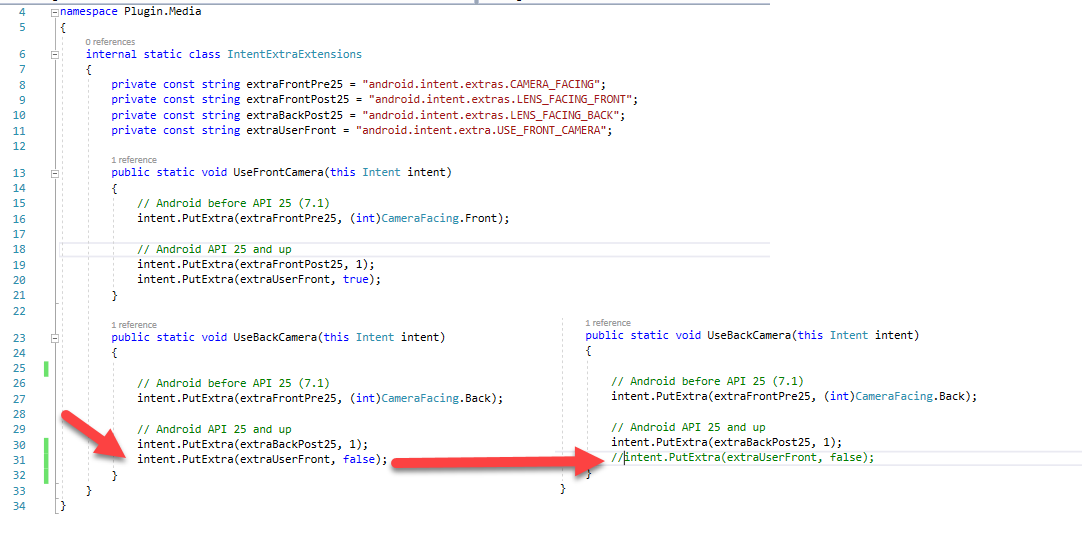
@mattcartwright I take that back, crashes only less with front camera from my experience… Darn is there actually a camera plugin that works on Xamarin??