LaTeX-Workshop: Activating Extension failed
Hi.
I am sorry but I cannot exactly describe this problem. It occurs frequently in these few days. The Latex-workshop seems stuck at some process. It is normal a few days ago.
I try to manual click the activate icon ’√‘ at the left status bar of vscode and It shows Activating Extension... and then re-show ’√‘ after a few second.
I try to click the extension icon of the left bar. It shows like this:
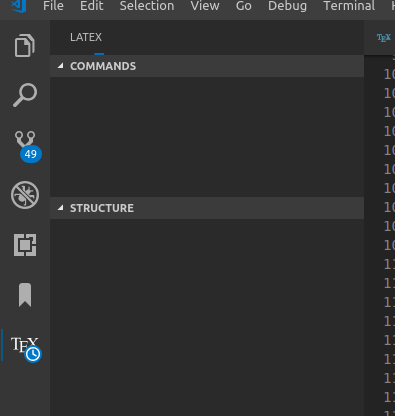
It seems the extension stuck when paring the structure of tex files.
My tex dir tree is as follows: thesis.tex(root file,\input{Tex/chap1},\input{Tex/chap1}…) — Tex — — chap1 — — chap2 — — chap3…
I try to install and reinstall the extension a few times but the problem can not solved. If I restart the vscode and the extension works again. But it can not figure out when the problem occurs again.
Desktop (please complete the following information):
- OS: ubuntu 16.04
- VS Code version: 1.31.1
- Extension version: 6.0.0
About this issue
- Original URL
- State: closed
- Created 5 years ago
- Comments: 23
Commits related to this issue
- Fix regex for scanning cpations This is related to #1201. It fixes a catastrophic backtrack introduced in b73f52e — committed to James-Yu/LaTeX-Workshop by jlelong 5 years ago
I have managed to reproduce the issue. This is again a catastrophic backtracking. I will try to fix tonight.
@James-Yu I guess we could make a new release.