fetch: Catch a 401
Is there a way to catch a 401 error code? I first thought I could add it to the checkStatus function but
it seems that a 401 does reject the promise.
But there is little to no information in the error object.
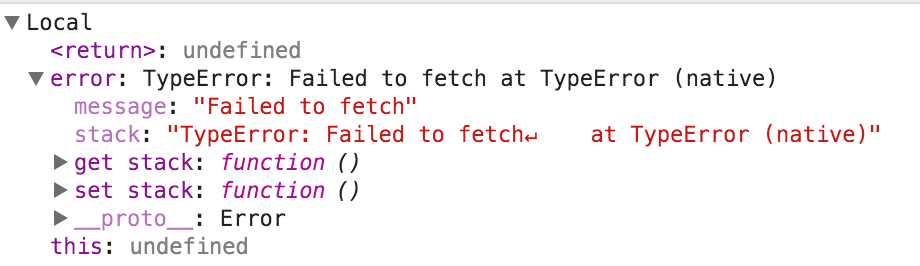
Am I missing something?
About this issue
- Original URL
- State: closed
- Created 9 years ago
- Reactions: 2
- Comments: 24 (6 by maintainers)
Commits related to this issue
- Server: Cors handling Cors headers were not set when there was no security context (401) or authorizatin issue (403). This was a pb because Chrome didn't call fetch.then(xxx), but instead fetch.catc... — committed to gonzalad/iam-malta-2016 by gonzalad 8 years ago
- workaround for rowdy missing CORS header for error response Fixes https://github.com/datagovsg/lapp/issues/250 Reference: https://github.com/github/fetch/issues/201 — committed to dsaidgovsg/lswagger-ui by deleted user 7 years ago
For anyone who will have this issue in the future
Fetch API fails only if it can’t make a request. And if it can,
fetchwill be executed successfully even if it has a bad status. For example:And here are some (not all) of the errors from Fetch API:
urllikefetch('https::://hey.com')–TypeError Failed to execute 'fetch' on 'Window': Failed to parse URL from https::://hey.com;urllikefetch('http://hey')–TypeError: Failed to fetch (GET http://hey/ net::ERR_NAME_NOT_RESOLVED);fetch('https://google.com')–TypeError: Failed to fetch (GET https://google.com/ net::ERR_NAME_RESOLUTION_FAILED)fetch('https://google.com')–TypeError: Failed to fetch (Refused to connect to 'https://google.com/' because it violates the following Content Security Policy directive: "connect-src 'self'...)fetch('https://google.com')–TypeError: Failed to fetch (Fetch API cannot load https://google.com/ has been blocked by CORS policy: No 'Access-Control-Allow-Origin' header is present on the requested resource....)The last two cases you can fix by adding (or editing) the appropriate headers on the server, if you have an access.
@dgraham that’s not correct. Fetch seems to reject the promise on a 401. So you don’t have access to the response object
I am seeing the same.
The polyfill is not active in browsers that include a native implementation of
window.fetch, including Chrome and Firefox.Here’s how you can detect and handle a 401 status code in the response from the server.
The promise is supposed to be rejected if CORS doesn’t allow it. I just tested with Chrome 45 and Chrome 47 and the promise is rejected by default when “No ‘Access-Control-Allow-Origin’ header is present on the requested resource.”
However if I add the
Access-Control-Allow-Origin: *header to the 401 response from the other server, the 401 response is received just fine (promise is resolved) and its HTTP status is readable and correct.@vdclouis Hey Louis, was you able to find a way to detect 401 code for rejected by CORS request? I’m stuck with same problem, I need to catch 503 status code
Is there a way to get those additional error messages to determine which error is occurring? For example (in Chrome 67), I’m running the following code:
Which fails, but the only message in the console is
TypeError: Failed to fetch. This example is obvious what the problem is, but when I have an actual URL in the fetch that resolves via a standard request, but fails usingfetch()I cannot figure out what the specific problem is.Edit: Thanks for the info below- in my situation
error.responseisundefinedso it must be a network error like you described.either way, this spec desperately needs to be fixed
@chrisblakley You can inspect
event.response(youreventargument is actually an Error instance) in thecatchhandler to accessresponse.statusTextand other information about a failed HTTP response.If there is no
error.response, then the fetch failed with what is usually a network error, and browsers don’t typically give us much information about those. See https://github.com/github/fetch/pull/562#issuecomment-330594122 for more contextYes, yes it is.