ipython: Highlight colour for errors makes them unreadable
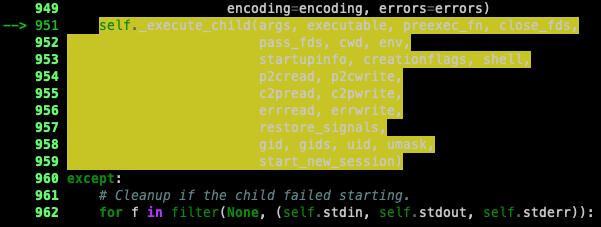
╰─ ipython
Python 3.9.2 (default, Mar 18 2021, 20:48:06)
Type 'copyright', 'credits' or 'license' for more information
IPython 8.0.1 -- An enhanced Interactive Python. Type '?' for help.
I’m on macos, iTerm2
About this issue
- Original URL
- State: closed
- Created 5 years ago
- Reactions: 6
- Comments: 17 (5 by maintainers)
@Carreau The issue you linked to has been locked. Are there any documented workarounds for this? The conversation in the linked issue talks about perhaps using bold, underlined text rather than a background color, but don’t include instructions.
This still appears to be an issue in iPython 8.4:
(Alacritty with Duskfox theme)
You can also create an ipython startup script and place it
.ipyhon/profile_default/startup/001.py. I’m not sure if the name of the file matters, but that was how I saw in some docs.Still experiencing this in ipython 8.11.0, I have to use the workaround described in the above comment
There is a temp fix suggested here that works for me; https://stackoverflow.com/a/74681224
Duplicate #13446