ionic-framework: bug: popover alignment property renders incorrect location in frameworks
Prerequisites
- I have read the Contributing Guidelines.
- I agree to follow the Code of Conduct.
- I have searched for existing issues that already report this problem, without success.
Ionic Framework Version
- v4.x
- v5.x
- v6.x
- Nightly
Current Behavior
When using various combinations of side and alignment on an inline ion-popover, the popover renders at the incorrect location when opened. This occurs in all three framework integrations (Angular/React/Vue), but not in core.
The linked repo has buttons for all combinations of side and alignment; here are the specific issues I noticed:
side="top"shows the popover too low, overlapping the button. This occurs with all values ofalignment, including when it isn’t set at all.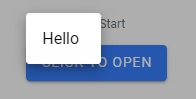
- For
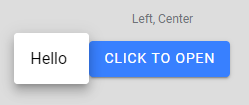
sides ofright,left,start, andend, and analignmentofcenter, the popover is rendered a pixel or two lower than the top edge of the button, when it should be vertically centered.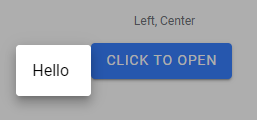
- For the same
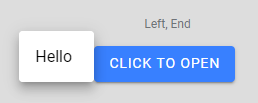
sides as the above, and analignmentofend, the popover is also rendered a few pixels lower than the button’s top edge (slightly lower than withalignment="center"), when it should be raised higher so the bottom edges align.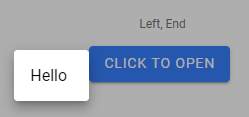
Expected Behavior
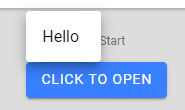
Here are corresponding screenshots from the position test in core, which shows the correct behavior:
Steps to Reproduce
- Clone repo (note the branch),
npm install,ionic serve - Click buttons corresponding to described side/alignment values (headers list side, then alignment)
Code Reproduction URL
https://github.com/amandaejohnston/sandbox-ionic-angular/tree/popover-positions
Ionic Info
[WARN] Error loading @capacitor/ios package.json: Error: Cannot find module '@capacitor/ios/package'

       Require stack:
       - C:\Users\moogl\AppData\Roaming\npm\node_modules\@ionic\cli\lib\project\index.js
       - C:\Users\moogl\AppData\Roaming\npm\node_modules\@ionic\cli\lib\index.js
       - C:\Users\moogl\AppData\Roaming\npm\node_modules\@ionic\cli\index.js
       - C:\Users\moogl\AppData\Roaming\npm\node_modules\@ionic\cli\bin\ionic
[WARN] Error loading @capacitor/android package.json: Error: Cannot find module '@capacitor/android/package'

       Require stack:
       - C:\Users\moogl\AppData\Roaming\npm\node_modules\@ionic\cli\lib\project\index.js
       - C:\Users\moogl\AppData\Roaming\npm\node_modules\@ionic\cli\lib\index.js
       - C:\Users\moogl\AppData\Roaming\npm\node_modules\@ionic\cli\index.js
       - C:\Users\moogl\AppData\Roaming\npm\node_modules\@ionic\cli\bin\ionic

Ionic:

   Ionic CLI                     : 6.18.1 (C:\Users\moogl\AppData\Roaming\npm\node_modules\@ionic\cli)
   Ionic Framework               : @ionic/angular 6.1.6
   @angular-devkit/build-angular : 12.1.4
   @angular-devkit/schematics    : 12.2.14
   @angular/cli                  : 12.1.4
   @ionic/angular-toolkit        : 4.0.0

Capacitor:

   Capacitor CLI      : 3.3.3
   @capacitor/android : not installed
   @capacitor/core    : 3.3.3
   @capacitor/ios     : not installed

Utility:

   cordova-res : not installed globally
   native-run  : 1.5.0

System:

   NodeJS : v16.13.0 (C:\Program Files\nodejs\node.exe)
   npm    : 8.1.0
   OS     : Windows 10
Additional Information
No response
About this issue
- Original URL
- State: closed
- Created 2 years ago
- Reactions: 1
- Comments: 17 (4 by maintainers)
@Lechevallier As You have written, might be that the content of
.popover-contentelement isn’t visible at the time when calculation is being made and so it’s dimensions are being retrieved as0px x 0px