ionic-framework: bug: ios 14, toggling pointer events does not re-enable scrolling
Ionic version: [x] 5.x
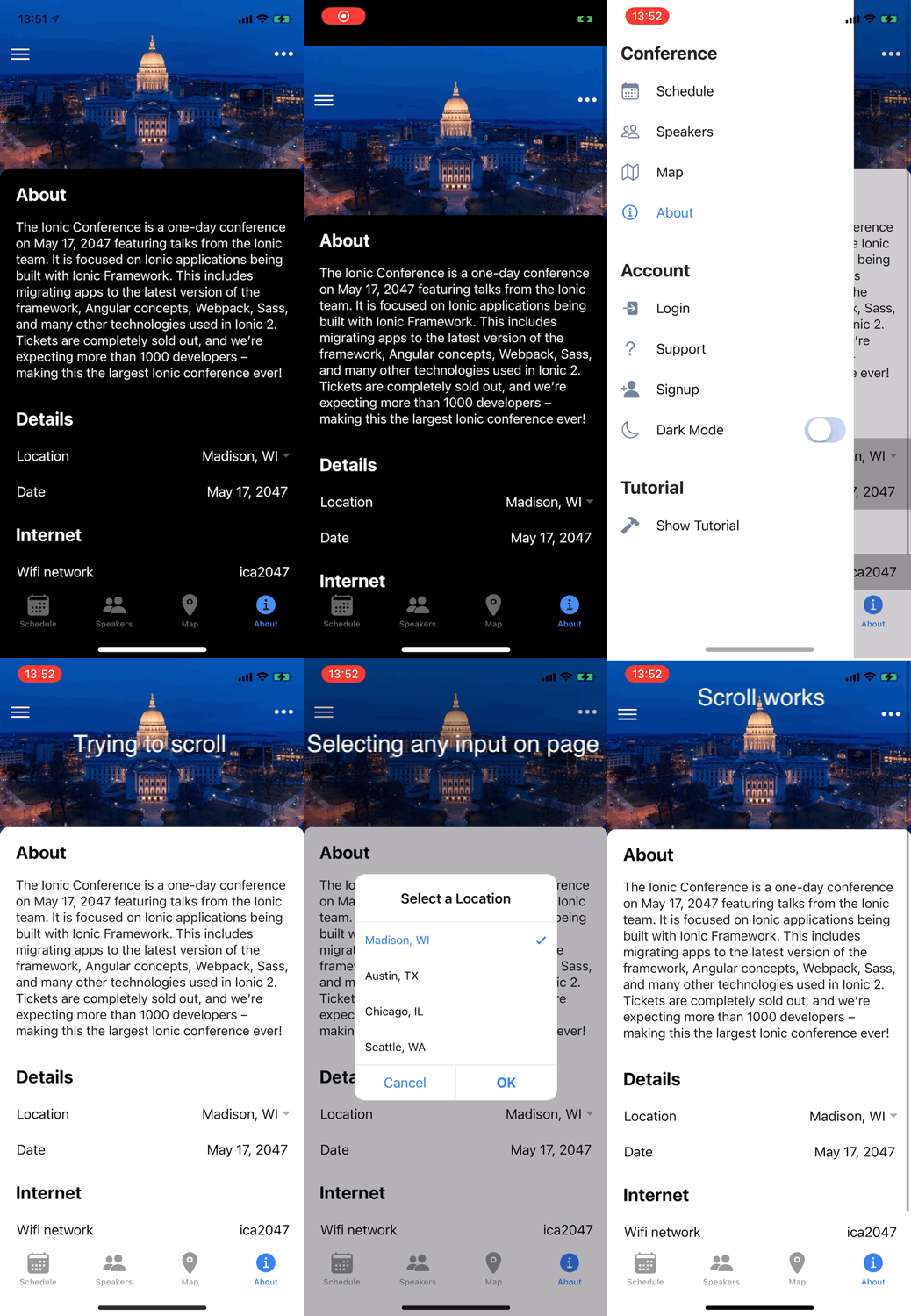
Current behavior: On iOS device, the side menu is opened and ion-input is tapped on (does not have to be changed), after closing the side menu, scroll does not work on current page.
Expected behavior: Scroll should work normally
Steps to reproduce:
- Navigate to
https://github.com/ionic-team/ionic-conference-appand install app as per documentation attached. (Optionallynpm updatecan be performed.) - Build and deploy to iOS device
- Open “About” page [important]
- Open ion-menu in the right top corner
- Enable “Dark Mode” (any other ion-input also will work)
- Close ion-menu
- Without tapping on any ion-input on the “About” page try to scroll.
This issue can be reproduced easily on any page with content, provided that user does not touch an actionable component while trying to scroll. A simple page with static ion-cards will also show this issue.
Related code: https://github.com/ionic-team/ionic-conference-app
A sample application via GitHub:
https://github.com/ionic-team/ionic-conference-app
Confirmed devices & iOS versions
- iPhone 11 Pro - iOS 14.0.1
- iPhone 6 - iOS 12.4.8
- iPad Pro (11-inch) - iPadOS 14.0.1
Ionic:

   Ionic CLI                     : 6.11.11 (/usr/local/lib/node_modules/@ionic/cli)
   Ionic Framework               : @ionic/angular 5.1.1
   @angular-devkit/build-angular : 0.803.25
   @angular-devkit/schematics    : 8.3.25
   @angular/cli                  : 8.3.25
   @ionic/angular-toolkit        : 2.2.0

Cordova:

   Cordova CLI       : 9.0.0 (cordova-lib@9.0.1)
   Cordova Platforms : ios 5.1.1
   Cordova Plugins   : cordova-plugin-ionic-keyboard 2.2.0, cordova-plugin-ionic-webview 4.1.3, (and 5 other plugins)

Utility:

   cordova-res (update available: 0.15.1) : 0.14.0
   native-run                             : not installed

System:

   Android SDK Tools : 26.1.1 (/Users/sylwester/Library/Android/sdk)
   ios-deploy        : 1.10.0
   ios-sim           : 8.0.2
   NodeJS            : v12.18.4 (/usr/local/Cellar/node@12/12.18.4/bin/node)
   npm               : 6.14.6
   OS                : macOS Big Sur
About this issue
- Original URL
- State: closed
- Created 4 years ago
- Reactions: 4
- Comments: 19 (8 by maintainers)
@ZakAttakk - this is what I’ve done (very ugly):
Let me know if it helps.
I tried different variations of this, including other ion-menu methods, however I found the above the most reliable.
As you can see from the code, the html is in app-component.html
Hi everyone,
I can confirm that this issue is resolved in iOS 14.5 beta 1. I will follow up here when iOS 14.5 ships for all iOS users.
Another thing to try is to add a
z-index: 1tobodythen remove it in arequestAnimationFrame:You could do the above whenever the menu closes. I am in communication with the WebKit team now, so hopefully it gets resolved soon.