ionic-framework: bug: cannot read property 'updateTiming' of undefined
I recently created a new starter app with sidemenu but when I click on the sidemenu to navigate it throws an error. I haven’t changed anything from the codes yet.
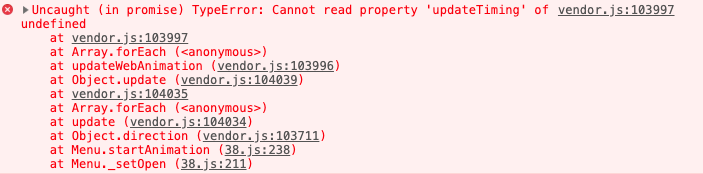
Here’s my ionic info
 Ionic CLI                     : 5.2.7
   Ionic Framework               : @ionic/angular 4.9.0
   @angular-devkit/build-angular : 0.801.3
   @angular-devkit/schematics    : 8.1.3
   @angular/cli                  : 8.1.3
   @ionic/angular-toolkit        : 2.0.0

Cordova:

   Cordova CLI       : 9.0.0 (cordova-lib@9.0.1)
   Cordova Platforms : android 8.0.0
   Cordova Plugins   : cordova-plugin-ionic-keyboard 2.2.0, cordova-plugin-ionic-webview 4.1.1, (and 4 other plugins)

Utility:

   cordova-res : 0.6.0
   native-run  : 0.2.8

System:

   Android SDK Tools : 26.1.1
   NodeJS            : v10.16.3
   npm               : 6.9.0
   OS                : macOS Mojave
   Xcode             : Xcode 10.2.1 Build version 10E1001
About this issue
- Original URL
- State: closed
- Created 5 years ago
- Comments: 42 (15 by maintainers)
Commits related to this issue
- fix(animation): fallback to CSS Animations on older versions of Chrome (#19288) fixes #19272 — committed to ionic-team/ionic-framework by liamdebeasi 5 years ago
- Use @ionic/angular dev build [https://github.com/ionic-team/ionic/issues/19272]. — committed to tkem/openlap by tkem 5 years ago
- fix(animation): fallback to CSS Animations on older versions of Chrome (#19288) fixes #19272 — committed to ionic-team/ionic-framework by liamdebeasi 5 years ago
@pandeeswaran That’s strange. Try this dev build:
4.10.0-dev.201909061231.2ea728eAre you using an Ionic/Angular app or just an Ionic Core app?
Hi everyone,
I have implemented a fix for this. Can you all give the following dev build a try and let me know how it goes?
If using Ionic Angular:
npm i @ionic/angular@4.10.0-dev.201909061231.2ea728eIf using Ionic Core:npm i @ionic/core@4.10.0-dev.201909061231.2ea728eThanks!
Older android devices are firing this error. Update to 4.9.0
Add this code to entry point (for me its main.js)
It temporarily fixes it. not tested on ios yet.
I believe old versions of chrome does not have updateTiming in animation. animation.ts thinks it supports new animations correctly.
https://github.com/ionic-team/ionic/blob/07140cf2c5585e2177c2b2e8dc09e3671afcd1b6/core/src/utils/animation/animation.ts#L45
This line is the problem.
Maybe you can check updateTiming?
Updating @ionic/angular to latest did the trick. Thanks.
npm i @ionic/angularIndeed, they were turned on.
I can’t remember turning them on, but it works perfectly now, thanks!
For Android - We had the same problem in @ionic/angular 4.9.0.
I have tested android device the version(6.0.1)