capacitor: bug: iOS 14.5 apps not loading global Ionic Styles in emulator
Bug Report
Capacitor Version
Latest Dependencies:

  @capacitor/cli: 3.0.2
  @capacitor/core: 3.0.2
  @capacitor/android: 3.0.2
  @capacitor/ios: 3.0.2

Installed Dependencies:

  @capacitor/android: not installed
  @capacitor/cli: 3.0.2
  @capacitor/ios: 3.0.2
  @capacitor/core: 3.0.2
Platform(s)
iOS 14.5
Current Behavior
App is not loading Ionic Styles. Inspecting with Safari I can see the styles.css file is empty. EDIT: Inspecting from Safari in Simulator I get this error: Did not parse stylesheet at ‘capacitor://localhost/styles.css’ because non CSS MIME types are not allowed in strict mode.
Expected Behavior
App styling correctly
Code Reproduction
Clone the repo: https://github.com/mrussmup/stylesbugios145
run ionic capacitor build ios Run the app in a iOS 14.5 Simulator
Other Technical Details
npm --version output:
6.14.10
node --version output:
14.15.4
pod --version output (iOS issues only):
1.10.1
Additional Context
Developing on a Mac Air M1. Opening XCode with Rosetta
About this issue
- Original URL
- State: closed
- Created 3 years ago
- Reactions: 4
- Comments: 35 (3 by maintainers)
We have a team member experiencing the same problem as @Andorbal and @raminnoodle, He’s the only team member with an M1 Mac, and the only one experiencing this problem. Rosetta turned off. Works fine when running from Xcode, fails to load css when using cli.
@jcesarmobile can you re-open this issue until it is completely resolved?
I am having same issue. On Mac with M1 because some of the frameworks don’t support M1, I had to switch XCode to Rosetta. When I am doing that, project is missing all css when built.
It works fine in non Rosetta mode. I have cleared all project build folders etc. no joy
Is there going to be a fix for this? The “workaround” no longer works and doesn’t seem to have worked in some time. I’ve tried all of them from messing with Rosetta to using the different WebView. I’ve tried multiple times with multiple cleans between runs.
@Andorbal @jcesarmobile please advise…this framework is basically unusable for anyone with a modern Mac now.
Confirmed that this is still an issue. I’m using the latest of literally everything - so, it’ll continue to be an issue.
jcesarmobile, you closed this last September saying there’s a known workaround, but that doesn’t seem to be working for many people. Could you re-open this issue and try to help resolve it?
I am also facing the same issue in M1 any one has resolved it ?
Still having the issue, turning off the “Open using Rosetta” didn’t fixed it for me.
I’ve encountered this issue days ago and turning off the “Open using Rosetta” solved my issue wherein the simulator does not render properly my app and the Safari console shows error like this: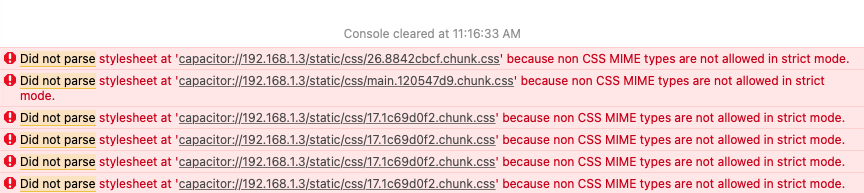
I turned it off by going to Finder > Right click “Xcode.app” > Get Info > Untick “Open using Rosetta”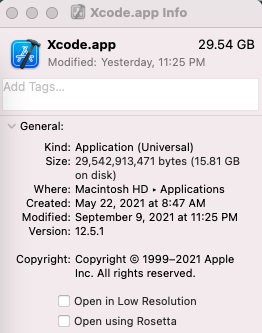
Same issue happens to us on a M1 (macOS Monterey, Xcode 13.4.1 Build version 13F100).
One workaround i found is the use the Simulator with older IOS version 13.7 for me works fine.
@mrussmup Check out the demo project https://github.com/qrdp/corodova-m-1-demo. It works fine on my MacBook M1.
https://github.com/qrdp/corodova-m-1-demo/blob/20153e4da693ed3350460361e9c6a52d2b05c70f/package.json#L54
After changing the version, it is better to clear the platform and plugin directories and rebuild project.
@mrussmup My fork of cordova-plugin-ionic-webview is just an example (for cordova project).
I think you can try to fork Capacitor and do something like this https://github.com/qrdp/capacitor/commit/228d591b9bdc13a9513e4d7b986855e8dcb5d845
Unfortunately, I can not run the code and check it now