instaloader: Stuck in Password Reset Loop
I’m trying to use instaloader -l USERNAME to save a session that I can then use with my own python script. But every single time I get checkpoint required and it requires me to make a new password.
I’m connecting from the same machine and same wifi and click “It was me” every time but it still warns that someone might have access to my password and forces the password change.
I’m tentative to try anymore times incase I get blocked completely.
Is there a step i’m missing?
All i’ve done so far is instaloader -l USERNAME and it worked the first time and then never again since.
Running this python script from the guide: https://instaloader.github.io/codesnippets.html#likes-of-a-profile-ghost-followers fails with the following error which is why I was trying to do the session again:
Traceback (most recent call last):
  File "app.py", line 9, in <module>
    L.load_session_from_file(USER)
  File "/Users/rob/Library/Python/3.8/lib/python/site-packages/instaloader/instaloader.py", line 618, in load_session_from_file
    with open(filename, 'rb') as sessionfile:
FileNotFoundError: [Errno 2] No such file or directory: '/var/folders/kg/ggvcmr3j6f743btcvrjl_0yr0000gn/t/.instaloader-myname/session-myname'
About this issue
- Original URL
- State: closed
- Created a year ago
- Comments: 15
I’m having this same issue. This script is essentially useless at this point.
UPDATE: I’m using the desktop exe and did the 615_import_firefox_session.py workaround, which worked. I had to install the python instaloader first, then I just uninstalled it afterward.
ORIGINAL: I’m having a similar issue, and no session is saved:
I then attempt to access that page, which is unusable and redirects me to instagram.com. I attempt to login via web and succeed but receive this, which then requires a password reset: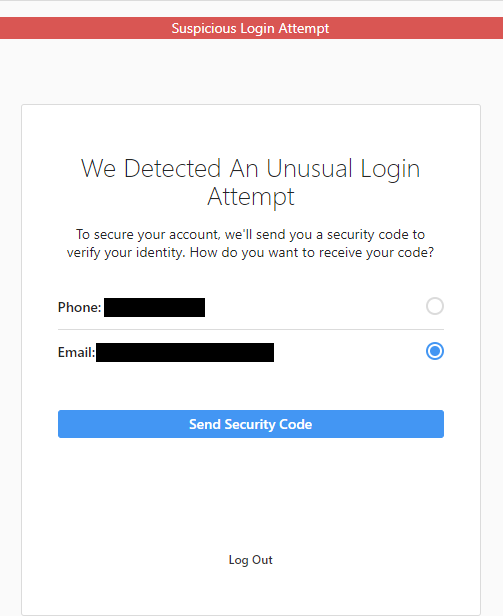
Same here… They force you to change it everytime I was like: IT IS ME THOOOOO
Yeah I don’t think it should be ignored or auto-closed by a bot. The script can’t be used in this state.
Yeah I used firefox. I think my python installation might be a mess. It was saving the session files in “C:\Users\USER\AppData\Local\Packages\PythonSoftwareFoundation.Python.3.10_qbz5n2kfra8p0\LocalCache\Local\Instaloader” I then created the directory “C:\Users\USER\AppData\Local\Instaloader” and moved the session file there. It worked. 👍