instaloader: Hashtag.from_name(): KeyError: 'graphql'
Found an error given by using wrong json metadata. Tried using different hashtags and to revert to previous versions of Instaloader, but it still gives the problem. I also checked your built-in code and everything looks fine to me, so I suppose it has something to do with Instagram changing it’s metadata format. Maybe this was already fixed for other types of objects but you forgot to fix it for Hashtags (?)
Traceback (most recent call last):
  File "C:\Users\exyss\Desktop\v3.0-beta\src\test.py", line 6, in <module>
    hashtag = instaloader.Hashtag.from_name(_loader.context, "cats")
  File "C:\Users\exyss\AppData\Local\Programs\Python\Python39\lib\site-packages\instaloader\structures.py", line 1302, in from_name
    hashtag._obtain_metadata()
  File "C:\Users\exyss\AppData\Local\Programs\Python\Python39\lib\site-packages\instaloader\structures.py", line 1316, in _obtain_metadata
    self._node = self._query({"__a": 1})
  File "C:\Users\exyss\AppData\Local\Programs\Python\Python39\lib\site-packages\instaloader\structures.py", line 1311, in _query
    return self._context.get_json("explore/tags/{0}/".format(self.name),
KeyError: 'graphql'
About this issue
- Original URL
- State: closed
- Created 3 years ago
- Reactions: 23
- Comments: 32 (2 by maintainers)
Commits related to this issue
- Fix download of hashtags and locations Fixes #1080, fixes #1129, closes #1240. — committed to instaloader/instaloader by aandergr 3 years ago
Thanks to you all for sharing your observations and for creating such a beautiful collection of workarounds for this issue!
The download of hashtags should now be fixed in Instaloader’s latest pre-release, Version 4.9b1.
What is a “GQL hash”? I did it: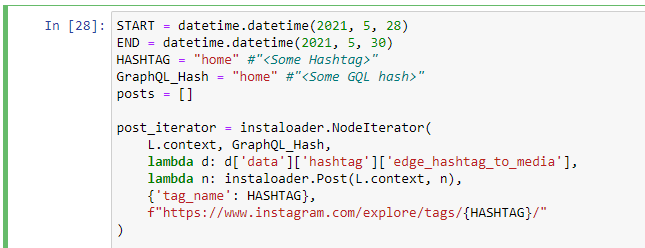 And the output was this error:
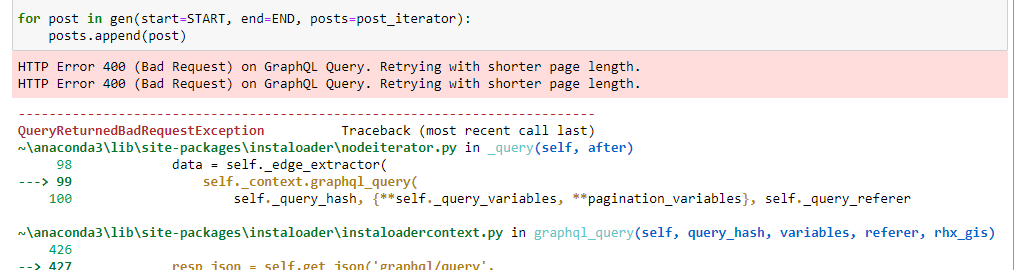 Where can i find the GQL hashtag for my “home” hashtag?
@hobzcalvin you can temporarily use my code. Just go through JSON and fetch all data you need (line 34).
Yes, without
--loginit works well, but I often get a redirectHTTP redirect from https://www.instagram.com/graphql/query to https://www.instagram.com/accounts/login/I have partially isolated the issue: it’s only a problem when you’re logged in. Here’s an example using the CLI:
This works:
This doesn’t, with the familiar graphql error:
Same error here, @frankjuniorr . I’m using the version
4.7.4@aandergr can you clarify how #874 (comment) can be used to fix this issue? Actually, I’m trying to use the command-line interface so any help getting that to work would be much appreciated.
I am using Instaloader 4.7.1. I have the same error. It seems to be a bug due to some recent changes made by Instagram.
I also have this error, an update would be nice
Same problem every time I try to log in