gcalcli: App is blocked by Google
I tried using gcalcli list for the first time and it opened a browser tab asking for verification. After choosing the account I got the following page:
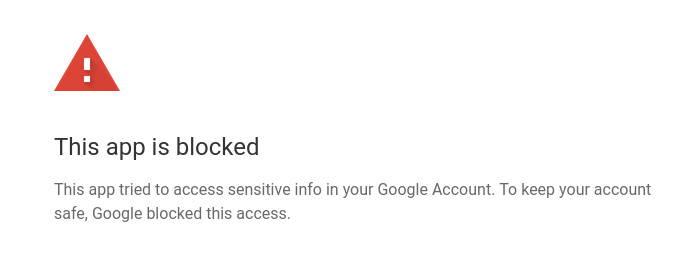
Not sure if this is intended or known. I tried this with my personal account and my University’s account and I got the same result in both scenarios. I tried using the --noauth_local_webserver option and got the same result after logging in.
Not sure how to solve it, and I couldn’t find any similar issues online.
I am tried using both gcalcli and gcalcli-git found on the AUR.
About this issue
- Original URL
- State: open
- Created 3 years ago
- Reactions: 46
- Comments: 16
Steps, loosely following comment https://github.com/insanum/gcalcli/issues/497#issuecomment-592948891
1. Google Developers Console https://console.developers.google.com
gcalcli2. + Enable APIs and Services"
Google Calendar APIgcalcliin Developers Console3. Credentials section in left menu
+ Create Credentials>OAuth client IDDesktop Appgcalcli4. OAuth consent screen section in left menu
External usersPublishing statusasTestingso your own gcalcli is not published to the world5. call gcalcli from command line
gcalcli --client_id "your client ID ending in ...apps.googleusercontent.com" --client_secret "your client secret" agendaYour browser has been opened to visit:(shown in shell after above command) and open it in chromium > follow steps and give permissions togcalcligcalcli agenda, create a file~/.gcalclircwithSO easy! 😂
Update 1: Chromium or Firefox?
With
gcalcli v4.0.0a3from the Linux Mint/Ubuntu repos, the Google website confirmation only works in Chromium. The pip-installed versiongcalcli v4.3.0makes the Google website confirmation process possible in Firefox.Update 2: --client_id or --client-id?
The above steps worked well with
gcalcli v4.0.0a3from the Linux Mint/Ubuntu repos. However,gcalcli v4.3.0installed with pip warns:If this appears, change the call parameters accordingly in shell command and if applicable in
~/.gcalclirc.Update 3: upgrade six
When running into error
AttributeError: module 'six.moves' has no attribute 'collections_abc'then make sure to upgradesixto the latest version, e.g., bypip3 install --upgrade six.I tried this guide for creating the client id and client secret and it worked flawlessly. I didn’t even have to run “DisplayUnlockCaptcha” nor enable Less Secure Apps.
https://github.com/aristosv/google_auth
I think the readme of this project should state a bit more clearly that you may have to do a 5+ step guide to authorize this app. Currently, it implies that only OAuth2 will be needed and anything else is optional.
Same issue. I’m trying to read my schedule from my work account, where I can’t change any of the above settings.
I’ve made some modifications in a fork using newer auth methods. Download a creds.json & put it in ~/.config/gcalcli/ - details in the update README.
I’m not providing support, but you can see if it works for you (it works for me).
Be warned this is a quick 30 minute hack, I suggest creating a virtualenv and installing it in there. Also it used my existing ~/.gcalcli_oauth file (not sure why currently) so I moved it to start a new auth flow.
I suggest inspecting the diffs, no guarantees this won’t wipe all your appointments!
https://github.com/jamespo/gcalcli
Additional information… (At 11:26)
I’ve been using gcalcli for about a week. I had authorized it to access one of my two Google accounts (my personal account) following the steps in the documentation. It was an awkward process, but I somewhat understand the complexities of working with Google’s security.
After using gcalcli for about a week, today I tried to use it to access the calendar belonging to my other Google account (my account in my employer’s enterprise). In Google Calendar, long ago I gave each of my Google accounts mutual access to their calendars. I tried to use the gcalcli authorization for my personal account to add an event to my work account. At first, I got the following stack trace…
Thinking that it might be a temporary problem, I tried again. This time, gcalcli opened the following address in a web browser…
In the Google page that opened, I selected my account name when prompted. The next page showed me the familiar message others have mentioned…
I’m not certain whether this was caused by my token being expired/revoked as mentioned in the first error message or maybe it was triggered by trying to access my work account calendar from my personal account.
Update 1
(Added at 12:09)
I went through all the auth. steps in README again. I created a completely new project in my personal account with new OAuth2 consent screen and client ID. gcalcli goes through the auth and shows me the output of the
listcommand. Not wanting to cause any problems by accessing my work account from my personal account, I tried to add an event to my personal account. I still get the same blocked error message.I wonder whether I need to add scopes to the Calendar API settings in my project.
Update 2
(Added at 14:10)
I have it working again. I changed a couple of things. First, I added all the GCal scopes to the OAuth consent screen of my new project. That didn’t make any difference. I can use the
listcommand, but I get errors with thequickcommand. Then I had the idea that maybe gcalcli itself is referring to the old project.So I deleted the gcalcli support files (
rm ~/.gcalcli_*). Then I used thelistcommand from the README with the auth settings. That was successful. I could get a calendar listing. Next, when I tried to usequickto create an event in my personal calendar, it worked.Finally, I tried using my personal account to access the calendar of my work account, to which access has been granted. This time, it worked! 🎉
In conclusion, I’m not sure why access via the first project I set up stopped working. It seems that access between my two accounts doesn’t have any effect on the auth. It does seem that gcalcli holds on to past auth data longer than it should.
Just chiming in here that yes, the problem is still blocking simple usage of gcalcli, but on the other hand, the complicated process above does still work when applied with some flexibility. Google keeps changing the dashboards of the relevant API management, so it’s hard to feel confident that you are doing the right thing. 😃 Thank you, @AurisNoctis
Your best bet is to follow the steps here to get your own API keys: https://github.com/insanum/gcalcli#login-information
Though I have a problem with that where it keeps logging me out and making me re-authenticate every week or so. I may need to get it verified for it to stick.