ha-nest-protect: Error 400: invalid_request when authenticating with Google
The problem
I installed the ha-nest-protect integration through HACS and restarted. I’m trying to add the integration now and when I click on the “authorize your account” link I get this error:

Clicking into the error details shows the following:
Error 400: invalid_request The out-of-band (OOB) flow has been blocked in order to keep users secure. Follow the Out-of-Band (OOB) flow Migration Guide linked in the developer docs below to migrate your app to an alternative method. Request details: access_type=offline response_type=code redirect_uri=urn:ietf:wg:oauth:2.0:oob client_id=<redacted> scope=openid https://www.googleapis.com/auth/userinfo.profile https://www.googleapis.com/auth/userinfo.email https://www.googleapis.com/auth/nest-account
I’ve tried it on two separate browsers to the same result.
Edited to add: I found this page: https://developers.google.com/identity/protocols/oauth2/resources/oob-migration
I was successfully able to get a token by appending a ack_oob_shutdown=2022-10-03 parameter to the query string on the auth url.
What version of this integration (ha-nest-protect) has the issue?
0.3.8
What version of Home Assistant Core has the issue?
2022.10.0
Device / Model
Nest Protect (Battery)
Diagnostics information
No response
Home Assistant log
No response
Additional information
No response
About this issue
- Original URL
- State: open
- Created 2 years ago
- Reactions: 15
- Comments: 143 (23 by maintainers)
Commits related to this issue
- Use forked `nest_protect` component See iMicknl/ha-nest-protect#105. — committed to joshuaspence/home-assistant-config by joshuaspence a year ago
- Use original `nest_protect` component See https://github.com/iMicknl/ha-nest-protect/issues/105#issuecomment-1523292221. — committed to joshuaspence/home-assistant-config by joshuaspence a year ago
The workaround above appears to have stopped working, at least for me. I consistently get a 400 despite adding the query string shown above.
Hi thanks all for the advice. It is not working for me, even if I tried to retrieve the cookie method as described. I found the request-url and the cookie as described and saved them for using them for the HA login.
I also made sure to use the whole URL got from iframerpc But the configuration window refuses the url as access token, see screnshot: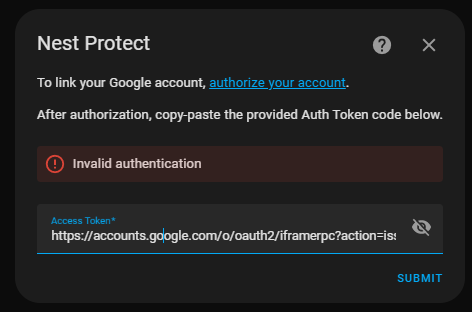 I tried also to find errors in the url, like to fill the spaces in the url with %20 (…&scope=openid profile email https:…)
am I something missing - how do I provide my “issue_token” and “cookie” to the integration? can I put them manually in some configuration file?
please note: I have installed the integration by manually downloading \custom_components\nest_protect to my docker since the easy method by clicking the link does not work
@iMicknl can you please help to understand if the problem at the moment is “unfixable” on the user side or if there is an issue only for me and in general the cookie method works for this integration?
EDIT: Since this was driving me nuts for 5 days in a ROW (and i even set up a Linux VM to see if there was a copy issue getting the request-url in windows) i only now got the problem - that the cookie methot is not merged into the iMicknl plugin jet and that i had to download the version of https://github.com/nicoinch/ha-nest-protect as @IceBotYT explained in their reply
I hope my edit helps prevent that others run into the same error as me
See https://community.home-assistant.io/t/support-for-nest-protect/310084/169?u=imick.
You have the wrong repo added.
https://github.com/nicoinch/ha-nest-protectinto theRepositoryfield.Categoryfield toIntegration.The same problem here. OOB is outdated 😦
It’s a little tricky but totally doable. Just follow the instructions and use this forked integration:
Nest Protect Integration Forked to use the Token/Cookies Method of Authentication: https://github.com/nicoinch/ha-nest-protect
Instructions - Retrieving issue_token and cookies: https://github.com/nicoinch/ha-nest-protect#retrieving-issue_token-and-cookies
Notes: Last I checked, the integration needed a minor update but its still working for me.
I did not use HACS but instead used the manual method of simply copying the appropriate folder from this repository into the ‘custom_components’ folder (create this folder if it doesn’t exist) under the config folder of your Home Assistant install.
Depending on what they use, we could change this integration as well. Unfortunately, the most user-friendly way of generating a token does not seem supported anymore.
Currently my time is very limited, thus I did not have time to look into this issue. Contributions to this integration are always welcome. Otherwise, we would just need to wait. If you are able to generate a token in a different way, you can pass this in the integration as well.
You’re solution worked for me too, just commenting to say thanks and add that you need to append &ack_oob_shutdown=2022-10-03 to the url provided in the setup steps (right click the link from HA and copy url, append the command to the link, then paste it into a browser).
I’m definitely not a programmer, more of a tinker’er, so this took me a bit longer to remember to add the & to properly append it. Mostly commenting in case others in my situation (and knowledge level) come across this issue before it’s fixed.
Ok, so I am in the process of installing the beta (0.4.0b2). I have gone through the token request process (I have the issue_token and the cookie) but don’t know how to proceed after this point. When I go to integrations in HA and try to add Nest Protect, I select Google Account and the next window asks me to input…something? I’ve tried my Gmail account address, the token and the cookie. Nothing seems to work. Any assistance as to what I’m missing would be appreciated.
UPDATE: It turns out that the latest beta version (0.4.0b2) is not working. I rolled back to (0.4.0b1) and got the correct fields for the Issue_Token and Cookies.
@iMicknl - It works again! Thanks!
For those of you searching for 0.4.0b1, I simply went into HACS, clicked Nest Protect, and then the 3 dot menu on the top right. Select
Redownloadand after enabling beta versions, pick 0.4.0b1. HitDownloadand then reboot home assistant! After rebooting it works again using cookies without any further steps! (Assuming you were running nicoinch’s version using cookie authentication)Yes. Make sure to update to the pre-release version (0.4.0b1).
This worked for me in Incognito mode! HINT: Use the popup “copy value”, do not try to copy paste in notepad like I did. I tried this so many times, they all failed until I used copy value!
@iMicknl Will you update the repo to correct that issue ?
Please create a new issue with more details and your log.
Hi, i forgot how but i managed to get it working, but i decided not to use it since its not accurate enough to pickup smoke from my neighbours burning trash
@hesspoint not soon, if you cannot use the other method, best is to switch to the prerelease.
Does it solve this error as well now
“Detected integration that called async_setup_platforms instead of awaiting async_forward_entry_setups”
Please update to latest pre-release (beta) via HACS or GitHub releases and try again, if you cannot use the old authentication method.
@MikeMannox no, unfortunately not. Google is not open and they don’t provide a public API for the Nest Protect. The earlier method has been blocked by recent app changes and thus at the moment the only possibility is to use the cookie method.
I don’t have much time at the moment to work on my opensource projects, however there have been some great contributions on this repository to enable the cookie method as a work around. Happy to merge them in when the current issues / bugs are fixed 😃.
This integration use a different authentication method and needs to be removed and replaced with this integration: https://github.com/nicoinch/ha-nest-protect
… which uses the issue_token and cookies method for authentication.
@MikeMannox I wouldn’t call it dead, I just have been very busy lately. There is still a wish to merge the new improvements and release a new version. I do own a Nest Protect (wired) myself as well, so I am still committed to have it working. (mine still works based on the previous auth method).
I fully agree that the cookie method is very technical and not user friendly at all, I have been looking in alternative ways to authenticate, but couldn’t find any yet. The HomeBridge solution also moved back to the cookie method.
Perfect! It worked for me on Edge. Thanks!
I followed these instructions using Chrome Incognito mode and it seems to be working for me: https://github.com/nicoinch/ha-nest-protect