label-studio: Uploading individual .txt files as individual tasks fails in multiple ways
Describe the bug For the NER usecase when each text file is a separate task; the export of annotated data exports only text file names for text content; even though there is no issues with labelling the content
To Reproduce Steps to reproduce the behavior:
- Set up NER labelling Task with following Config (I used the valueType=“url” based on recommendation here to have each .txt file as a separate task : https://labelstud.io/guide/tasks.html#Plain-text; it reads “If you want to import entire plain text files without each line becoming a new labeling task, customize the labeling configuration to specify valueType=“url” in the Text tag. See the Text tag documentation”)
  <Labels name="label" toName="text">
    <Label value="label1" background="#FFA39E"/>
    <Label value="label2" background="#D4380D"/>
    <Label value="label3" background="#FFC069"/>
    <Label value="label4" background="#AD8B00"/>
    <Label value="label5" background="#D3F261"/>
    <Label value="label6" background="#389E0D"/>
    <Label value="labe7" background="#5CDBD3"/>
  </Labels>
  <Text name="text" value="$text" valueType="url"/>
</View>
- Upload a few .txt files and Import as Time Series (only Time Series option keeps the each .txt files as a separate task)
- Annotate the data
- Try to Export the annotated data through API or UX and in any format. The annotated data does not contain content of .txt files
Expected behavior
- The text content is visible in the exported data
- When uploading .txt files; there is an option to upload it as .txt or .txtl (text or textLine similar to json or jsonl)
- Perhaps a new valueType param in Text tag to indicate text or textline
Screenshots If applicable, add screenshots to help explain your problem.
Environment (please complete the following information):
- Label Studio Version [e.g. v1.01]
Additional context https://label-studio.slack.com/archives/C01SKFX54QK/p1621488696013000
About this issue
- Original URL
- State: closed
- Created 3 years ago
- Comments: 20 (7 by maintainers)
using last docker build, the workaround with valueType=“url” works
<Text name="text" value="$text" granularity="word" valueType="url"/>still no solution ?
I think I had the same issue. And I want to explain why it is confusing to the end users. So I wanted to import a plain text document as one task. Let’s say the content is:
my-doc.txtSo when I import it into label studio. It as me to choice
Treat CSV/TSV as: List of tasks/Time Series or Whole Text Filewhich is confusing becasuse I want to import a plain text document instead of CSV/TSV file. But any waywhen I chose
List of tasksI’ll get 3 tasks, which is not expected, I want one task instead of 3.when I chose
Time Series or Whole Text FileI get one task but not data importedWhat I’m actually expecting is:
tempory solution
conver the plain text into JSON before import
Don’t know if we can make the behavior more intuitive to the user.
I wanted to do the same thing as you - import a whole text file as a single task. I did what you said in the OP and I can’t reproduce - exporting shows me labels just fine.
I clicked ok anyways (though it’d be cool if the example detected that I used valueType=“url” and switched example text to an url). The template I used is in the screenshot also.
Upload a .txt file as time series (this was very confusing - I’m uploading a text file and the app is asking me if it should interpret TSV as time series or separate tasks? I’m uploading plain text, not TSV or CSV). I have similar findings that uploading as time series is the only way to get Label Studio to interpret the file as a single task.
Annotate some text and save my annotations - I have a feeling maybe you didn’t save after annotating?
Export as CSV: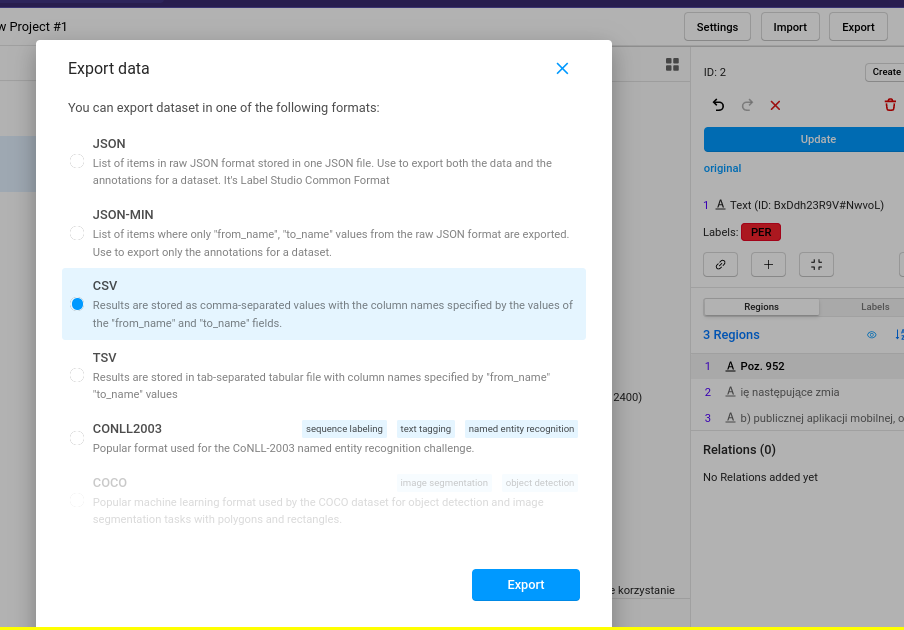
The exported CSV contains annotations that seem to be correct:
I downloaded the Label Studio Docker image 2 hours ago, so my version is “from today” 😛 Below is more detailed info