label-studio: Annotations of pre-annotated data don't get saved after update
Describe the bug I uploaded pre-annotated text data into Label Studio. The annotators are either adding new annotation by selecting text region, then updating, or editing and changing the pre-annotations and updating. Also there is a Binary Choice (“yes”, “no”) which has default value (the default is “no”). In any case the updates often don’t get saved for this project. Other projects work fine. The labeling interface code doesn’t have any errors, it’s shown in the “To Reproduce” section. We tried clearing browser cookies and cache, working in incognito mode but it didn’t help. Changing annotator’s account helped temporarily but the problem returned. I saw in the issues that almost similar problem happened before (https://github.com/heartexlabs/label-studio/issues/1101) but it didn’t get solved since the author stopped doing the labeling. The author stated that they “decided it was mostly due to poor internet connections” but it doesn’t hold in our case.
To Reproduce The behavior happens not constantly and it’s not clear what causes it to happen. I guess you need to do a lot of labeling and then the problem will arise. Steps to reproduce the behavior: The labeling interface code
<View>
  <Labels name="label_expansion" toName="google_expansion" showInline="true" choice="multiple">
    <Label value="Filler" background="#ADA49E" granularity="symbol" hint="for google expansion text highlighting"/>
  </Labels>
  <Labels name="label" toName="original" showInline="true" choice="multiple">
    <Label value="EXPN" background="#FFA39E" granularity="symbol" hint="abbreviations"/>
    <Label value="CARDINAL" background="#FFC069" granularity="symbol"/>
    <Label value="DECIMAL" background="#D3F261" granularity="symbol"/>
    <Label value="FRACTION" background="#F759AB" granularity="symbol"/>
    <Label value="ORDINAL" background="#5CDBD3" granularity="symbol"/>
    <Label value="DIGIT" background="#9254DE" granularity="symbol"/>
    <Label value="DATE" background="#ADC6FF" granularity="symbol"/>
    <Label value="TIME" background="#096DD9" granularity="symbol"/>
    <Label value="MONEY" background="#FFC069" granularity="symbol"/>
    <Label value="MEASURE" background="#FFA39E" granularity="symbol"/>
    <Label value="PERCENT" background="#AD8B00" granularity="symbol"/>
    <Label value="RANGE" background="#389E0D" granularity="symbol"/>
    <Label value="LETTERS" background="#D4380D" granularity="symbol"/>
    <Label value="TELEPHONE" background="#FFA39E" granularity="symbol"/>
    <Label value="ADDRESS" background="#9254DE" granularity="symbol"/>
    <Label value="URL" background="#389E0D" granularity="symbol"/>
    <Label value="EMAIL" background="#389E0D" granularity="symbol"/>
    <Label value="HASHTAG" background="#5CDBD3" granularity="symbol"/>
    <Label value="VERBATIM" background="#5CDBD3" granularity="symbol"/>
    <Label value="WDLK" background="#FFC069" granularity="symbol" hint="misspelling"/>
  </Labels>
  <View style="margin-top: 20px; padding: 20px; box-shadow: 2px 2px 8px #AAA;">
    <Header value="Original text"/>
    <Text name="original" value="$original"/>
  </View>
  <View visibleWhen="region-selected">
    <Header value="Write the expansion"/>
    <TextArea name="expansion" toName="original" editable="true" perRegion="true" required="false"/>
  </View>
  <View style="margin-top: 20px; padding: 20px; box-shadow: 2px 2px 8px #AAA;">
    <Header value="Google dataset expansion"/>
    <Text name="google_expansion" value="$google_expansion"/>
  </View>
  <View style="margin-top: 20px; padding: 20px; box-shadow: 2px 2px 8px #AAA;">
    <Header value="Normalise expansion"/>
    <Text name="norm_expansion" value="$norm_expansion"/>
  </View>
  <View style="margin-top: 10px; margin-bottom: 10px; padding: 20px; box-shadow: 2px 2px 8px #AAA;">
    <Choices name="type" toName="original" choice="single">
      <Header value="Is the original text problematic?"/>
      <Choice value="Yes"/>
      <Choice value="No"/>
    </Choices>
  </View>
</View>
- Upload pre-annotated text data. There is an example. {‘id’: ‘11’, ‘data’: {‘original’: ‘On October 25, 2014 , they held their 500th sit in protest .’, ‘google_expansion’: ‘On october twenty fifth twenty fourteen , they held their five hundredth sit in protest .’, ‘norm_expansion’: ‘On october twenty fifth twenty fourteen, they held their five hundredth sit in protest.’}, ‘annotations’: [{‘id’: ‘397425’, ‘completed_by’: {‘id’: 1, ‘email’: ‘some_email’, ‘first_name’: ‘name’, ‘last_name’: ‘name’}, ‘was_cancelled’: False, ‘ground_truth’: False, ‘created_at’: ‘2021-52-23T16:52:12’, ‘updated_at’: ‘2021-52-23T16:52:12’, ‘lead_time’: 0, ‘result_count’: 0, ‘prediction’: {}, ‘result’: [{‘id’: ‘397425_5201099’, ‘from_name’: ‘label’, ‘to_name’: ‘original’, ‘type’: ‘labels’, ‘value’: {‘start’: 3, ‘end’: 19, ‘text’: ‘October 25, 2014’, ‘labels’: [‘DATE’]}}, {‘id’: ‘397425_5201099’, ‘from_name’: ‘expansion’, ‘to_name’: ‘original’, ‘type’: ‘textarea’, ‘value’: {‘start’: 3, ‘end’: 19, ‘text’: [‘october twenty fifth twenty fourteen’]}}, {‘id’: ‘397425_52010990’, ‘from_name’: ‘label_expansion’, ‘to_name’: ‘google_expansion’, ‘type’: ‘labels’, ‘value’: {‘start’: 3, ‘end’: 39, ‘text’: ‘october twenty fifth twenty fourteen’, ‘labels’: [‘DATE’]}}, {‘id’: ‘397425_5201104’, ‘from_name’: ‘label’, ‘to_name’: ‘original’, ‘type’: ‘labels’, ‘value’: {‘start’: 38, ‘end’: 43, ‘text’: ‘500th’, ‘labels’: [‘ORDINAL’]}}, {‘id’: ‘397425_5201104’, ‘from_name’: ‘expansion’, ‘to_name’: ‘original’, ‘type’: ‘textarea’, ‘value’: {‘start’: 38, ‘end’: 43, ‘text’: [‘five hundredth’]}}, {‘id’: ‘397425_52011040’, ‘from_name’: ‘label_expansion’, ‘to_name’: ‘google_expansion’, ‘type’: ‘labels’, ‘value’: {‘start’: 58, ‘end’: 72, ‘text’: ‘five hundredth’, ‘labels’: [‘ORDINAL’]}}, {‘id’: ‘choices_692603’, ‘from_name’: ‘type’, ‘to_name’: ‘original’, ‘type’: ‘choices’, ‘value’: {‘choices’: [‘No’]}}]}]}
- Select a label and region or click on the pre-annotated region.
- Write an expansion for that region or edit the expansion of the pre-annotated region.
- Click on Update.
- Repeat 2-4 steps multiple times (maybe several days).
- The updates will start to not get saved.
Expected behavior Task annotations are getting saved after updates.
Screenshots
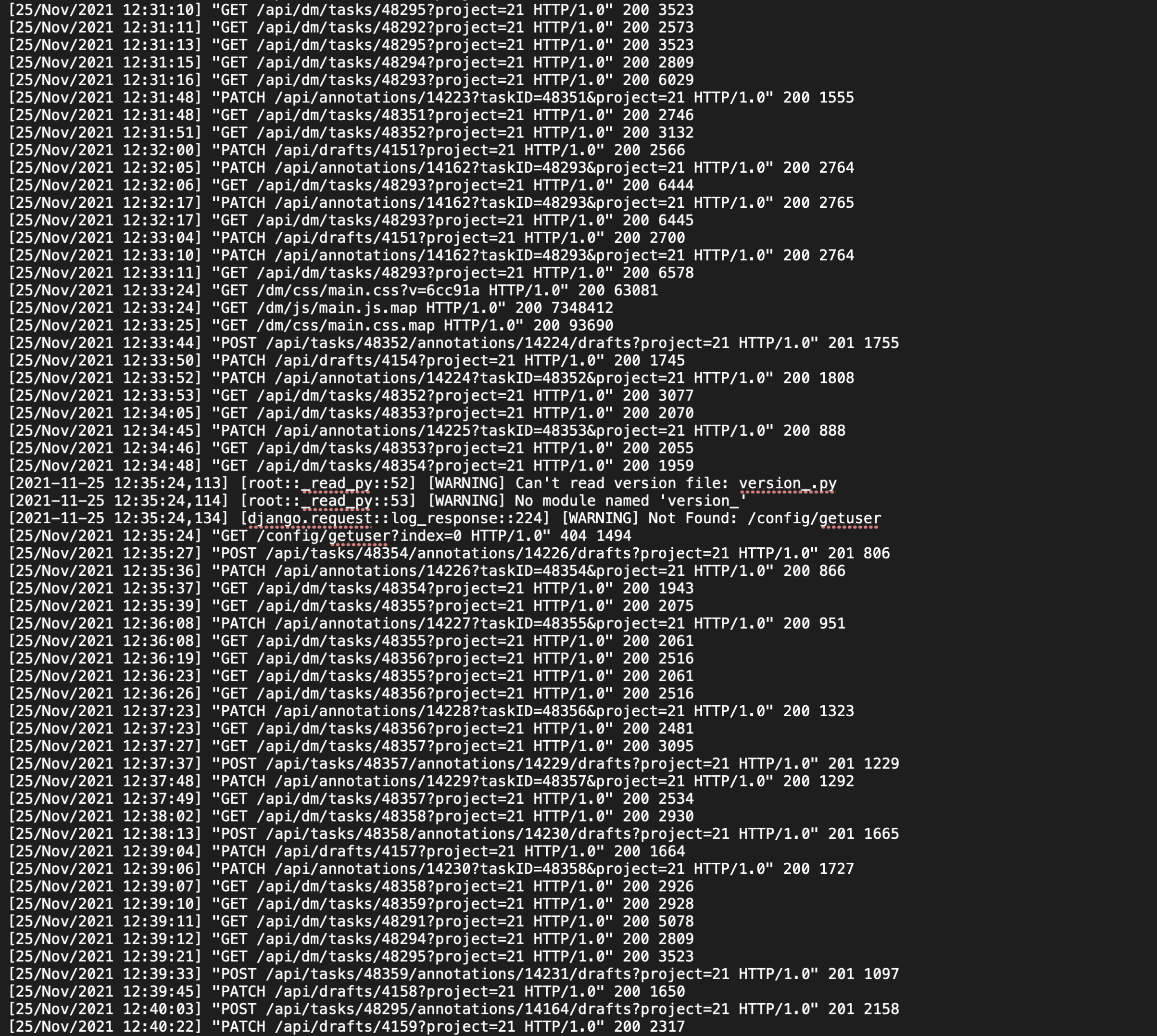
The logs when the saving problem happened.
Environment (please complete the following information):
- OS: Ubuntu (deployment), macOS, Windows 10 (users)
- Label Studio Version: 1.3.post0
About this issue
- Original URL
- State: closed
- Created 3 years ago
- Reactions: 2
- Comments: 19 (8 by maintainers)
Yes it works. The functionality is now more user-friendly: change an annotation -> Update -> the changed annotation is showing. I am not sure if the original author of this issue is satisfied (the issue was originally slightly different?), but I am.
@noircir Thank you for your video. This is related to drafts, try to click on it after update.