install: Headless Xcode Command Line Tools installation failed on 10.14
We have an automated Jenkins job that sets up machines by installing Homebrew on them. It started failing recently.
Reproduction:
- Have a fresh installation of macOS Mojave (tested with 10.14.4)
- Run
ruby -e "$(curl -fsSL https://raw.githubusercontent.com/Homebrew/install/master/install)"
Expected outcome: Homebrew installs successfully in interactive shell and non-interactive shell
Actual outcome:
In interactive shell

In non-interactive shell
[2019-06-04T14:42:20.932Z] Installing homebrew
[2019-06-04T14:42:21.189Z] ==> This script will install:
[2019-06-04T14:42:21.189Z] /usr/local/bin/brew
[2019-06-04T14:42:21.189Z] /usr/local/share/doc/homebrew
[2019-06-04T14:42:21.189Z] /usr/local/share/man/man1/brew.1
[2019-06-04T14:42:21.189Z] /usr/local/share/zsh/site-functions/_brew
[2019-06-04T14:42:21.189Z] /usr/local/etc/bash_completion.d/brew
[2019-06-04T14:42:21.189Z] /usr/local/Homebrew
[2019-06-04T14:42:21.189Z] ==> The following existing directories will be made group writable:
[2019-06-04T14:42:21.189Z] /usr/local/lib
[2019-06-04T14:42:21.189Z] /usr/local/lib/pkgconfig
[2019-06-04T14:42:21.189Z] ==> The following existing directories will have their owner set to anka:
[2019-06-04T14:42:21.189Z] /usr/local/lib
[2019-06-04T14:42:21.189Z] /usr/local/lib/pkgconfig
[2019-06-04T14:42:21.189Z] ==> The following existing directories will have their group set to admin:
[2019-06-04T14:42:21.189Z] /usr/local/lib
[2019-06-04T14:42:21.189Z] /usr/local/lib/pkgconfig
[2019-06-04T14:42:21.189Z] ==> The following new directories will be created:
[2019-06-04T14:42:21.189Z] /usr/local/bin
[2019-06-04T14:42:21.189Z] /usr/local/etc
[2019-06-04T14:42:21.189Z] /usr/local/include
[2019-06-04T14:42:21.189Z] /usr/local/sbin
[2019-06-04T14:42:21.189Z] /usr/local/share
[2019-06-04T14:42:21.189Z] /usr/local/var
[2019-06-04T14:42:21.189Z] /usr/local/opt
[2019-06-04T14:42:21.189Z] /usr/local/share/zsh
[2019-06-04T14:42:21.189Z] /usr/local/share/zsh/site-functions
[2019-06-04T14:42:21.189Z] /usr/local/var/homebrew
[2019-06-04T14:42:21.189Z] /usr/local/var/homebrew/linked
[2019-06-04T14:42:21.189Z] /usr/local/Cellar
[2019-06-04T14:42:21.189Z] /usr/local/Caskroom
[2019-06-04T14:42:21.189Z] /usr/local/Homebrew
[2019-06-04T14:42:21.189Z] /usr/local/Frameworks
[2019-06-04T14:42:21.189Z] ==> The Xcode Command Line Tools will be installed.
[2019-06-04T14:42:21.189Z] ==> /usr/bin/sudo /bin/chmod u+rwx /usr/local/lib /usr/local/lib/pkgconfig
[2019-06-04T14:42:21.189Z] ==> /usr/bin/sudo /bin/chmod g+rwx /usr/local/lib /usr/local/lib/pkgconfig
[2019-06-04T14:42:21.189Z] ==> /usr/bin/sudo /usr/sbin/chown anka /usr/local/lib /usr/local/lib/pkgconfig
[2019-06-04T14:42:21.445Z] ==> /usr/bin/sudo /usr/bin/chgrp admin /usr/local/lib /usr/local/lib/pkgconfig
[2019-06-04T14:42:21.445Z] ==> /usr/bin/sudo /bin/mkdir -p /usr/local/bin /usr/local/etc /usr/local/include /usr/local/sbin /usr/local/share /usr/local/var /usr/local/opt /usr/local/share/zsh /usr/local/share/zsh/site-functions /usr/local/var/homebrew /usr/local/var/homebrew/linked /usr/local/Cellar /usr/local/Caskroom /usr/local/Homebrew /usr/local/Frameworks
[2019-06-04T14:42:21.445Z] ==> /usr/bin/sudo /bin/chmod g+rwx /usr/local/bin /usr/local/etc /usr/local/include /usr/local/sbin /usr/local/share /usr/local/var /usr/local/opt /usr/local/share/zsh /usr/local/share/zsh/site-functions /usr/local/var/homebrew /usr/local/var/homebrew/linked /usr/local/Cellar /usr/local/Caskroom /usr/local/Homebrew /usr/local/Frameworks
[2019-06-04T14:42:21.445Z] ==> /usr/bin/sudo /bin/chmod 755 /usr/local/share/zsh /usr/local/share/zsh/site-functions
[2019-06-04T14:42:21.445Z] ==> /usr/bin/sudo /usr/sbin/chown anka /usr/local/bin /usr/local/etc /usr/local/include /usr/local/sbin /usr/local/share /usr/local/var /usr/local/opt /usr/local/share/zsh /usr/local/share/zsh/site-functions /usr/local/var/homebrew /usr/local/var/homebrew/linked /usr/local/Cellar /usr/local/Caskroom /usr/local/Homebrew /usr/local/Frameworks
[2019-06-04T14:42:21.445Z] ==> /usr/bin/sudo /usr/bin/chgrp admin /usr/local/bin /usr/local/etc /usr/local/include /usr/local/sbin /usr/local/share /usr/local/var /usr/local/opt /usr/local/share/zsh /usr/local/share/zsh/site-functions /usr/local/var/homebrew /usr/local/var/homebrew/linked /usr/local/Cellar /usr/local/Caskroom /usr/local/Homebrew /usr/local/Frameworks
[2019-06-04T14:42:21.701Z] ==> /usr/bin/sudo /bin/mkdir -p /Users/anka/Library/Caches/Homebrew
[2019-06-04T14:42:21.701Z] ==> /usr/bin/sudo /bin/chmod g+rwx /Users/anka/Library/Caches/Homebrew
[2019-06-04T14:42:21.701Z] ==> /usr/bin/sudo /usr/sbin/chown anka /Users/anka/Library/Caches/Homebrew
[2019-06-04T14:42:21.701Z] ==> Searching online for the Command Line Tools
[2019-06-04T14:42:21.701Z] ==> /usr/bin/sudo /usr/bin/touch /tmp/.com.apple.dt.CommandLineTools.installondemand.in-progress
[2019-06-04T14:42:43.596Z] ==> Downloading and installing Homebrew...
[2019-06-04T14:42:43.596Z] xcode-select: note: no developer tools were found at '/Applications/Xcode.app', requesting install. Choose an option in the dialog to download the command line developer tools.
[2019-06-04T14:42:43.596Z] Failed during: git init -q
script returned exit code 1
Also, the following popup is visible on the machine:
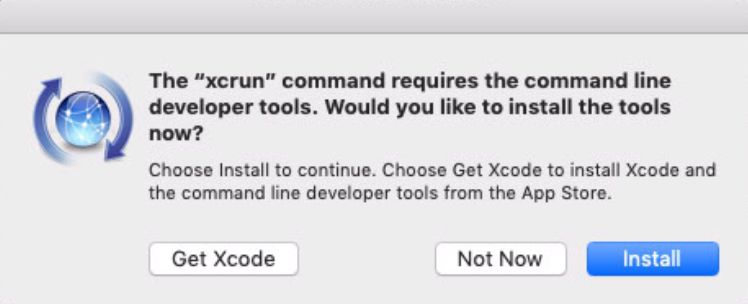
Here is the non-interactive output from the 8th of May when it was still working correctly:
20:31:15  Installing homebrew
20:31:16  ==> This script will install:
20:31:16  /usr/local/bin/brew
20:31:16  /usr/local/share/doc/homebrew
20:31:16  /usr/local/share/man/man1/brew.1
20:31:16  /usr/local/share/zsh/site-functions/_brew
20:31:16  /usr/local/etc/bash_completion.d/brew
20:31:16  /usr/local/Homebrew
20:31:16  ==> The following existing directories will be made group writable:
20:31:16  /usr/local/lib
20:31:16  /usr/local/lib/pkgconfig
20:31:16  ==> The following existing directories will have their owner set to anka:
20:31:16  /usr/local/lib
20:31:16  /usr/local/lib/pkgconfig
20:31:16  ==> The following existing directories will have their group set to admin:
20:31:16  /usr/local/lib
20:31:16  /usr/local/lib/pkgconfig
20:31:16  ==> The following new directories will be created:
20:31:16  /usr/local/bin
20:31:16  /usr/local/etc
20:31:16  /usr/local/include
20:31:16  /usr/local/sbin
20:31:16  /usr/local/share
20:31:16  /usr/local/var
20:31:16  /usr/local/opt
20:31:16  /usr/local/share/zsh
20:31:16  /usr/local/share/zsh/site-functions
20:31:16  /usr/local/var/homebrew
20:31:16  /usr/local/var/homebrew/linked
20:31:16  /usr/local/Cellar
20:31:16  /usr/local/Caskroom
20:31:16  /usr/local/Homebrew
20:31:16  /usr/local/Frameworks
20:31:16  ==> The Xcode Command Line Tools will be installed.
20:31:16  ==> /usr/bin/sudo /bin/chmod u+rwx /usr/local/lib /usr/local/lib/pkgconfig
20:31:16  ==> /usr/bin/sudo /bin/chmod g+rwx /usr/local/lib /usr/local/lib/pkgconfig
20:31:17  ==> /usr/bin/sudo /usr/sbin/chown anka /usr/local/lib /usr/local/lib/pkgconfig
20:31:17  ==> /usr/bin/sudo /usr/bin/chgrp admin /usr/local/lib /usr/local/lib/pkgconfig
20:31:17  ==> /usr/bin/sudo /bin/mkdir -p /usr/local/bin /usr/local/etc /usr/local/include /usr/local/sbin /usr/local/share /usr/local/var /usr/local/opt /usr/local/share/zsh /usr/local/share/zsh/site-functions /usr/local/var/homebrew /usr/local/var/homebrew/linked /usr/local/Cellar /usr/local/Caskroom /usr/local/Homebrew /usr/local/Frameworks
20:31:17  ==> /usr/bin/sudo /bin/chmod g+rwx /usr/local/bin /usr/local/etc /usr/local/include /usr/local/sbin /usr/local/share /usr/local/var /usr/local/opt /usr/local/share/zsh /usr/local/share/zsh/site-functions /usr/local/var/homebrew /usr/local/var/homebrew/linked /usr/local/Cellar /usr/local/Caskroom /usr/local/Homebrew /usr/local/Frameworks
20:31:17  ==> /usr/bin/sudo /bin/chmod 755 /usr/local/share/zsh /usr/local/share/zsh/site-functions
20:31:17  ==> /usr/bin/sudo /usr/sbin/chown anka /usr/local/bin /usr/local/etc /usr/local/include /usr/local/sbin /usr/local/share /usr/local/var /usr/local/opt /usr/local/share/zsh /usr/local/share/zsh/site-functions /usr/local/var/homebrew /usr/local/var/homebrew/linked /usr/local/Cellar /usr/local/Caskroom /usr/local/Homebrew /usr/local/Frameworks
20:31:17  ==> /usr/bin/sudo /usr/bin/chgrp admin /usr/local/bin /usr/local/etc /usr/local/include /usr/local/sbin /usr/local/share /usr/local/var /usr/local/opt /usr/local/share/zsh /usr/local/share/zsh/site-functions /usr/local/var/homebrew /usr/local/var/homebrew/linked /usr/local/Cellar /usr/local/Caskroom /usr/local/Homebrew /usr/local/Frameworks
20:31:17  ==> /usr/bin/sudo /bin/mkdir -p /Users/anka/Library/Caches/Homebrew
20:31:17  ==> /usr/bin/sudo /bin/chmod g+rwx /Users/anka/Library/Caches/Homebrew
20:31:17  ==> /usr/bin/sudo /usr/sbin/chown anka /Users/anka/Library/Caches/Homebrew
20:31:17  ==> Searching online for the Command Line Tools
20:31:17  ==> /usr/bin/sudo /usr/bin/touch /tmp/.com.apple.dt.CommandLineTools.installondemand.in-progress
20:31:33  ==> Installing Command Line Tools (macOS Mojave version 10.14) for Xcode-10.2
20:31:33  ==> /usr/bin/sudo /usr/sbin/softwareupdate -i Command\ Line\ Tools\ (macOS\ Mojave\ version\ 10.14)\ for\ Xcode-10.2
20:31:33  Software Update Tool
20:31:33
20:31:33
20:31:37  Downloading Command Line Tools (macOS Mojave version 10.14) for Xcode
20:31:37  Downloaded Command Line Tools (macOS Mojave version 10.14) for Xcode
20:32:34  Installing Command Line Tools (macOS Mojave version 10.14) for Xcode
20:32:34  Done with Command Line Tools (macOS Mojave version 10.14) for Xcode
20:32:34  Done.
20:32:34  ==> /usr/bin/sudo /bin/rm -f /tmp/.com.apple.dt.CommandLineTools.installondemand.in-progress
20:32:34  ==> /usr/bin/sudo /usr/bin/xcode-select --switch /Library/Developer/CommandLineTools
20:32:34  ==> Downloading and installing Homebrew...
20:32:41  From https://github.com/Homebrew/brew
20:32:41   * [new branch]      master     -> origin/master
[...]
20:32:41   * [new tag]         2.1.2      -> 2.1.2
20:32:41  HEAD is now at 37f4b9264 Merge pull request #6108 from Homebrew/dependabot/bundler/docs/unicode-display_width-1.6.0
20:32:46  ==> Homebrew is run entirely by unpaid volunteers. Please consider donating:
20:32:46    https://github.com/Homebrew/brew#donations
20:32:49  ==> Tapping homebrew/core
20:32:49  Cloning into '/usr/local/Homebrew/Library/Taps/homebrew/homebrew-core'...
20:32:56  Checking out files:  78% (3945/5007)
[...]
Checking out files: 100% (5007/5007), done.
20:33:11  Tapped 2 commands and 4775 formulae (5,032 files, 12.4MB).
20:33:12  Already up-to-date.
20:33:12  ==> Installation successful!
About this issue
- Original URL
- State: closed
- Created 5 years ago
- Comments: 23 (7 by maintainers)
Commits related to this issue
- Allow install to use the CommandLineTools bundled with Xcode Maybe closes #206 I don't want to install the CommandLineTools on a machine that already has Xcode — committed to AndrewSB/install by AndrewSB 5 years ago
- Allow install to use the CommandLineTools bundled with Xcode Maybe closes #206 I don't want to install the CommandLineTools on a machine that already has Xcode — committed to AndrewSB/install by AndrewSB 5 years ago
Fixed by Apple now.
Submitted a bug report (Jun 7, 2019 at 5:21 PM – FB6132845) since the folks in developer support seem like bots and are extremely unhelpful.
I’m afraid it affects everyone who don’t have Command Line Tools installed. I guess this will mainly break automated CI setups. Looks like it’s best to just wait for Apple to fix the list of software updates though.
Why are you closing this if it’s not fixed? I think it’d be nice to keep it open as long as Apple doesn’t fix their software update to avoid duplicate reports.