supervisor: Latest supervisor break updates and snapshots on synology dsm
Describe the issue
Trying to update ha to 0.118.2 from 0.118.1, get error
20-11-23 10:15:34 WARNING (MainThread) [supervisor.jobs] 'HomeAssistantCore.update' blocked from execution, system is not healthy
also when trying to update addon
20-11-23 11:00:24 WARNING (MainThread) [supervisor.jobs] 'AddonManager.update' blocked from execution, system is not healthy
also snapshots are broken
20-11-23 11:12:41 WARNING (MainThread) [supervisor.jobs] 'SnapshotManager.do_snapshot_full' blocked from execution, system is not healthy
Steps to reproduce
I know that synology docker installation isn official supported, but it popular way to use home assistant May be there are some way to disable this health check to update? Or downgrade supervisor is nessesary?
Enviroment details
- Operating System:: Synology DSM
- Supervisor version:: 2020.11.2
- Home Assistant version: 0.118.1
- Docker version: 18.09.8, build bfed4f5 (latest on DSM so far)
Supervisor logs
Supervisor logs
Paste supervisor logs here
About this issue
- Original URL
- State: closed
- Created 4 years ago
- Reactions: 3
- Comments: 80 (16 by maintainers)
It works fine for me. See attached screenshot how it should look like. I restarted the supervisor container and now I am able to play with add-ons.
Sad to see this breaking change, too. Yes, Synology uses some old docker version, but it is the most recent version for all synology users out there. Can understand the intention to move forward, but am unhappy to see so many installations break…
The actual FIX is this post: https://github.com/home-assistant/supervisor/issues/2288#issuecomment-738158680
and how I implemented it here: https://github.com/home-assistant/supervisor/issues/2288#issuecomment-738182230
For posterity, I’m keeping this in case its needed by others in the future:
For those searching for a solution here who are NOT as technical (like me) and you’re using Ubuntu or other Linux Supervised Installs, here are detailed steps used to FIX (OK, BYPASS)this problem:
find your Home assistant install directory (“hassio”). It will look like the pic below. rt-click Open the dir AS ADMINISTRATOR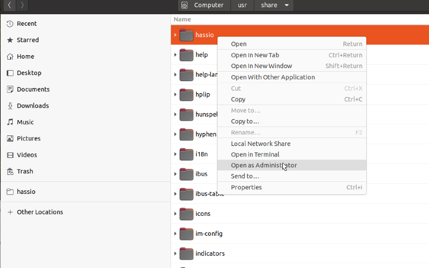
Create a new file there with all the other json files called jobs.json. or just duplicate one of the existing files and rename it
put this one line in that file:
{“ignore_conditions”: [“healthy”]}
save it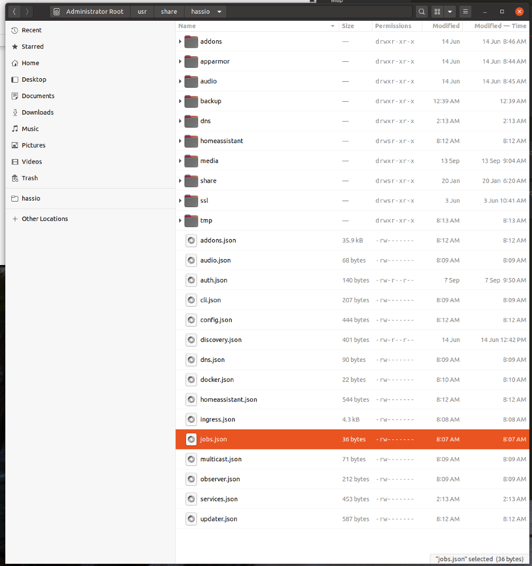
restart the Supervisor Docker container either in Portainer or reboot your system.
I Was successfully able to restore a Snapshot after doing this. All is now well in the Universe. I can now see my chickens are about to lay eggs on each other!
Jeff
Pascal has opened a PR today that will allow people to disable the health check enforcement https://github.com/home-assistant/supervisor/pull/2290 . Possible but not advised.
10000000% this!
This is exactly my situation as well. I couldn’t have said it better than @HCanber did here.
@Krocko add jobs.json {“ignore_conditions”: [“healthy”]} in the hassio folder just above config. This ignores unhealthy conditions
I’m also seeing this now when I try to upgrade from 0.118.2 to 0.118.3.
I’ve read the attached and although I am running on an unsupported OS (ubuntu) I’ve got the correct docker version and can’t see any other issues in my logs or otherwise.
Operating System Ubuntu 18.04.3 LTS Docker version 19.03.5 Supervisor Version 2020.11.2
The challenge from my understanding is that this then eliminates everyone running on a Synology NAS as they have not moved forward beyond 18.09.8. (Unless I am mistaken)
Hi Guys,
same here for me: Debian 9 in ESXi with docker 18.x and hupsakee System unhealthy (and warning that supervisor not in privileged mode)
upgrade debian 10 and docker did not help check networkmanager did not help
but what did help was: https://community.home-assistant.io/t/supervisor-in-privileged-mode/170629 changing the json file cleared all errors 👍 It is easy visualised with portainer - superviser container - Inspect - Hostconfig - Privileged
@frenck, the concept is noble & good maybe a summary why unhealthy could be interesting in the search of a solution. I did not known about that hostconfig.json (and privileged entry) with the supervisor container …
Mario