core: Zigbee False Motion Alerts OR Device checking in is triggering motion alerts
The problem
Been seeing false motion alerts from couple devices from two different manufactures when all individuals are away from home.
This happened while back and though it was the sensors but its also happening to the new ones as of 2 releases ago.
What version of Home Assistant Core has the issue?
core - 2022.7.7
What was the last working version of Home Assistant Core?
unknown
What type of installation are you running?
Home Assistant OS
Integration causing the issue
Centralite Micro Motion Sensor & LEDVANCE Sylvania LIGHTIFY ZigBee Indoor Motion and Temperature Sensor
Link to integration documentation on our website
https://www.centralite.com/downloads/DataSheet-3SeriesMicroMotionSensor.pdf
Diagnostics information
zha-9a854b8b0085e6df7d982523e0035a76-CentraLite 3328-G-1570d1adb7842f444cd9af6b37f5532a.json.txt
Example YAML snippet
No response
Anything in the logs that might be useful for us?
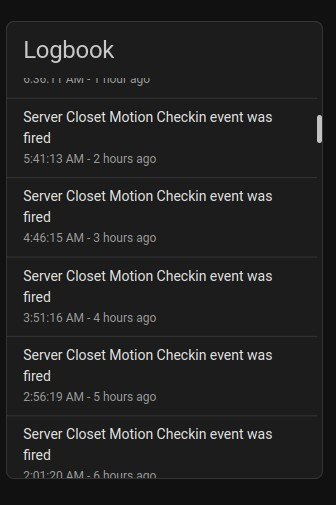
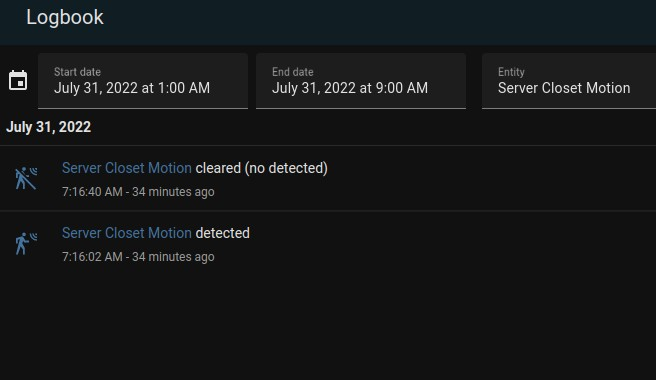
Logbook doesn't match from device logbook and logbook from left panel.

Device logbook has multiple alert entries  while the logbook itself does not. However, am receiving alerts via the automation rule.

No one was in the closet from 1am-6am.  Screenshots are inserted below
Additional information
Version core-2022.7.7 Installation Type Home Assistant OS Development false Supervisor true Docker true User root Virtual Environment false Python Version 3.10.5 Operating System Family Linux Operating System Version 5.15.55 CPU Architecture x86_64 Timezone America/Chicago Configuration Directory /config
Host Operating System Home Assistant OS 8.4 Update Channel stable Supervisor Version supervisor-2022.07.0 Agent Version 1.2.1 Docker Version 20.10.14 Disk Total 30.8 GB Disk Used 5.0 GB Healthy true Supported true Board ova Supervisor API ok Version API ok

About this issue
- Original URL
- State: closed
- Created 2 years ago
- Comments: 19 (8 by maintainers)
Thanks. The kitchen sensor is down to 46% on battery but will replace shortly. The closet to monitor the the network equipment temp is at 77%. So, not sure why that one is sending out motion events. Might just remove the motion for that one sensor.
The better half and me haven’t had the chance to leave the house for a bit. But I’m also watching the debug logs. Will leave debug mode enabled throughout the night and monitor.
I’d say, lets put this on standby until I’m able to capture the event.
Will do… We have to run an errand this afternoon and hopefully we can capture whats going on.