core: ZHA Zigbee groups are incorrect assigned to controller device
The problem
Zigbee groups in ZHA are bound to their controller device, which they should not.
A Zigbee group is not a device on its own, and should therefore not be bound to a device.
As a result of the current behavior, scenes cannot be used:

Another area where this goes wrong is when targeting areas or using device automations.
Environment
- Home Assistant Core release with the issue: 0.113.0.dev20200706
- Last working Home Assistant Core release (if known): Unkown
- Operating environment (OS/Container/Supervised/Core): Supervised
- Integration causing this issue: ZHA
- Link to integration documentation on our website: https://www.home-assistant.io/integrations/zha
Problem-relevant configuration.yaml
Traceback/Error logs
Additional information
About this issue
- Original URL
- State: closed
- Created 4 years ago
- Reactions: 16
- Comments: 46 (11 by maintainers)
@dmulcahey any update? I would be okay if you just removed the device for now to make Zigbee groups usable through GUI.
Imho its best to represent Zigbee groups as (virtual) devices because they inherently have the same functionality as a single device (e.g one lamp vs group of lamps).
Note for anyone having trouble with the above workaround as I did, the drop-down to add individual entities in the scene editor is only visible once you turn on Advanced Mode in your user profile.
@selfish Although the issue is still present, there’s a “workaround” for using the HA scene editor now: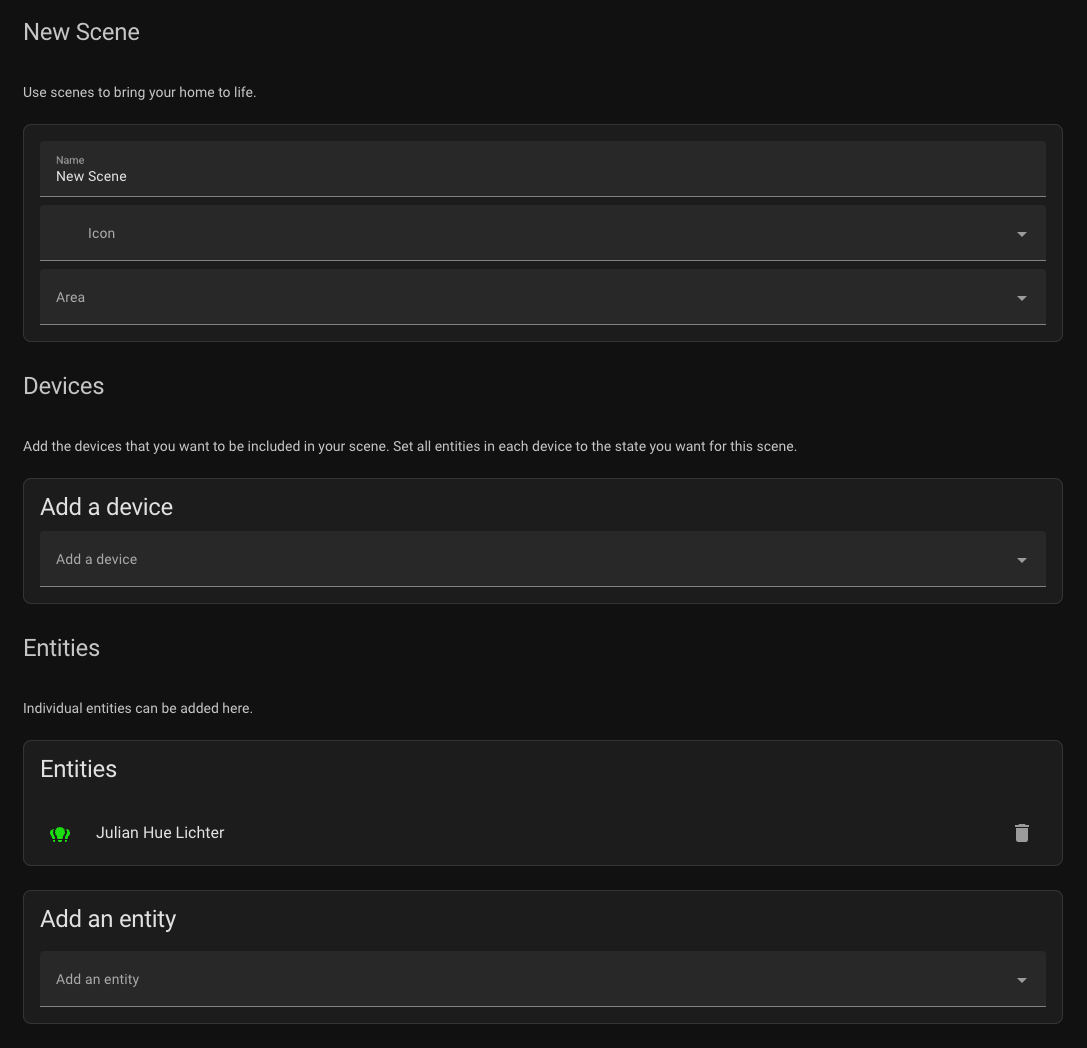 Basically, you can add individual entities to a scene in the HA scenes editor without adding the entire device. This also works for ZHA groups.
(The Hue integration has “fake devices” for groups)
I hear ya 😃 that said, I guess I could make the argument that the coordinator is the virtual device 😛.
Anyway, I’m willing to make the change outlined above to remove the device altogether. As for virtual devices, that would require a bit more thought to ensure that everything works correctly. If you’re ok with this staying the way it is for a bit then I’ll explore it otherwise I’ll get something up to sever them from the coordinator tomorrow.
There hasn’t been any activity on this issue recently. Due to the high number of incoming GitHub notifications, we have to clean some of the old issues, as many of them have already been resolved with the latest updates. Please make sure to update to the latest Home Assistant version and check if that solves the issue. Let us know if that works for you by adding a comment 👍 This issue has now been marked as stale and will be closed if no further activity occurs. Thank you for your contributions.
I also ran into this: ZHA groups inherit the controller device’s area and the UI doesn’t allow me to change the area of the group entity itself. I found the workaround to set the
area_idattribute of the group entity manually in.storage/core.entity_registryand restart HA. (Once done, further area edits can actually be done via the UI.)I have (unrelated) KNX light entities that in
.storage/core.entity_registryhave"device_id": null. So I suspect one could also set thedevice_idattribute of a ZHA group entity tonullto detach it from the controller device. Thus, I would expect the originally reported scene issue to also be resolved. But I didn’t dare fiddling with my working setup to try it out. Maybe someone who still has this issue wants to try it out…I think the fix for this may be very simple. I think I can move https://github.com/home-assistant/core/blob/f8651d9faa87cec74985de0751d829175489c557/homeassistant/components/zha/entity.py#L82-L94 to https://github.com/home-assistant/core/blob/f8651d9faa87cec74985de0751d829175489c557/homeassistant/components/zha/entity.py#L161 and I think it will fix the issue.
I just hacked it really quick locally and it seems to correct the issue. The only problem is that the registry is still dirty and needs to be manually corrected. I am sure there are things in the API that I’ll have to double check but this should not be that difficult to correct.