core: Tesla Integration - Error Communicating with API
The problem
I am a new Tesla owner and have been very much looking forward to using this integration in addition to driving my new car. I am encountering two issues:
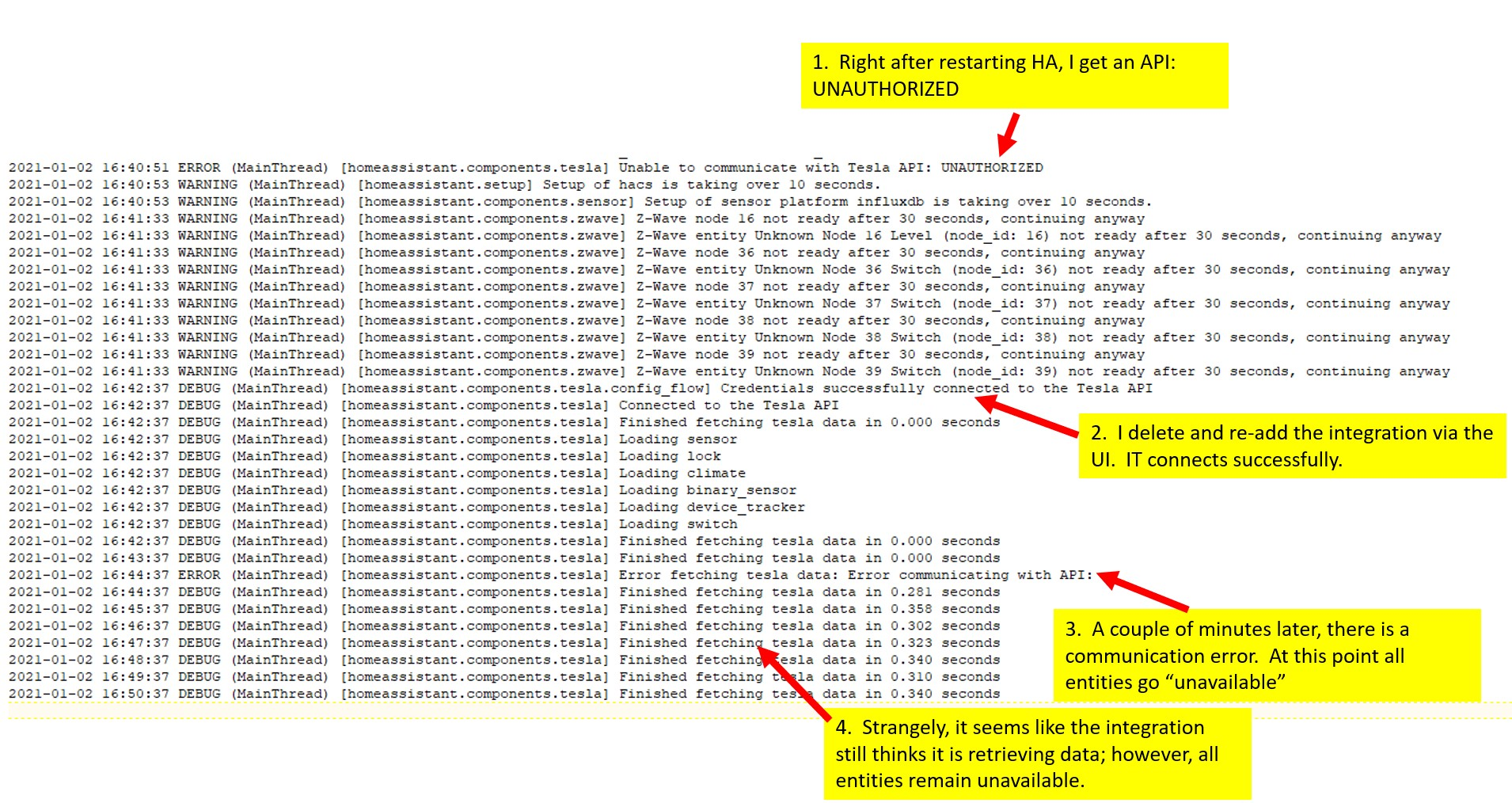
- Upon restart of HA, I immediately get a “Unable to Communicate with Tesla API: UNAUTHORIZED” message
- I then remove the integration via the UI, and re-add it. Upon re-adding the integration HA is able to communicate with Tesla servers for a few minutes; however, I soon get a “Unable to Communicate with Tesla API:” message again – this time there is no indication of what the issue actually is.
Environment
- Home Assistant Core release with the issue: 2020.12.2
- Last working Home Assistant Core release (if known): Unknown.
- Operating environment (OS/Container/Supervised/Core): Docker/Supervised
- Integration causing this issue: Tesla
- Link to integration documentation on our website: https://www.home-assistant.io/integrations/tesla/
Full Health Report for my system:
System Health
| version | 2020.12.2 |
|---|---|
| installation_type | Home Assistant Supervised |
| dev | false |
| hassio | true |
| docker | true |
| virtualenv | false |
| python_version | 3.8.6 |
| os_name | Linux |
| os_version | 5.4.79-v7l+ |
| arch | armv7l |
| timezone | America/Chicago |
Home Assistant Community Store
| GitHub API | ok |
|---|---|
| Github API Calls Remaining | 4723 |
| Installed Version | 1.9.0 |
| Stage | running |
| Available Repositories | 711 |
| Installed Repositories | 9 |
Home Assistant Cloud
| logged_in | false |
|---|---|
| can_reach_cert_server | ok |
| can_reach_cloud_auth | ok |
| can_reach_cloud | ok |
Hass.io
| host_os | Raspbian GNU/Linux 10 (buster) |
|---|---|
| update_channel | stable |
| supervisor_version | 2020.12.7 |
| docker_version | 20.10.1 |
| disk_total | 228.0 GB |
| disk_used | 16.7 GB |
| healthy | true |
| supported | failed to load: Unsupported |
| supervisor_api | ok |
| version_api | ok |
| installed_addons | File editor (5.2.0), Home Panel (1.8.3), InfluxDB (3.7.9), Let’s Encrypt (4.11.0), Samba share (9.3.0) |
Lovelace
| dashboards | 1 |
|---|---|
| mode | storage |
| views | 5 |
| resources | 8 |
Problem-relevant configuration.yaml
I configured this integration via the UI using the required information: Email Address: ******** Password: *************
Traceback/Error logs
Debug Logs with relevant info highlighted:
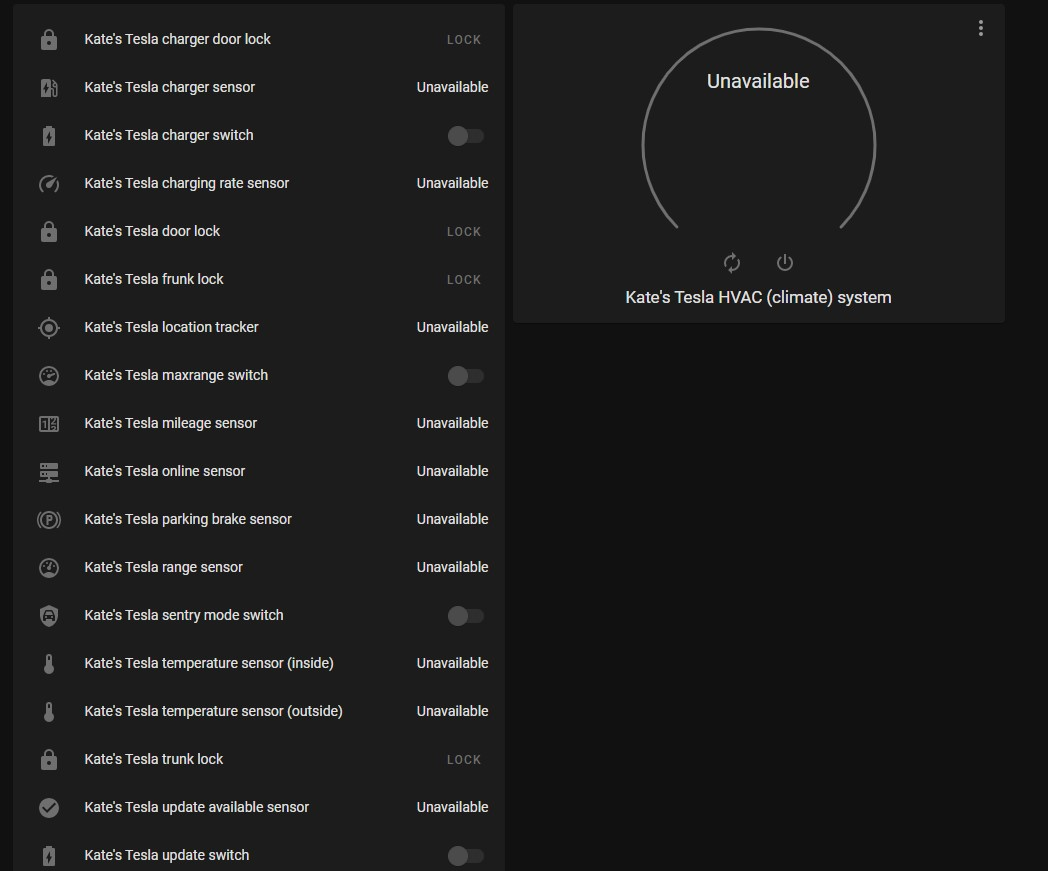
Behavior observed with all Telsa entities in HomeAssistant after encountering the error in #3 of the attached logs above:
Additional information
About this issue
- Original URL
- State: closed
- Created 3 years ago
- Reactions: 3
- Comments: 73 (13 by maintainers)
Is it worth pre-empting this and just moving it into HACS? Reading over the comments, it seems like it’s almost certain this will get rejected as it goes against the “no web scraping” rule.
I get why the HA guys want to maintain certain standards, but when there’s no alternative, stalling stuff like this indefinitely just harms the userbase.
For what it’s worth, I applied the patch and it fixed it for me.
@qJake
Fortunately, I didn’t lose any of my entity IDs by doing this, which would have been a real pain as I log statistics against them in InfluxDB.
No. The cause of the webscrape is having to login to the SSO site Tesla has site up. Since we’re simulating the Tesla App, oauth will not let us redirect to a non-Tesla url with the necessary login information. To my knowledge, Tesla does not have a third party API available so there’s no way to change the oauth redirrect.
I did, and it does.
Upgraded to 2021.2.3 from the prior version that I had patched, and the integration kept right on integrating without missing a beat.
If you’re struggling with patching, there’s been a promising flurry of activity today - it looks like this fix will be included in 2021.2.3, which ought not to be far away.
Many thanks to @alandtse and @bdraco for getting this over the line.
Patch works for me too. +1 vote for a working (if imperfect) integration vs a perfectly broken one.
@adebree my guess is you didn’t patch your system?
The separate driver account is just for the MFA part, not for the oauth3 issue (that is the main problem) 😃
If you care enough, you can apply the PR.
@alandtse Is the reason for webscraping, because HA does not allow any OAuth2 popups for authentication? You know, like you click a button and a little Google/Microsoft/whatever web form appears (on their domain) that lets you sign in. Is that a current limitation of HA, and thus the reason for the scrape? Seems like that should be on the roadmap in general, as countless services authenticate that way. Is there an issue tracking that already?
Yes, I have a working PR submitted. It may not be allowed since it requires webscraping. So this may have to go to HACS.
For me I was using Home Assistant OS. The SSH and Web Terminal Community Add-on is an easy way to access the command line. The resource posted above will be helpful for accessing the host with the command line. Host access is disabled by default for security. From there it is a similar process: docker exec -it homeassistant /bin/bash cd /usr/src/homeassistant apk add patch wget https://patch-diff.githubusercontent.com/raw/home-assistant/core/pull/45766.diff patch -p1 < ./45766.diff
Getting root access was the hardest part for me. If the path /usr/src/homeassistant does not exist then you are not logged in with root access to the host.
Edit: Just had to go threw this again after updating HA. Ended up being the exact same steps layed out above. Just confusing on how to get that root access.
Just to summarize if you are using the docker container, follow these steps: docker exec -it homeassistant /bin/bash apk add patch cd /usr/src/homeassistant wget https://patch-diff.githubusercontent.com/raw/home-assistant/core/pull/45766.diff patch -p1 < ./45766.diff
Hit enter twice to ignore the test files that it tries to patch that don’t exist
Restart home assistant and your tesla integration should be working again
millerkyle72 i have passed that step, you must login as root on the core and for that is necessary to access at ssh port 22222. info here: https://developers.home-assistant.io/docs/operating-system/debugging/#ssh-access-to-the-host , then wen you log in, you run the command
loginat HA core, and afterdocker exec -it homeassistant /bin/bashafter this you will be able to access homeassistant folder: at least this i can help:
The workaround I posted a month or so ago is still running solid. Created a separate driver account just for HA. That user doesn’t have MFA. Haven’t missed a beat.
Sent from my iPad
Really wish there was a way for Tesla owners and developers to express their frustrations somewhere where Tesla would listen to us… this is pretty ridiculous.
P.S. Thanks to everyone here and the folks over at
teslajsonpyfor their hard work. You guys are doing the best you can. 🙂No it’s not that hard. The issue is there is already a custom component for tesla so it may not make sense to have two integrations there. In fact they were working on solving this issue themselves. I may just switch over to that instead of trying to carry this along further.
Looks like they switched to OpenID Connect (or, basically OAuth2 with some fun bits on top).
https://tesla-api.timdorr.com/api-basics/authentication
It looks like there are only a few options:
passwordgrant each time and just get a new token when you need itWas it previously using OpenID Connect, or is this new? Is that something that
teslajsonpyhandles or are we going to have to handle that?<del>Just an FYI, but it loos like the tesla-api ruby gem came across this, and has documented in:</del>
<del>https://github.com/timdorr/tesla-api/issues/260</del>
<del>https://tesla-api.timdorr.com/api-basics/authentication</del>
<del>Not sure how helpful or not that is for anyone here.</del>
Never mind, just noticed that alandtse is already over in that issue so he is well aware.
It’s much more complicated. I’m taking a look now.
UPDATE: Not working yet but I’m taking a break if anyone wants to figure out why it fails exchanging the bearer token. https://github.com/alandtse/teslajsonpy/tree/oauthv3
@tobbensoft well, here it is… I wonder how far/complex is a move to the newer API
Tesla has deprecated oauth authorization, could we be running into this issue? Saw it discussed on Teslamotors subreddit.
See https://github.com/timdorr/tesla-api/issues/260