core: SRP energy integration does not update on new data
The problem
- the state updates on first run after a restart but does not update on subsequent changes
- the sensor class is total increasing however the value returned from SRP Energy is not a total increasing signal, it represents the daily energy use. This can result in errors when the current reading is lower than the previous as it is assumed that a new cycle started in between readings.
- the readings provided by SRP are not always stable until later in the day, I have noticed that the 23:00 reading is adjusted a couple of times in the early morning. Not sure but I suspect it is adjusted to balance the daily number.
- I don’t understand why the sensor name is hardcoded to “sensor” instead of the entity name.
- this did work a couple of years ago.
modified sensor code sensor.txt summary of logs showing behaviour for a typical day: srp logs.xlsx
full log over last restart at 04-05 to this morning home-assistant 2022-04-06.log
What version of Home Assistant Core has the issue?
core-2022.3.8
What was the last working version of Home Assistant Core?
No response
What type of installation are you running?
Home Assistant OS
Integration causing the issue
SRP Energy
Link to integration documentation on our website
https://www.home-assistant.io/integrations/srp_energy/
Diagnostics information
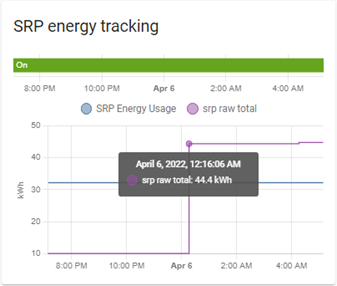
see log file however this trend shows the issue. The raw total represents the data returned by the api, however the state of the entity is not updated
Example YAML snippet
No response
Anything in the logs that might be useful for us?
The logs show the data coming in from the api, however the state of the entity does not update.
Additional information
I also attached a copy of the code modifications that i made to add additional logging.
About this issue
- Original URL
- State: closed
- Created 2 years ago
- Reactions: 2
- Comments: 50 (13 by maintainers)
Can confirm this is a critical bug - the plugin is currently useless without the above fix.
Hi @richardcalgary, I’ll investigate this and keep you posted.
You can download the code from github and run as a custom component. I am running it that way myself.Richard Roberts On Dec 9, 2022, at 10:53 AM, Stephen J Anderson @.***> wrote: Is there a way to run the updated code ahead of an approved PR?
—Reply to this email directly, view it on GitHub, or unsubscribe.You are receiving this because you were mentioned.Message ID: @.***>
Hi all, looks like srp just changed the api. I was finalizing the code with new sensors when the api changed today.
@pjvander SRP doesn’t provide an api for hourly data to read right now. If you query at this moment on 8/30/2022 at 4:00 PM, the returned hourly data will be for yesterday.
Home assistant can check every 10min, or every 8 hours, it will only pull up the data up to yesterday.
In my example code I returned the sum of hourly data as shown above
SRP only updates the api daily. There’s not a way I know to get hourly data except after the fact. I plan on adding Hourly data as an additional attribute
On Thu, Aug 25, 2022 at 9:53 AM pjvander @.***> wrote:
Hi @pjvander and @richardcalgary and @dinosoup1 , I just pushed a potential update on my branch. Let me know if this works in your environment
I don’t have Dev enviroment setup so I can’t test it. Look forward to your feedback once you finish your test.
@briglx any chance that you could give us an update on your investigation, it has been over 3 months now since we have had any feedback.
did some more testing, coordinator name is just for logs, so it is not the issue. here is the latest code with with the hourly update and the addition of self._state = coordinator.data within the native method which produces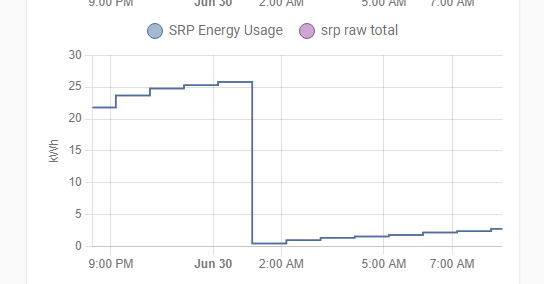 sensor.py.txt
thanks, feel free to ask if you want me to test anything or provide additional information.