core: Reverse Proxy: "Logging in to Home with Trusted Networks.. login aborted. Your computer is not allowed"
The problem
I just upgraded from Home Assistant 2021.4.6 —> Home Assistant 2021.7.
Immediately after doing this, when I try to login into the web interface, I get the error message below:
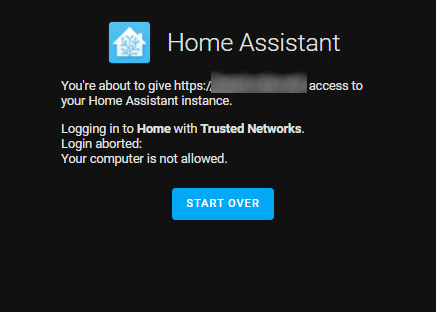
My Home Assistant instance is behind an Nginx reverse proxy.
I can either sign in manually using my username/password or bypass my Nginx reverse proxy entirely (which I definitely don’t want to do).
What is version of Home Assistant Core has the issue?
core-2021.7
What was the last working version of Home Assistant Core?
core-2021.4.6
What type of installation are you running?
Home Assistant OS
Integration causing the issue
http
Link to integration documentation on our website
https://www.home-assistant.io/integrations/http
Example YAML snippet
configuration.yaml

http:
  use_x_forwarded_for: True
  trusted_proxies:
    - 192.168.1.1
    - 192.168.1.2

api:

homeassistant:
  auth_providers:
    - type: trusted_networks
      trusted_networks:
        - 192.168.1.0/24
        - 172.16.0.0/12
        - fe00::/8
    - type: homeassistant
nginx.conf
    server {
            listen 443 ssl http2;
            listen [::]:443 ssl http2;
            ssl_certificate     ./ssl/fullchain.cer;
            ssl_certificate_key ./ssl/cert.key;
            server_name  ha.myurl.com;
            location / {
                proxy_pass http://192.168.1.101:8123;
                proxy_set_header Accept-Encoding "";
                proxy_http_version 1.1;
                proxy_set_header Upgrade $http_upgrade;
                proxy_set_header Connection $http_connection;
                proxy_set_header X-Forwarded-For $proxy_add_x_forwarded_for;
Anything in the logs that might be useful for us?
No related errors or warnings in the log.
Additional information
I’ve never had issues related to trust network or nginx reverse proxy until I upgraded to Home Assistant 2021.7. I suspect the problem was caused by: https://github.com/home-assistant/core/pull/52388.
Please advise how I can configure Nginx and/or Home Assistant for Trusted Networks to work correctly again behind a reverse proxy.
About this issue
- Original URL
- State: closed
- Created 3 years ago
- Comments: 19 (10 by maintainers)
Yup, that is the hairpinning issue. Could be solved by running your proxy on another subnet or by setting up split DNS so you target the proxy directly when inside your network.
You are missing x forwarded for the root there? You only have it for glances.
Make sure to also add the proto.