core: REST sensors show as "Unavailable" state after upgrading to Home Assistant 0.117.0 (Part 2)
Hi Guys, this issue is a continuation of the original issue: https://github.com/home-assistant/core/issues/42608 (since that issue was closed without a confirmed fix/PR).
Ever since I upgraded to Home Assistant 0.117.0, 4 REST sensors (pointing to a Glances API endpoints) started producing an “Unavailable” state along with respective failed with [Errno 111] Connect call failed errors in the log. This occurs even though the respective endpoints are easily accessible via a web browser or using cURL.
This issue still occurs to this day even on the latest Home Assistant Version 2021.2.1. Other people have reported the same issue in https://github.com/home-assistant/core/issues/42608 who have the same symptoms/issue and similar REST sensors/API endpoints.
The only known workaround for people affected by this is to follow the directions below:
- Go to https://downgit.github.io/#/home
- Download https://github.com/home-assistant/core/tree/0.117.6/homeassistant/components/rest
- Unpack the .zip as a custom_component (unpack the files into config/custom_components/rest/)
- Restart HA
NOTE: There were some changes made to Home Assistant core in recent months which reduced the frequency of this issue a tiny bit; where the affected REST sensors “sometimes” could get values. However, most of the time they still show as “Unavailable”.
What is version of Home Assistant Core has the issue?
core-2021.2.1
What was the last working version of Home Assistant Core?
Core-0.117
What type of installation are you running?
Home Assistant OS
Integration causing the issue
REST
Link to integration documentation on our website
https://www.home-assistant.io/integrations/rest/
REST sensors that are affected: (pointing to Glances API)
  - platform: rest
    resource: http://192.168.1.2:61208/api/3/fs
    name: Horizon C Drive Used
    value_template: '{{ value_json[0].percent | round }}'
    unit_of_measurement: "%"
    verify_ssl: false
    timeout: 30
    scan_interval: 16
  - platform: rest
    resource: http://192.168.1.2:61208/api/3/fs
    name: Horizon E Drive Used
    value_template: '{{ value_json[1].percent | round }}'
    unit_of_measurement: "%"
    verify_ssl: false
    timeout: 30
    scan_interval: 16
  - platform: rest
    name: diskio_0
    resource: http://192.168.1.2:61208/api/3/diskio
    value_template: '{{ ( value_json[0] ) }}'
    json_attributes_path: "$.0"
    json_attributes:
      - time_since_update
      - disk_name
      # - read_count
      # - write_count
      - read_bytes
      - write_bytes
    verify_ssl: false
    timeout: 30
    scan_interval: 16
  - platform: rest
    name: diskio_1
    resource: http://192.168.1.2:61208/api/3/diskio
    value_template: '{{ ( value_json[1] ) }}'
    json_attributes_path: "$.1"
    json_attributes:
      - time_since_update
      - disk_name
      # - read_count
      # - write_count
      - read_bytes
      - write_bytes
    verify_ssl: false
    timeout: 30
    scan_interval: 16
REST sensors that are NOT affected: (pointing to same Glances API)
  - platform: rest
    resource: http://192.168.1.2:61208/api/3/uptime
    value_template: '{{ value_json | regex_replace(find="[\"]", replace="") | regex_replace(find="(?<=( (\d{1})|(\d{2})):\d{2}):\d{2}", replace=" hours") }}'
    name: Horizon Uptime
    verify_ssl: false
    timeout: 30
    scan_interval: 16
  - platform: rest
    resource: http://192.168.1.2:61208/api/3/cpu
    name: Horizon CPU
    value_template: '{{ value_json.total | round }}'
    unit_of_measurement: "%"
    verify_ssl: false
    timeout: 30
    scan_interval: 16
  - platform: rest
    resource: http://192.168.1.2:61208/api/3/mem
    name: Horizon RAM
    value_template: '{{ value_json.percent | round }}'
    unit_of_measurement: "%"
    verify_ssl: false
    timeout: 30
    scan_interval: 16
  - platform: rest
    resource: http://192.168.1.2:61208/api/3/memswap
    name: Horizon Pagefile
    value_template: '{{ value_json.percent | round }}'
    unit_of_measurement: "%"
    verify_ssl: false
    timeout: 30
    scan_interval: 16
  - platform: rest
    name: gpu
    resource: http://192.168.1.2:61208/api/3/gpu
    value_template: '{{ ( value_json ) }}'
    json_attributes:
      - name
      - mem
      - proc
      - temperature
    verify_ssl: false
    timeout: 30
    scan_interval: 16
  - platform: rest
    name: network
    resource: http://192.168.1.2:61208/api/3/network
    value_template: N/A
    json_attributes:
      - interface_name
      - time_since_update
      # - cumulative_rx
      - rx
      # - cumulative_tx
      - tx
      # - cumulative_cx
      - cx
      # - is_up
      # - speed
    verify_ssl: false
    timeout: 30
    scan_interval: 16
Debug Log:
# Put your logs below this line
2021-02-07 15:34:34 ERROR (MainThread) [homeassistant.components.rest.data] Error fetching data: http://192.168.1.2:61208/api/3/fs failed with [Errno 111] Connect call failed ('192.168.1.2', 61208)
2021-02-07 15:34:34 DEBUG (MainThread) [homeassistant.components.rest.sensor] Data fetched from resource: None
2021-02-07 15:34:34 ERROR (MainThread) [homeassistant.components.rest.data] Error fetching data: http://192.168.1.2:61208/api/3/fs failed with [Errno 111] Connect call failed ('192.168.1.2', 61208)
2021-02-07 15:34:34 DEBUG (MainThread) [homeassistant.components.rest.sensor] Data fetched from resource: None
2021-02-07 15:34:34 ERROR (MainThread) [homeassistant.components.rest.data] Error fetching data: http://192.168.1.2:61208/api/3/diskio failed with [Errno 111] Connect call failed ('192.168.1.2', 61208)
2021-02-07 15:34:34 DEBUG (MainThread) [homeassistant.components.rest.sensor] Data fetched from resource: None
2021-02-07 15:34:34 WARNING (MainThread) [homeassistant.components.rest.sensor] Empty reply found when expecting JSON data
2021-02-07 15:34:34 ERROR (MainThread) [homeassistant.components.rest.data] Error fetching data: http://192.168.1.2:61208/api/3/diskio failed with [Errno 111] Connect call failed ('192.168.1.2', 61208)
2021-02-07 15:34:34 DEBUG (MainThread) [homeassistant.components.rest.sensor] Data fetched from resource: None
2021-02-07 15:34:34 WARNING (MainThread) [homeassistant.components.rest.sensor] Empty reply found when expecting JSON data
It’s important to note that this issue and respective symptoms are reproducible by installing a recent version of Glances on another PC; and, making REST API calls via Home Assistant to the below API endpoints (using REST sensor code posted above):
/api/3/fs
/api/3/diskio
There are other API endpoints that Home Assistant can’t handle correctly (such as the API for: https://github.com/fredlcore/BSB-LAN). Below, are the respective raw outputs returned from both API’s when using cURL:
https://github.com/home-assistant/core/issues/42608#issuecomment-723147316 https://github.com/home-assistant/core/issues/42608#issuecomment-725312591
About this issue
- Original URL
- State: closed
- Created 3 years ago
- Comments: 46 (22 by maintainers)
I think this will be helpful https://jsonpath.com/
I checked out #46711 and copied the files to my custom_components folder and rebooted Home Assistant. My REST sensors started successfully but over the past 18 or so hours I have seen them periodically become unavailable. For instance this sensor that calls a Google Sheet cell via REST has been dropping out about 50% of the time. I have also seen unavailable sensors with other custom sensors I’ve created, as well as the Coronavirus integration and my Ring doorbell integration. On the good side, the sensors do now come back when re-polled periodically. Previously I had to restart Home Assistant for the chance of them coming back. Attached is the sensor status of that google sheet call.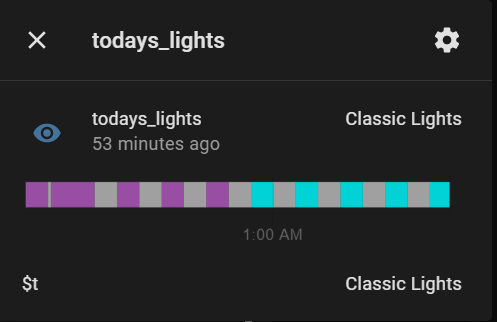
@Yo59 We actually figured out what was causing the issue I was seeing. It has to do with a code change affecting how often REST sensors make requests to the respective API end point (parallel requests changed to unlimited async requests).
So while our issues aren’t identical, they are likely related… and, caused by the same code changes.