core: Home Connect - unauthorized_client
The problem
After adding your addin to HASS I get this error after providing my client and secret ID. I have a selfhosted domain that is reachable behind an nginx proxy manager reverse proxy.
So maybe I have to reset your addin and start from scratch but I can’t find anything on how to do that.
{
  "error": "unauthorized_client",
  "error_description": "request rejected by client authorization authority (developer portal)",
  "state": "eyJ0eXAiOiJKV1QiLCJhbGciOiJIUzI1NiJ9.eyJmbG93X2lkIjoiZTJlYjRmMWYyOTZjZTQxMTI3M2FkM2RhZThlODI0MzkiLCJyZWRpcmVjdF91cmkiOiJodHRwczovL215LmhvbWUtYXNzaXN0YW50LmlvL3JlZGlyZWN0L29hdXRoIn0.5eEsHhZMPsKEdsDMJrFGpRDhKdy_8CRBc9iBH0eOfys"
}
What version of Home Assistant Core has the issue?
2022.7.7
What was the last working version of Home Assistant Core?
No response
What type of installation are you running?
Home Assistant OS
Integration causing the issue
Home Connect
Link to integration documentation on our website
https://www.home-assistant.io/integrations/home_connect/
Diagnostics information
cant download because the integration wasn’t installed properly due to the error from above.
Example YAML snippet
No response
Anything in the logs that might be useful for us?
No response
Additional information
No response
About this issue
- Original URL
- State: closed
- Created 2 years ago
- Reactions: 2
- Comments: 29 (1 by maintainers)
ahhh ty, trying 😃
OMG IT WORX! FINALLY…
So for everybody else that was trying and trying and trying here a summarize:
Well I do - but now I delete in file system under
config/.storage/the fileapplication_credentials. Now it works!Drop cache from the browser to trigger new login to the site and it will ask to do it old fashioned or via single key
On Tue, 16 Aug 2022, 17:23 nicedevil007, @.***> wrote:
For me it did only work after changing the login method to the ‘new’ suggested SingleKey setup. Now everything works, with the https://my.home-assistant.io/redirect/oauth link.
Edit: I’m sorry I did not see that you disabled the “my” plugin. I did not know that was an option.
Edit 2: It just works for me on a fresh install with the “my” plugin disabled, sorry.
Original:
Link changed. The result is the same. Does not work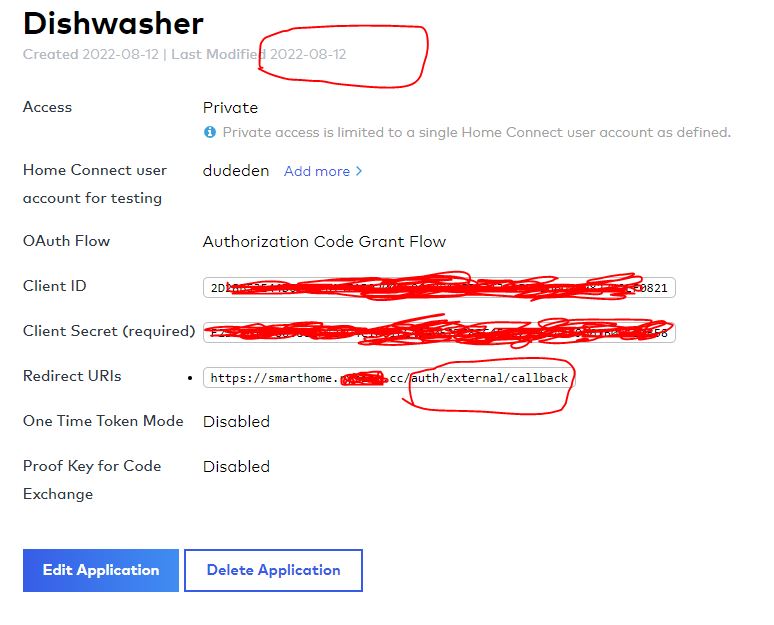
yep I already did this.
Here are the things I tryed so far:
1st - remove the credentials, restart HASS, try to connect again => fail 2nd - remove the credentials, remove the app in homeconnect, recreate a new app in homeconnect, restart HASS => fail 3rd - did 1st and 2nd with the Coffee Maker switched over to the same VLAN as my HASS is connected to => fail 4th - did 1st and 2nd and 3rd with my dyndns => fail (and yes it is configured right, otherwise other applications won’t work right 😛 alexa is working f.e. or my LG wasching machine) 5th - did 1st and 2nd and 3rd with my local IP address of the HASS installation 0> fail
Thats why I’m posting here, seems to be a problem with home connect integration that is not used with nabu casa in my opinion.