core: Hive integration could not authenticate
The problem
After restarting Home Assistant the Hive integration works for a while, from a few minutes to maybe 30 minutes, and then stops with an authentication error in the core logs. This happens with and without 2FA enabled.
I’m UK based so Hive is still available to me.
What version of Home Assistant Core has the issue?
core-2022.4.6
What was the last working version of Home Assistant Core?
core-2022.4.4
What type of installation are you running?
Home Assistant OS
Integration causing the issue
Hive
Link to integration documentation on our website
https://www.home-assistant.io/integrations/hive/
Diagnostics information
No response
Example YAML snippet
No response
Anything in the logs that might be useful for us?
Log data:
Logger: homeassistant.config_entries
Source: config_entries.py:349
First occurred: April 22, 2022, 8:46:51 PM (1 occurrences)
Last logged: April 22, 2022, 8:46:51 PM

Config entry 'xxxxxx@xxxxx.xxx' for hive integration could not authenticate

Core log data:
2022-04-23 06:36:35.748 | ERROR    | apyhiveapi.api.hive_async_api:request:74 - Hive token has expired when calling https://beekeeper.hivehome.com/1.0/nodes/all?products=true&devices=true&actions=true - HTTP status is - 401
2022-04-23 06:36:35.886 | ERROR    | apyhiveapi.api.hive_async_api:request:74 - Hive token has expired when calling https://beekeeper.hivehome.com/1.0/nodes/all?products=true&devices=true&actions=true - HTTP status is - 401
2022-04-23 06:36:35.986 | ERROR    | apyhiveapi.api.hive_async_api:request:74 - Hive token has expired when calling https://beekeeper.hivehome.com/1.0/nodes/all?products=true&devices=true&actions=true - HTTP status is - 401
2022-04-23 06:36:36.075 | ERROR    | apyhiveapi.api.hive_async_api:request:74 - Hive token has expired when calling https://beekeeper.hivehome.com/1.0/nodes/all?products=true&devices=true&actions=true - HTTP status is - 401
Additional information
No response
About this issue
- Original URL
- State: closed
- Created 2 years ago
- Reactions: 1
- Comments: 229 (47 by maintainers)
Some fixes have been proposed for the next release. Just working with the HA team to get them in the next build
Hi all, there are no changes I made 2022.6.3 I am working on some changes at the minute but they aren’t quite ready yet. Hopefully 2022.6.4
@ukgaz1987 i appreciate the comments, I don’t have a buy me a coffee link. I just enjoy doing the work for my hive setup and sharing it with others as my home is heavily invested into hive. But I do appreciate the comment.
Hi All, I have now managed to replicate the issue around users who get the error
botocore.exceptions.NoCredentialsError: Unable to locate credentialsI lot of the previous attempts at fixes have been on a Whim but I feel now being able to replicate the issue, the fix I’m working on now hopefully will put an end to this issue.
Some people who have been upgrading may have to remove the integration and re authenticate with it, but it should be a one off.
Im hoping this next fix is going to solve the issue for everyone.
When I’m back later on I’ll work on a fix in my production home assistant and get it into the next 2022.6.x release
@neilsleightholm-paxton if you need to login and don’t have a confirgured integration, using a custom integration wont change anything.
@julianjd-uk no changes went into 2022.6.2 as it’s been a busy weekend, I have been looking into it still where I can
@KJonline just wanted to add my thanks. You need to get a Buy me a coffee 😃
There are multiple scenarios for people and I believe it’s working for you because of a scenario I fixed in the last build to continue support for old tokens as already alluded to.
the main error around credentials is what the fix going into 2022.6.6 is for. In total I found 3 scenarios I had to put different fixes in for.
Same issue but I get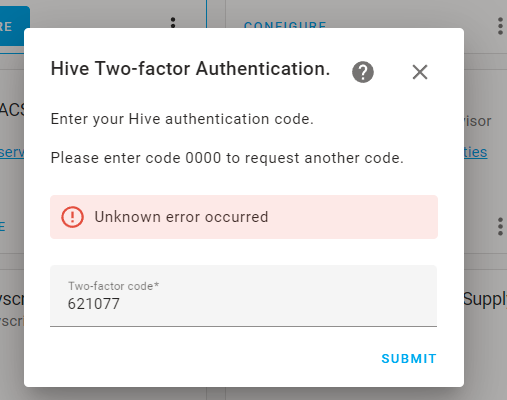
@KJonline thanks for the update again 😃 at least it’s happened in summer and not winter when we need Hive the most haha.
My understanding about hive is below
you need 2fa to use the lastest version of the hive app which now uses device linking to hive account in aws.
you can disable 2fa and login now but it doesn’t support token refresh and this cannot be used on the app but can be used for the website which makes sense as you wouldn’t usually keep a web page running for longer than 1 hour.
Along side the 2 current scenarios mentioned above Hive are also supporting legacy tokens which where created a while ago before they introduced device linking so these legacy tokens still work. The way you can tell is if you go into the hive app and check your list of devices linked to your account in account security. You may see that your logged into the app but don’t have any linked devices. This means the app is running with legacy tokens, to get to this scenario you need to be logged into the hive app from a while ago.
Ultimately people using home assistant for a while as they logged in a while ago will be using legacy tokens which doesn’t need device linking. For new users they have no choice but to do device linking and that is the credential errors that have been occuring
Wasn’t lack of faith in KJonline, this just made me think about local vs web connected. Like I said still will be doing the heating etc through Hive.
You know how it is with HA, you read up on one thing and it starts you down the rabbit hole of other stuff. 😃 Was originally planning to get hive motion sensors, but then realised that the update/polling time for Hive integration would delay response if going through Hive, so then started looking at local options.
@KJonline So I tried for a while, and took a little break from it. Then whenever I tried to installed the integration, after entering my username and password, it would just show a blank screen.
In my config.yaml, I still had an entry for Hive, with my username and password. Deleting this entry then allowed me to install the integration.
All’s well that ends well.
For anyone using HAOS then home assistant supervisor should take care of updates.
Same process here and it worked for me too.
Huge thanks to @KJonline for getting to the bottom of this and fixing it (for me, at least). Here’s what I did:
As others have said, I can see Home Assistant in my trusted devices.
I am one happy HA user!!
From what I can read of the comments the issues still outstanding are with the custom component. Which I think I will need to make a change to I’ll take a look at it
@KJonline thanks for the work on this
@KJonline it’s working perfectly fine for myself with 2FA, keep up the amazing working!
Guaranteed I’ll have my own special little scenario that won’t work because that’s just my luck 😂
I did remove it. The only difference may have been I disabled 2FA first before trying to reauthenticate.
@landiuk I had dodgy internet for a while got fed up of reliance on cloud service. Moved to zigbee2mqtt for my hive sensors and bulbs and let me be honest yes I lost voice control (unless I use HA Cloud) or I use Node Red and create each function manually. But the immediate advantage is the polling time. I used to have a hive routine to turn on 3 upstairs lights they would all come on at a slightly staggered time and that would be random each time, to be honest it always looked a bit poor. Also there are the delays for the sensors, using HA Alarm panel and integrating the sensors as a burglar alarm is great until you realise it could take 1-2 minutes each time to get triggered. Sadly most of my setup is now packed away due to a house move but can’t wait to get it all up and running again 😃 hopefully the guys in here will fix the hive integration.
Thanks for the link, but I was aware that I could move the thermostat etc. Conscious decision in keeping heating on Hive as it runs Boiler IQ too which British Gas monitor.
@Nismonx Yes, MQTT lists Hive TRV valve support here: https://www.zigbee2mqtt.io/devices/UK7004240.html
@KJonline brilliant thanks mate. Bet you can’t wait to get to the bottom of this, must be driving you up the wall.
Not sure you need to check the zigbee2mqtt page for the radiator valves. I might integrate my hive thermostat to zigbee2mqtt depending on this integration, that said it has been working fine for me over the years. So let’s see how quickly it can be resolved.
There you go: https://www.zigbee2mqtt.io/devices/SLT3B.html
still broken here too
Same as before for me but I still get the unknown error message.
Thanks for working on it, but the Latest v6.5 update stil not working for me either
Logger: homeassistant.config_entries Source: components/hive/init.py:89 First occurred: 00:14:33 (1 occurrences) Last logged: 00:14:33
Error setting up entry hxx@xxxx.co.uk for hive Traceback (most recent call last): File “/usr/src/homeassistant/homeassistant/config_entries.py”, line 339, in async_setup result = await component.async_setup_entry(hass, self) File “/usr/src/homeassistant/homeassistant/components/hive/init.py”, line 89, in async_setup_entry devices = await hive.session.startSession(hive_config) File “/usr/local/lib/python3.9/site-packages/apyhiveapi/session.py”, line 493, in startSession await self.getDevices(“No_ID”) File “/usr/local/lib/python3.9/site-packages/apyhiveapi/session.py”, line 416, in getDevices await self.hiveRefreshTokens() File “/usr/local/lib/python3.9/site-packages/apyhiveapi/session.py”, line 303, in hiveRefreshTokens result = await self.auth.refreshToken( File “/usr/local/lib/python3.9/site-packages/apyhiveapi/api/hive_auth_async.py”, line 537, in refreshToken result = await self.loop.run_in_executor( File “/usr/local/lib/python3.9/concurrent/futures/thread.py”, line 58, in run result = self.fn(*self.args, **self.kwargs) File “/usr/local/lib/python3.9/site-packages/botocore/client.py”, line 391, in _api_call return self._make_api_call(operation_name, kwargs) File “/usr/local/lib/python3.9/site-packages/botocore/client.py”, line 691, in _make_api_call request_dict = self._convert_to_request_dict( File “/usr/local/lib/python3.9/site-packages/botocore/client.py”, line 739, in _convert_to_request_dict request_dict = self._serializer.serialize_to_request( File “/usr/local/lib/python3.9/site-packages/botocore/validate.py”, line 360, in serialize_to_request raise ParamValidationError(report=report.generate_report()) botocore.exceptions.ParamValidationError: Parameter validation failed: Invalid type for parameter AuthParameters, value: ({‘REFRESH_TOKEN’: ‘eyJjdHkiOiJKV1QiLCJlbmMiOiJBMjU2R0NNIiwiYWxnIjoiUlNBLU9BRVAifQ.UFmbY43358VksOBh9AP8DRiL_ZSKrXw5Mmc-iL32rI1GL2yuqpObgF8_pLEW2ClZiTExbljpJmWFZbm5cI8sptvni-cIl2W0R4CgTWZvta9aCTfrvIhYyhk1kN-PkB6pmPT_vx5jrQbINfD-h4LDuCcemGy4ay-3Zw9UliJOlqT69BiX6FuR94QA5OmIAJjKDvoeQjdILeKLtP1uy7GlrR2bU0jpbkrQ-0IT8yqbWs-B6dkMZGeQbz7Hz41ElGUAAuXMejSohnLljhpu_k3l7wzlBfBbymEOboS7INI_FZQzN2wJogr26ZsGR393hS7jnX_uHFE2s44eCqDwR4yb7Q.2FCd-wSCG4xovhZD.qRJKzL8Py_8pxPp6nngPfF92FJsH0f4xRLp2000rwf9F5mq5lhgWAD0uT_QwZNmZt67hw0-Ph-StrekQB1hIUVV73B9AiEW9f4CIBqP0yfCWOeucNEOnFr4cPb0bmxIXQmaWPPSL_1RCObseY4fJp54ysIdfedL9LbDNSx8YvBOuhSwFd2_TfTktwl9hMUQMZktH6ob8Rl-mKHLunFdgRvnHU8Y8sfzzChIhWOAw1ROqqk3lmjdTKMahT_b6t9fVh6dJ2OLbJka4RjCkzOCFF7nvF3q3BbDHi3EyREnJ_3n0U1_FyBxI_d8tRI9qk7AxbuxPGDlIKurbnn_MzKhxPo_nSsjegQrl3arbg-Kij1PP8DlTzPu3ada_1JGxU3gwzA1Vl8Eb-2HiEY53i-5G-8tTZwHCrLtL41BTIYxxRP9ZBK9OgFfBIGULx5UZ1A-XlvCjRw2UrSbGrGuakk7S9eNhrYz6_MQP8z7P7xJsPCzuTfbUdzKsjXI9AbCH4Pk6Kj7jF9-qeZVlh0dSxZMFCaFWqq0kqOMPcdBbAk20n8WUbL5C_NUsWDGfCLeV44NFolXPJQf15YoD-_Q0XZN_sp2HnhBico9bMrE5UxXko67-eRmXdgGPoflKk4zmCrBrmjGIGHgBAQAmcssDHWUzVtgOjLgoVwLzCZ5WsBgwLGBXojKVihiMKL-YU29D84IFUvVYWOUOYB36XH_QcOunQTKEEO_qVAW4CWUrCRq8MjdakPSnlkiHGjN7qmzHEpeUpft2rerPMKWPn6mYUjA1vv2tZiScL6VOWQ9aGu1R3u10J7k_pKyqHSEoq4fMdWyTwLCWk7gym6U5tTMyUjemu2p4mxOJExhK_nnJ4Nf5GaMOAixSDKWHWCWua2bGeLN175DjgRwNnWl-5vhCuGBMdreGtvZSWT4JOMnVnhZ7LY_6zLfTz7Db79rJ60wgaJHzOxRmR1jFPMdmKCcuKTqSVv3tyIYlqNcHP9vUTvi9WGjEexnhlk-Wm7UJT0bZIrYZVz9eVrb4e3jsHaxLGHlSR-vwvSya_67Ajiz3jExjkajFK-waB6kEZvQIjdUK7JIBuBUlJPtk_kWjb0RL2Kce9coPEUEC3x_cHVqCU9iXmy9bhsAjooj6OULOXF5NvBQJfSXra1iB1juTmqwpQTMnSIpQh3qvoZ65XAMRh2l2WR9YjW6sX4gOEQBCujrNeF9fTzpUfr_FVKBLFeDidTLIm8nl5TqVtRW2c5LHc3J7vAriYAMGFHzXFVAB5u5B3TljsYiOvO_yeD03Gg7OmJReJpk4hdHHyzTiKRA6UwtsBK4u1FH4aJlPsB9mJGc.-d9CUViZl71AKUcTox2QbQ’},), type: <class ‘tuple’>, valid types: <class ‘dict’>
@KJonline; do you mean hopefully in 2022.6.5 as 2022.6.4 is already out?
If it’s the same issue then I’d keep it here so it doesn’t get messy for the developer 🙂
I’m running 2022.6.1 inside a docker container running on Ubuntu 22.04 LTS. I have different errors depending upon whether 2FA is enabled on my Hive account. With 2FA enabled, I get this error after the App prompts for my OTP:
Running with 2FA disabled, I get this error:
I got an error trying to add Hive Integration with 2022.6.1 as well.