core: Growatt_server integration not working in
The problem
Growatt_server integration works in HA version 2022.10.4 not in version 2022.10.5.
What version of Home Assistant Core has the issue?
2022.10.5
What was the last working version of Home Assistant Core?
2022.10.4
What type of installation are you running?
Home Assistant Container
Integration causing the issue
growatt_server
Link to integration documentation on our website
https://www.home-assistant.io/integrations/growatt_server
Diagnostics information
No response
Example YAML snippet
No response
Anything in the logs that might be useful for us?
Logger: homeassistant.components.sensor
Source: components/growatt_server/sensor.py:164
Integration: Sensor (documentation, issues)
First occurred: 1:36:19 PM (2 occurrences)
Last logged: 1:36:19 PM

Error adding entities for domain sensor with platform growatt_server
Error while setting up growatt_server platform for sensor
Traceback (most recent call last):
  File "/usr/src/homeassistant/homeassistant/helpers/entity_platform.py", line 428, in async_add_entities
    await asyncio.gather(*tasks)
  File "/usr/src/homeassistant/homeassistant/helpers/entity_platform.py", line 691, in _async_add_entity
    await entity.add_to_platform_finish()
  File "/usr/src/homeassistant/homeassistant/helpers/entity.py", line 777, in add_to_platform_finish
    self.async_write_ha_state()
  File "/usr/src/homeassistant/homeassistant/helpers/entity.py", line 533, in async_write_ha_state
    self._async_write_ha_state()
  File "/usr/src/homeassistant/homeassistant/helpers/entity.py", line 571, in _async_write_ha_state
    state = self._stringify_state(available)
  File "/usr/src/homeassistant/homeassistant/helpers/entity.py", line 539, in _stringify_state
    if (state := self.state) is None:
  File "/usr/src/homeassistant/homeassistant/components/sensor/__init__.py", line 404, in state
    value = self.native_value
  File "/usr/src/homeassistant/homeassistant/components/growatt_server/sensor.py", line 164, in native_value
    result = round(result, self.entity_description.precision)
TypeError: type NoneType doesn't define __round__ method

-----------------------------------------------------------

Logger: homeassistant.components.growatt_server.sensor
Source: components/growatt_server/sensor.py:176
Integration: Growatt Server (documentation, issues)
First occurred: 1:36:19 PM (1 occurrences)
Last logged: 1:36:19 PM

Unable to fetch data from Growatt server
Additional information
Updated and downgraded the version a couple of times and problem is solved in 2022.10.4.
About this issue
- Original URL
- State: closed
- Created 2 years ago
- Comments: 156 (32 by maintainers)
Commits related to this issue
- Growatt version bump - fixes #80950 — committed to muppet3000/core by deleted user 2 years ago
- Growatt version bump - fixes #80950 — committed to muppet3000/core by deleted user 2 years ago
- Growatt version bump - fixes #80950 — committed to muppet3000/core by muppet3000 2 years ago
- Growatt version bump - fixes #80950 (#81161) — committed to home-assistant/core by muppet3000 2 years ago
- Growatt version bump - fixes #80950 (#81161) — committed to home-assistant/core by muppet3000 2 years ago
Ok, so I have something that has remained stable for 30 minutes, although, since it’s dark here now I can’t comment on the accuracy of all the values or how often they’re updating, but, the library no longer errors out every time you try to use it. I’ll leave it running with this overnight and confirm that it’s stable before submitting the correct fix to the upstream library (which will take time to release and then also build into HA). In the meantime people can use the following workaround.
Now, the last time we had to issue a fix like this I discovered that there were loads of different ways of running home-assistant and everyone needed to do this in different ways, unfortunately I can only tell you the file that needs to be edited and what to put there. You’ll all have to work out for yourselves how to do it specific to your installation.
I personally use docker and implement these hacks by mounting in a copy of the file over the top of the original, but most people don’t use the docker version and need to track down the specific file that needs to be modified, so, here is the most generic description of what to do:
pip show growattServeron your home-assistant instance. In the output you’ll get something like this:Copy the
Locationand then edit the file undergrowattServer/__init__pyusing the example above the path would be:/usr/local/lib/python3.9/site-packages/growattServer/__init__.pyAdd the following after line 29:
The function will then look something like this:
For anyone interested in the details, this is adding headers to the HTTP requests that are made from the library to make it appear as if it is an Android device rather than not defining anything. From my (very limited) testing, you can simply stick anything in that ‘User-Agent’ field and it’ll work, so long as it’s not blank. My intention is to make it look as much like an Android device as possible however in order to reduce Growatt’s ability to filter out the traffic via Firewall rules etc.
Have a play, let me know if it works for people (sorry I can’t be more help on the implementation details). If my system remains stable overnight and into the daytime tomorrow I’ll submit a PR to the upstream library and then get it merged in and cascaded into HA too. It’ll just take a bit of time.
FYI - It’s now getting late here, so I’m calling it a day on this one, but I’ll pick any issues up tomorrow and also provide an update on the status of my system too.
I’ve spent the last hour running various tests based on my earlier hypothesis. Sadly my earlier hypothesis has been disproven, HOWEVER I think I’ve stumbled upon an alternative hypothesis which seems more viable.
I’ve been playing with the underpinning library that myself and Indy collaborated on which the HA integration calls out to. I’ve managed to make it appear as though it’s an android device rather than a standard web-browser/python library, it seems SIGNIFICANTLY more stable.
I’m about to make the change inside my home-assistant instance and see if it also works there at which point I’ll share it, but with the massive caveat that this is just a working theory rather than anything I’m saying is an official ‘FIX’ for the problem.
I’ll report back shortly after some more testing.
I’ve still got problems this morning, very intermittent data. I’ve just restarted HA and it’s now refusing altogether to connect to Growatt. I have no idea what the issue is and I’m about to start work for the day so I’m not going to be in a position to look at this again until this evening, but I’ve carved out the whole evening to look at it, so I should at least be able to get some form of answer to why it’s being so intermittent.
The odd part about it is that the python library that underpins the HA integration appears to be working fine when I run that in isolation, which means I think the HA integration is maybe trying to pull a statistic that potentially no longer exists (at least for my ‘mix’ system), as the ShinePhone app now seems to have stabilised.
I’ll update if I make any breakthroughs during the day, but it’s unlikely.
Ok, so I’ve done some debug (only a small amount though because I’m at work and trying to make it look like I’m doing my ‘real’ job). I think (and this entirely speculative without a huge amount to base it on) that they’ve somehow configured their firewall (or at least something) to block inbound requests made using the python library
requests(which underpins most api style libraries like this) but they’ve only done it for the most recent version. I’ve thrown together some test scripts and run them in various different containers with different versions of the requests library and everything BUT the latest seems to have no problem accessing the server, the second I use the latest version it immediately starts throwing errors.My next plan is to try and throw some more tests together using the requests library at the latest version but also spoofing a different browser type in the headers that are sent.
I’ll report back when I have anything useful to report.
Had very similar issues yesterday around the same time. I keep running my tests directly from the python library in the background on my server (not using HA at all) and they’re devastatingly slow and sometimes just fail altogether.
My recommendation is to just remain patient (I know that’s easy to say and harder to do) and see what the situation is like in a few hours at which point it could all be up and stable again. I’m reluctant to jump to any conclusions around changes to the API until at least the app and the website are stable.
In a few hours (once I’ve finished work and my children have gone to bed) I’ll do a load of debugging against the API calls that the phone app is making, just in case they’ve changed something, but on my first inspections it just looks like their server isn’t handling the load properly.
I think it is time for me to try to make it local with esphome and the growatt integration for esphome 😃
I’ve noticed that there seems to be some real problems with the growatt API server today. I’ve just tried to access it on my phone and it’s really struggling to load anything, I haven’t seen any other complaints about the HA integration, so I think it’s almost definitely an issue with the server.
This is a really interesting discussion, and there’s been lots of similar discussions around this on the forums over here: https://community.home-assistant.io/t/anyone-experience-with-connecting-a-growatt-solar-inverter/60430 (it’s a bit of a mega thread but worth looking through some of the most recent comments in there after the outage back in August).
Grott was originally designed to remove the need for Growatt users to have to upload their data to the cloud at all i.e. cut out the growatt servers entirely and have the data pushed directly somewhere else e.g. HA via MQTT. It is a solution to a different problem HOWEVER given the recent issues with the Growatt servers maybe something that people turn to more and more.
At the interests of keeping this thread focussed on the specific issue that’s being experienced as a result of the recent changes, can I recommend any further discussion on that particular topic is continued in the forums?
Note, not that it matters, when I posted the original fix above I had the line:
headers = {'User-Agent': 'Dalvik/2.1.0 (Linux; U; Android'}The closing)was missing, I’ve updated the post above now so that it reads:headers = {'User-Agent': 'Dalvik/2.1.0 (Linux; U; Android)'}As I said yesterday, it doesn’t matter, it’s completely irrelevant, I just wanted it to be consistent/correct for you all.The main problem to me is that exceptions are raised in a fairly common situation, i.e. the growatt server is unreachable. In growatt_server/sensor.py
self.probe.get_datareturnsNoneif the server is unreachable. This case is not handled properly. I suggest to test explicitly forresult is not None and self..entity_description.precision is not NoneSecondly, in
self.api.loginwill raise aJSONDecodeErrorexception if the login does not succeed. Movingself.api.logininto thetryblock will catch this situation, i.e.Reminder - This ticket is closed.
However, @MaciekzP - Thanks for this, can you please let me know what method you used to contact them? If it was an email address can you please let me know as I’ll try reaching out AGAIN!
The comments about dynamic IP seem pretty random given that mobile phones on roaming data will have dynamic IPs, there’s certainly more targeted logic from their end on how they’re blocking.
Interesting to see that server.growatt.com is back up and running again as they stopped that from working about 5 months ago, I will re-add that to the integration as an option until we get some kind of confirmation from them.
Yes it is the same issue - see comments on other ticket, this one is closed.
@bartpaeleman & @Saentist - I’ve responded over on the new ticket (#81470) responding to this specific issue.
Given that the core reason this ticket was opened has now been resolved can I please ask that if people have new issues they raise a new ticket and I’ll track it separately.
Good job @muppet3000 !!! Installed the dev build this morning. It’s working fine now !
Again - one for discussion over on the forums rather than here.
Not trying to be a dick about it, just trying to keep this thread focussed on the issue with the integration itself.
To respond to some of the comments etc that have come in since I last checked in this morning.
@Saentist - I’m not sure what you’re saying about “inviting” alternative images, I’m sure there’s a way to hack them, however, I don’t run HA that way therefore I can’t offer any experience on what to do, if people can’t work out how to do it, they’ll have to wait until the next release that has the fix in it. I’ve had a thought about how I may be able to submit a HA only fix until the upstream library is released.
@Saentist @SACU-Student - Just so you know it doesn’t go via the Web UI, instead it goes via the same API that the Android App uses, so there’s no problems with Captchas etc.
FYI for everyone - My personal Growatt system seems to have been offline for about 1.5 hours this afternoon, but that includes the fact that the ShineApp itself on my mobile phone is also not working, therefore that particular problem isn’t related to the HA integration, it’s just the Growatt servers being crappy again! They’re clearly doing something on the servers that has prompted all of this, I’m just not sure what it is!!! EDIT - Ignore that, it just sprang back to life again - typical!!
Alright i made a stupid noob mistake… I used the tab instead of spaces… Sorry my bad, now its working like a charm!! Thanks @muppet3000
For crying out loud, I was using another SSH Terminal wich doesnt give you access to docker exec -it homeassistant bash" command. Thank you bigfloor.
LE: Confirming working after applying muppet3000’s fix. Everything looks good, thank you so much.
I can confirm this works with the AddOn called ‘SSH & Web Terminal Access’. You need to DEACTIVATE the button: Protection Mode. Then go to the Terminal option on the left in HA Enter the following command: docker exec -it homeassistant bash
This will change your prompt to bash-5.1# There you will enter the command muppet3000 told you: pip show growattServer
That should output the info you need (where is the init.py file located)
Worked for me !!!
To test if things are running in docker or not you can run the following: (the one I haven’t blurred out).
docker ps -aand see what containers are running, if one of them is called “home-assistant” then you’re in the money. An example would be something like this:After that you can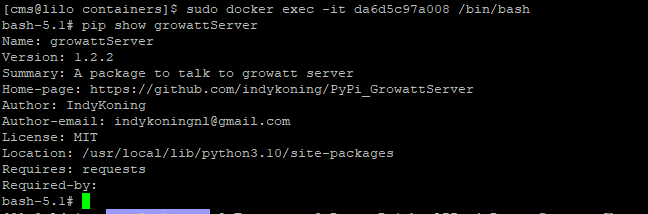
execinto the container and run the command to work out where the init file is e.g.:The ‘exec’ drops you inside the running docker container, then the pip command is run inside there. If you then run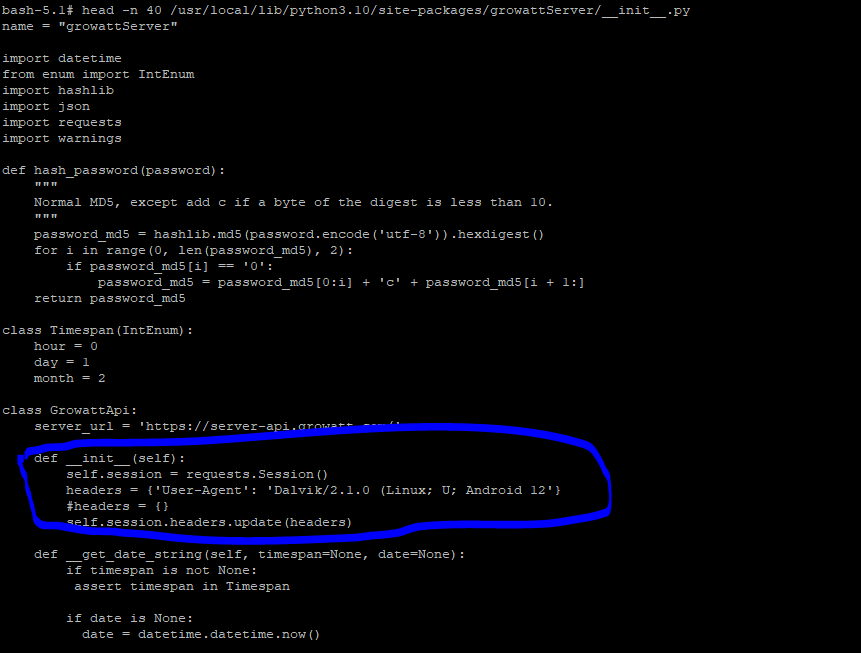
headon the file I listed before you can check it’s the right file:Ignore the extra bits I’ve got in mine, I was playing with a few options.
If that’s the correct file and in the correct place you can then change things. The biggest problem you’ll have is you’ll need to find out how the image is actually launched and change it to mount in an alternative copy of the file otherwise any changes you make will be lost the second you restart the container.
On my system I mount it in using the docker -v command to mount it over the top, but I don’t know how the synology NAS implementation works. If someone works out how to do it, can they please share in here for everyone else to benefit from it.
Sorry I can’t be more help with specific installations for people. However I’ve been trawling through this ticket https://github.com/home-assistant/core/issues/76453 where people had to put in a temporary hack to make this work until it was fixed officially. If you look at this comment: https://github.com/home-assistant/core/issues/76453#issuecomment-1214875551 there’s a way of installing an add-on for Home-Assistant called “SSH & Web Terminal”, that should then give you access to the command-line where home-assistant is actually running and therefore you should be able to see the file I’ve referred to.
Separately, my change has remained stable overnight, I’m now going to push a change to the upstream library so we can start turning the handle on the official fix.
Mine went up and down for the last 2 days as well. I found that if I keep on reloading the integration, eventually it seems to start working. Probably load balancing that is causing an issue. I saw on someone else’s installation that they ‘revamped’ the website completely as well, but I did not manage to get the ‘new’ website when going to server.growatt.com. Definitely something happening on the Growatt side.
We’ve gone off topic, it’s because I have my grafana pointing at prometheus which pulls the values from HA, which means it pulls the last value rather than a null, so it always looks like it’s online. It’s something I’ve been meaning to fix but have never bothered to spend time on it, it’s pretty obvious that it’s broken when that happens!
Definitely problems with their server. The app was almost useless yesterday. Today seems a little more stable in HA but their website access is hit-and-miss with errors. I suspect it seems more stable in HA due to the fact the data only updates every 5 mins. At least that’s what I see. The system was only installed yesterday so it’s been a great first impression. 😉
Just look at some of the load times!
FYI - Looks like it’s happening to me today as well, only this time the app seems to be working but the python library that underpins the HA integration is going dog slow and then eventually timing out. I’ll continue to monitor it though just in case they’ve done something to change the API again!!
I see a similiar problem:
I think it would be helpful if the integration logged more info when it fails, for example http headers and payload.