core: Error setting up entry Bluetooth for bluetooth
The problem
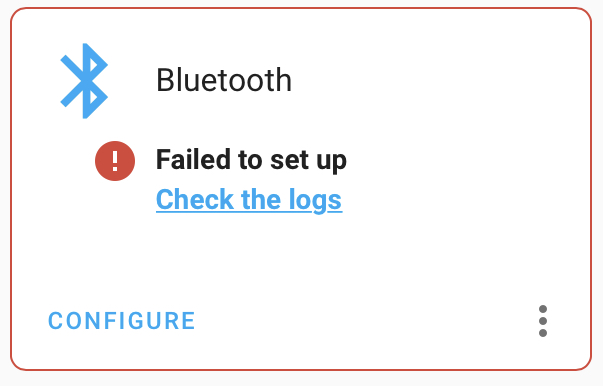
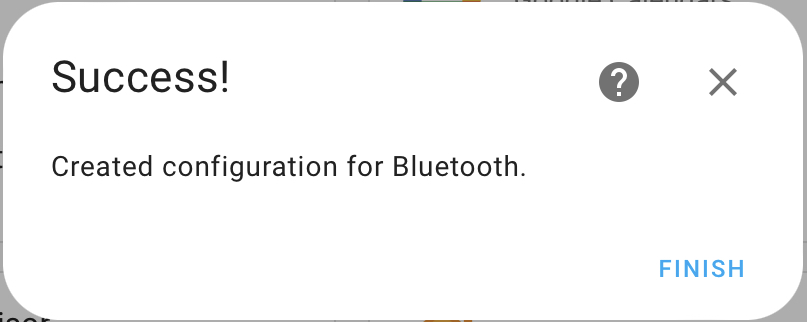
I added the new bluetooth integration, got a success message box, but the integration is displaying an error.
The error message is alternating between
Failed to set up
Check the logs
and
Retrying setup: DBus connection broken: [Errno 32] Broken pipe; try restarting `bluetooth`, `dbus`, and finally the docker container
What version of Home Assistant Core has the issue?
2022.8.0
What was the last working version of Home Assistant Core?
No response
What type of installation are you running?
Home Assistant OS
Integration causing the issue
bluetooth
Link to integration documentation on our website
https://www.home-assistant.io/integrations/bluetooth/
Diagnostics information
No response
Example YAML snippet
No response
Anything in the logs that might be useful for us?
Logger: homeassistant.config_entries
Source: components/bluetooth/__init__.py:345
First occurred: 8:44:57 PM (1 occurrences)
Last logged: 8:44:57 PM

Error setting up entry Bluetooth for bluetooth
Traceback (most recent call last):
  File "/usr/local/lib/python3.10/site-packages/bleak/backends/bluezdbus/manager.py", line 324, in async_init
    reply = await self._bus.call(
  File "/usr/local/lib/python3.10/site-packages/dbus_next/aio/message_bus.py", line 305, in call
    await future
asyncio.exceptions.CancelledError

During handling of the above exception, another exception occurred:

Traceback (most recent call last):
  File "/usr/src/homeassistant/homeassistant/config_entries.py", line 357, in async_setup
    result = await component.async_setup_entry(hass, self)
  File "/usr/src/homeassistant/homeassistant/components/bluetooth/__init__.py", line 255, in async_setup_entry
    await manager.async_start(
  File "/usr/src/homeassistant/homeassistant/components/bluetooth/__init__.py", line 345, in async_start
    await self.scanner.start()  # type: ignore[no-untyped-call]
  File "/usr/local/lib/python3.10/site-packages/bleak/backends/bluezdbus/scanner.py", line 128, in start
    manager = await get_global_bluez_manager()
  File "/usr/local/lib/python3.10/site-packages/bleak/backends/bluezdbus/manager.py", line 804, in get_global_bluez_manager
    await instance.async_init()
  File "/usr/local/lib/python3.10/site-packages/bleak/backends/bluezdbus/manager.py", line 344, in async_init
    await self._bus.disconnect()
TypeError: object NoneType can't be used in 'await' expression


Logger: homeassistant.config_entries
Source: config_entries.py:769
First occurred: 9:06:34 PM (1 occurrences)
Last logged: 9:06:34 PM

Config entry 'Bluetooth' for bluetooth integration not ready yet: DBus connection broken: [Errno 32] Broken pipe; try restarting `bluetooth`, `dbus`, and finally the docker container; Retrying in background
Additional information
The hardware is Raspberry Pi 4.
It’s also somewhat misleading/confusing that I get a message with huge “Success” title, and it’s not entirely true.
Screenshots:
About this issue
- Original URL
- State: closed
- Created 2 years ago
- Comments: 34 (15 by maintainers)
I figured out the problem. I forgot I had the bluetooth disabled in
config.txtwithdtoverlay=disable-bt🤦After removing the line, everything seems to work.
Thank you for help
@RamonBell I’m not sure if you saw #76204 yet, but it fixed it for me in Unraid.
I don’t think there is anything more I can do to troubleshoot as it looks like a hardware or OS problem. You might be able to get some more help on the forums. If it turns out not to be a hardware problem, you might want to open an issue at https://github.com/home-assistant/operating-system
You can access the host via https://developers.home-assistant.io/docs/operating-system/debugging/#home-assistant-operating-system
You can also install the community ssh addon and access the docker container in unprotected mode
@jrbloemhof I tried both restarting HA and rebooting the device, and it didn’t change anyhthing.
I understand the “Success” message was meant to indicate that, but it’s still feels misleading to announce success when only a portion of the entire process has completed. “The integration configuration was successfully created” is not really a milestone I’m interested in as a user.
@the-ress: Try restarting your Home Assistant and/or reboot the device. Restarting Home Assistant Core cleared the error when I got it, though I’m running Home Assistant Supervised instead of OS like you.
Also, the “Success” message does make sense if you think of it not as “The integration is successfully running” but as “The integration configuration was successfully created”.
@ItsJamesMurray: That seems different, since it’s indicating you don’t have DBus installed. You may want to start your own issue.