core: Atome key stops updating after 2 hours
The problem
Ever since i updated to 2021.10.6 after 2 hours that HomeAssistant has been running Atome information stop updating.
It can only restarting getting consumption info if I reboot HA… which is kind of annoying to do every two hours.
As you can see in the graphs all the flat lines are HA stopping getting Atome information adn the rebooting it and starting all over for two hours.
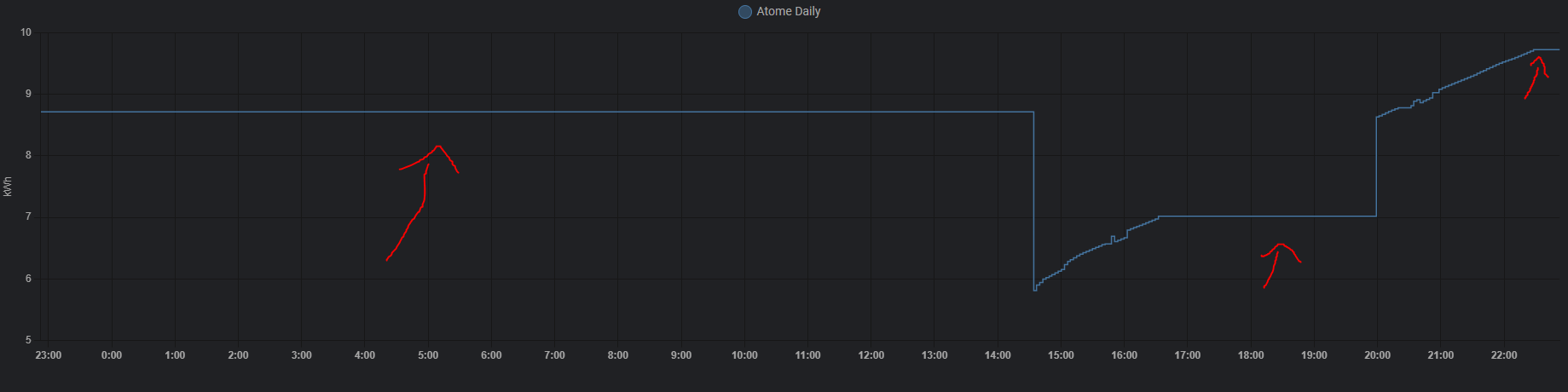
FYI Atome key is working fine since the official Atome App is getting live info even when HA has stopped… And a simple reboot of HA makes it start getting consumption data again.
Also issue started 2 hours after i upgraded to 2021.10.6 and it has been going ever since each time it takes two hours to stop polling data…
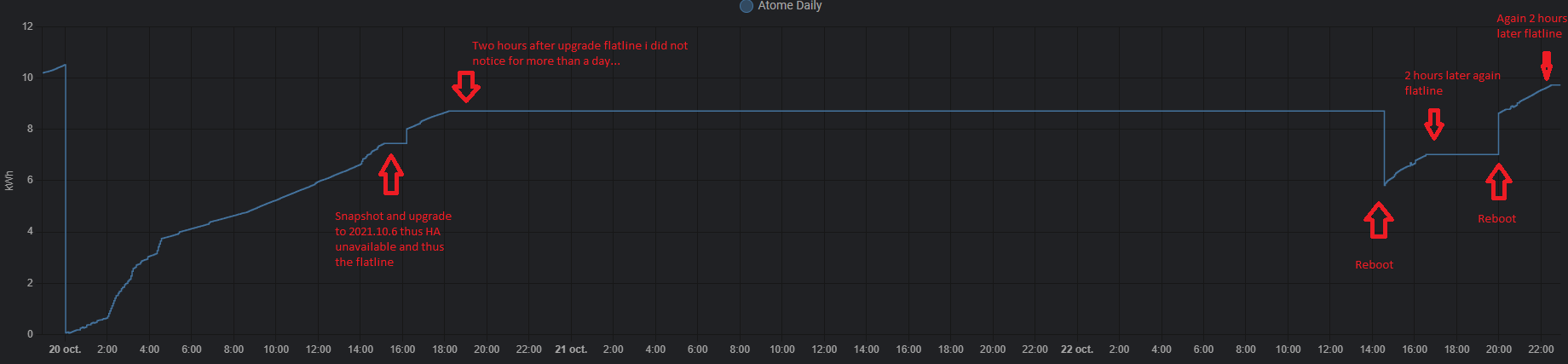
When the issue starts 2 hours after the last boot these are the logs that i have (multiple times)
2021-10-22 22:30:51 ERROR (SyncWorker_4) [homeassistant.components.atome.sensor] Missing last value in values: {'message': 'Login failed'}: 'last'
2021-10-22 22:30:51 ERROR (SyncWorker_4) [homeassistant.components.atome.sensor] Missing last value in values: {'message': 'Login failed'}: 'total'
What is version of Home Assistant Core has the issue?
core-2021.10.6
What was the last working version of Home Assistant Core?
2021.10.5
What type of installation are you running?
Home Assistant Supervised
Integration causing the issue
Atome
Link to integration documentation on our website
https://www.home-assistant.io/integrations/atome/
Example YAML snippet
- platform: atome
    username: !secret atome_user
    password: !secret atome_pass
Anything in the logs that might be useful for us?
2021-10-22 22:30:51 ERROR (SyncWorker_4) [homeassistant.components.atome.sensor] Missing last value in values: {'message': 'Login failed'}: 'last'
2021-10-22 22:30:51 ERROR (SyncWorker_4) [homeassistant.components.atome.sensor] Missing last value in values: {'message': 'Login failed'}: 'total'
Additional information
No response
About this issue
- Original URL
- State: closed
- Created 3 years ago
- Reactions: 5
- Comments: 34 (10 by maintainers)
I’ve manually applied this update to the sensor.py file on HA core-2021.11.1 and can confirm this solves the issue. It was definitely a need to re-authenticate with the API after a certain period of time (seems like 2 hours is spot-on!)
Thanks for the fix, and hope to see this in a release soon!
Hello, It works, I will do in a proper way 😉
I perform some evolutions in
atome/sensor.py. If it works, I will perform a pull requestHere a snapshot that shows the improvment 😉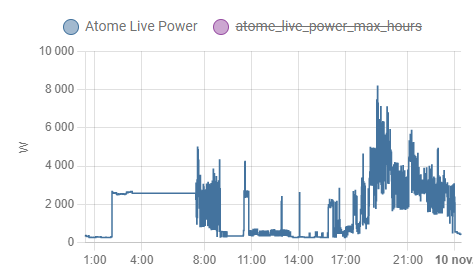
Please post the MR link here when you’re done, I’d like to read that !
Thanks 😃
Hello, I’ve made a pull request : https://github.com/home-assistant/core/pull/59452
So I talked to Atome by phone and the person could only tell me that they have been told that the application Atome will be discontinued and we will have to use the app Total Energies (Elec & Gaz) instead. I don’t know if this is related to any API change they have made and the person I had on the phone had no knowledge of this. She told me to contact Atome service directly by mail to atome@mail.totalenergies.fr but since I do not know how the API works with HomeAssistant maybe the persons in charge of the integration Atome in HA would be more suited to ask the right questions.
_FYI also it looks like we cant login to this site related to Atome anymore: https://esoftlink.esoftthings.com/login_
Hello, you can overwrite a core component with a custom component of the same name. Create a new directory
atomein yourcustom_componentsfolder. In the new directory, copy the__init.py__, thesensor.pyof the PR and themanifest.json. Inmanifest.json, you need to add a version key"version": "2.0.0"because custom components need a version.This solution is working on my PI4B