core: Apple iCloud integration repeatedly and frequently causes Apple ID sign-in notifications
Update: a solution is being worked on
For the benefit of people affected by the issue and discovering this report, see #42881 and picklepete/pyicloud#310.
The problem
Since yesterday, the Apple iCloud integration causes Apple ID sign-in notifications to appear on all my Apple devices every few minutes: “Your Apple ID is being used to sign in to a new device”.
I haven’t changed anything in the configuration for a long time.
This seems similar to #34332, which was closed. I have not tried the “solution” described there. Even if it works, it would be best to find and fix the underlying bug that causes this behavior. Users should not regularly have to remove and reinstall the integration.
It also seems similar to an issue discussed on the forum.
Environment
- Home Assistant Core release with the issue: 0.115.6
- Last working Home Assistant Core release (if known):
- Operating environment (OS/Container/Supervised/Core): Supervised HassOS 4.13
- Integration causing this issue: Apple iCloud
- Link to integration documentation on our website: https://www.home-assistant.io/integrations/icloud
Problem-relevant configuration.yaml
N/A
Traceback/Error logs
N/A
Additional information
From @GitHubxtsnl : https://community.home-assistant.io/t/icloud-integration-keeps-popping-up-apple-id-sign-in-request-on-ios-devices/219007/6
About this issue
- Original URL
- State: closed
- Created 4 years ago
- Reactions: 42
- Comments: 142 (12 by maintainers)
The guys at PyiCloud have merged https://github.com/picklepete/pyicloud/pull/310!
This closes out https://github.com/picklepete/pyicloud/issues/308 and https://github.com/picklepete/pyicloud/issues/307 for whomever wasn’t watching over there.
Getting excited for this issue to finally have some movement!
Please read a bit up this thread, people. The progress of implementation that we are awaiting is here: https://github.com/picklepete/pyicloud/pull/310/commits. Also showing progress today, so let’s just wait.
And commenting with just ‘+1’ is very, VERY bad behaviour on GitHub, so please don’t do that 🙂
You know that there is a subscribebutton, so you can just subscribe without making a comment?
Thanks, I did, but I also wanted to visibly add to the number of people known to be finding this issue to be a huge PITA.
commenting to subscribe. Same problem.
There’s a real easy workaround to this:
hunter2and the verification code is123456your password becomeshunter2123456).There’s another option which survives a restart: create a new apple ID, add it to your family, use that account to log in instead (make sure you select ‘with family’ on the login modal).
Updated the first comment to include a link to #42881 and picklepete/pyicloud#310.
Hey everyone, thanks for the patience! I’ve been working on getting the update out on picklepete/pyicloud and over here in HA and I’m excited that we’ve got a PR which should resolve the issue once and for all (or at least until Apple decides to change authentication again).
It would be really helpful if we could get some of you to test this out in a beta once the PR is merged, so that we can iron out any bugs I may have missed out.
Thanks all!
While this may be true, it’s also true that I simply missed the relevant comment by scrolling through on mobile. It would have been great if the relevant link were to be edited into the first comment, which unfortunately isn’t yours. Additionally not every platform member will be able to fully use every available feature on GitHub the correct way due to various (available time, knowledge, …) reasons.
That said, I think that many of us (non coding members) still very much appreciate the work that is being done here in general, which due to the same reasons above also goes underappreciated regularly.
+1
Hope this gets fixed soon.
For reference, it is here: https://github.com/picklepete/pyicloud/pull/310
App-specific passwords does not work, since the underlying lib uses the iCloud.com website authentication, and it’s impossible to connect with an App-specific password through https://www.icloud.com/.
I should add this to the documentation: https://www.home-assistant.io/integrations/icloud
I personally got the issue starting from 9th of October.
There are issues created on the library too : picklepete/pyicloud#307 & picklepete/pyicloud#308
I’ll create an alert on https://alerts.home-assistant.io/
If anyone want to help, please get in touch here : picklepete/pyicloud#308
For a workaround of some features, please use the Mobile app : https://www.home-assistant.io/integrations/mobile_app
Sorry but solving this will be long.
This is my concern as well, the constant stream of “signed in” emails inures you to these warnings and degrades the security of your account. These recurring emails ought to be classified as a security issue rather than a mere inconvenience.
Is this still considered an issue to be addressed at a future date? I’m a little concerned that all these comments are about embracing a very clever workaround that relies on having spare devices sitting around. Am I the only person who trades-in/recycles their old hardware?
If you have an extra iOS device like and old iPod or iPad, create a new iCloud account, add it to your family and use it to log into the integration. Once setup…stuff that old device into a drawer and ignore the notifications. I did that and it’s working like a charm…I don’t have to worry about the notifications on my main devices that are logged in to my main account. Just a suggestion if you have an extra device laying around…I know it’s not a solution to this problem, but at least you can keep the integration working and not get annoyed by the constant pop-ups.
drove me bonkers until I removed the integration, hoping this gets fixed fast.
+1
They are testing a fix. This requires an update to a Python library that the integration is dependent on.
I saw on GitHub the developers would be testing this week so maybe in a few weeks there will be a fix.
From: matteo notifications@github.com Sent: Wednesday, November 18, 2020 10:52:09 AM To: home-assistant/core core@noreply.github.com Cc: Dan Decker daniel.decker1@gmail.com; Comment comment@noreply.github.com Subject: Re: [home-assistant/core] Apple iCloud integration repeatedly and frequently causes Apple ID sign-in notifications (#41315)
same issue
— You are receiving this because you commented. Reply to this email directly, view it on GitHubhttps://eur01.safelinks.protection.outlook.com/?url=https%3A%2F%2Fgithub.com%2Fhome-assistant%2Fcore%2Fissues%2F41315%23issuecomment-729770569&data=04|01||042d432bba5a4cfdc4ce08d88bd9eab3|84df9e7fe9f640afb435aaaaaaaaaaaa|1|0|637413115339364608|Unknown|TWFpbGZsb3d8eyJWIjoiMC4wLjAwMDAiLCJQIjoiV2luMzIiLCJBTiI6Ik1haWwiLCJXVCI6Mn0%3D|1000&sdata=tOdSf2YZWRByvwm2qsPO1MBA3c%2FeOEyA6zLPRH1OYWE%3D&reserved=0, or unsubscribehttps://eur01.safelinks.protection.outlook.com/?url=https%3A%2F%2Fgithub.com%2Fnotifications%2Funsubscribe-auth%2FACSWFWZ3ASQIBAS6SW3VFBLSQPUSTANCNFSM4SFNZ5NQ&data=04|01||042d432bba5a4cfdc4ce08d88bd9eab3|84df9e7fe9f640afb435aaaaaaaaaaaa|1|0|637413115339374606|Unknown|TWFpbGZsb3d8eyJWIjoiMC4wLjAwMDAiLCJQIjoiV2luMzIiLCJBTiI6Ik1haWwiLCJXVCI6Mn0%3D|1000&sdata=zpPIvlAx6tPy954JDuE%2BPlxDHqOVKtapHgyI96f2Eec%3D&reserved=0.
+1. Following version 117.4
+1. Following
Yeah, bear in mind that a pre-release with the fix included is not yet available, it’ll be a few more days to get the fix checked, approved, merged in and then the release created.
The password thing works, for sure, but as some have pointed out in this thread already, it stops syncing the data after approx. 1 day. No password prompt, but just outdated data in the integration. Really looking forward to a proper fix!
+1 following
+1 Same issue…
That doesn’t work either. Within 4 hours you will get the pop ups again
I removed the integration and reconfigured it again. It didn’t change. The endless notifications started again.
I’ve deleted the iCloud integration altogether until this is sorted out.
Just curious. How does one disable an integration without deleting it?
I’m experiencing the same issue
Me too! Is this normal?
I am also receiving these recurring emails and am likewise happy to provide any relevant logs or data needed for debugging.
Nice to hear that and i will test the fix once it is available.
@therealdandecker
I am using Home Assistant OS on a Raspberry and this is how i test an integration with a custom component:
Download the release with the fix included here, extract the contents, copy the folder homeassistant/components/icloud to /config/custom_components and restart HA. The custom_component will override the built in one and you are ready to test it.
Regards Richard
Started happening for me yesterday. Thanks for sharing the dependency issue’s conversation as well. Following.
+1 following
Its been 4 days for me, and I still only get notifications on my old phone. My current phone, ipad, watch don’t get notifications.
I’ve also been testing the HACs iCloud3 integration. The documentation is a bit lengthy but I eventually got it up and running. So far it works well (I’ve got my watch battery back, yay), and it doesn’t seem to suffer from the same authentication problem.
Issue will persist until pyicloud library is updated.
Get Outlook for iOShttps://aka.ms/o0ukef
From: maikeru010 notifications@github.com Sent: Friday, November 13, 2020 2:04:29 AM To: home-assistant/core core@noreply.github.com Cc: Dan Decker daniel.decker1@gmail.com; Comment comment@noreply.github.com Subject: Re: [home-assistant/core] Apple iCloud integration repeatedly and frequently causes Apple ID sign-in notifications (#41315)
117.2 and facing the same issue
— You are receiving this because you commented. Reply to this email directly, view it on GitHubhttps://github.com/home-assistant/core/issues/41315#issuecomment-726564908, or unsubscribehttps://github.com/notifications/unsubscribe-auth/ACSWFWZ2HQP2JC3ZTOZWIUDSPTK73ANCNFSM4SFNZ5NQ.
Same issue for me Home Assistant 0.116.4 2FA set on iCloud acc Orginal setup fine the messages started over night and now every few minutes. I’ve uninstalled the integration. pending a solution. UPDATE: Uninstalled the integration and reinstalled. In less than 24 hours the sign in notifications returned and were repeating every few minutes.
I guess maybe only the family ‘Organiser’ can see all the watches? That kinda makes sense too.
I’ve also noticed that my battery life has resumed normal behaviour. It’s been awful for a few weeks and I wasn’t sure why. I’m at about 60% now, whereas for the last week or two I would have been at around 20% at this time of day.
I can confirm, the above works for a while but the notifications return.
This is weirdly brilliant.
From: gilper notifications@github.com Sent: Saturday, October 17, 2020 6:36:51 PM To: home-assistant/core core@noreply.github.com Cc: Dan Decker daniel.decker1@gmail.com; Comment comment@noreply.github.com Subject: Re: [home-assistant/core] Apple iCloud integration repeatedly and frequently causes Apple ID sign-in notifications (#41315)
If you have an extra iOS device like and old iPod or iPad, create a new iCloud account, add it to your family and use it to log into the integration. Once setup…stuff that old device into a drawer and ignore the notifications. I did that and it’s working like a charm…I don’t have to worry about the notifications on my main devices that are logged in to my main account. Just a suggestion if you have an extra device laying around…
— You are receiving this because you commented. Reply to this email directly, view it on GitHubhttps://github.com/home-assistant/core/issues/41315#issuecomment-711088994, or unsubscribehttps://github.com/notifications/unsubscribe-auth/ACSWFW4GPRRZOVR2HG6O4STSLIMAHANCNFSM4SFNZ5NQ.
Not sure if it helps with debugging this, but since this started, I get an email from Apple with the subject “Your Apple ID was used to sign in to iCloud via a web browser.” roughly once a day. The device mentioned in the email is clearly Home Assistant. But this happens far from every time I get a notification.
Me too
Same here. Usual method of removing/re-adding iCloud integration doesn’t seem to rectify. Everything seems to work, however.
I actually just experienced the same behaviour, it shows me the 2FA modals every … 30 min ?
That would be awesome @JulienFloris but as the iCloud lib uses the iCloud.com website to login and request APIs, that’s not possible now. (for info: App Specific password exists for 5+ years 😉)
Same issue, i also see a (new?) option in the Apple Account management page for an App Specific password. This this would exclude MFA, not tested yet. Looking for an way in Home Assistant to change the password.
(Screenshot in Dutch)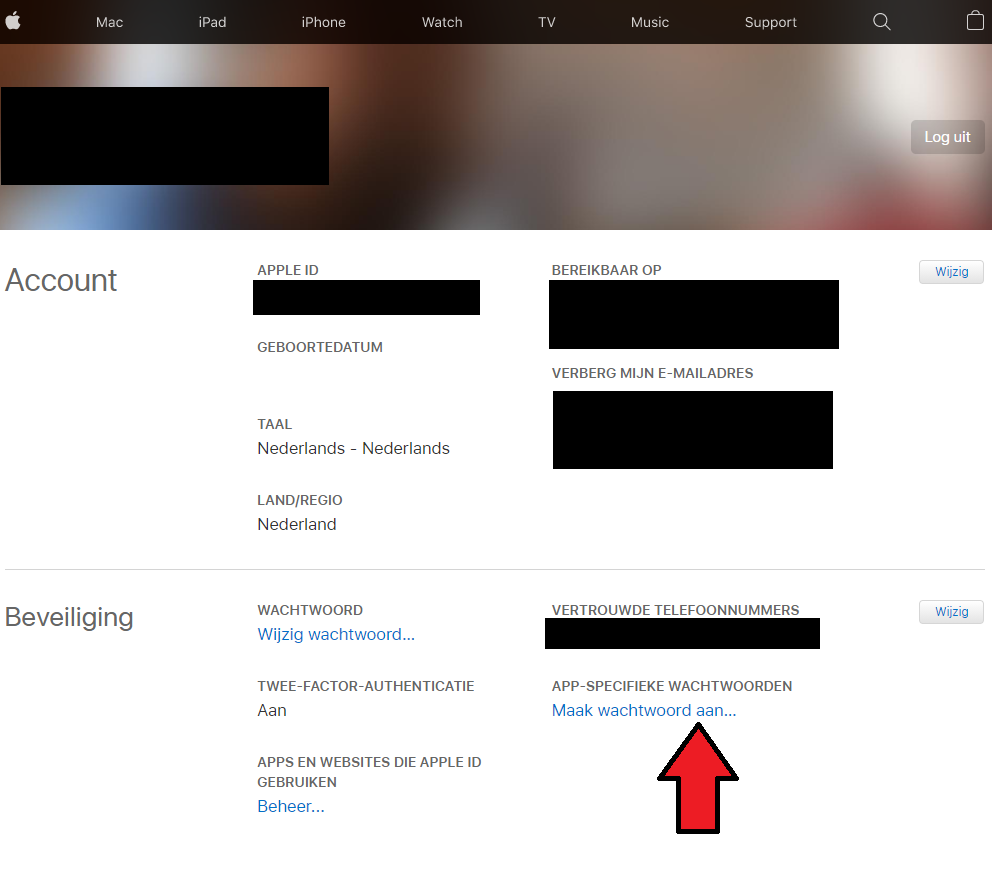
Hey there @quentame, mind taking a look at this issue as its been labeled with an integration (
icloud) you are listed as a codeowner for? Thanks! (message by CodeOwnersMention)