core: After HA upgrade to 0.115.0b8, yeelights entities are not available
The problem
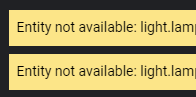
After upgrading HA to 0.115.0b8, all yeelight bulbs just stopped working. There is ‘entity not avaiable’ text. Lights were working for more than one year with this configuration, and I did several HA upgrades in this time.
Environment
- Home Assistant Core release with the issue: 0.115.0b8
- Last working Home Assistant Core release (if known): 0.114.4
- Operating environment (OS/Container/Supervised/Core): Raspbian, container, RPi4
- Integration causing this issue: yeelight
- Link to integration documentation on our website: https://www.home-assistant.io/integrations/yeelight/
Problem-relevant configuration.yaml
# Yeelight config
discovery:
  ignore:
    - yeelight
yeelight:
  devices:
    172.16.15.1:
      name: Lamp1
    172.16.15.2:
      name: Lamp2
    172.16.15.3:
      name: Lamp3
    172.16.15.4:
      name: Lamp4
Traceback/Error logs
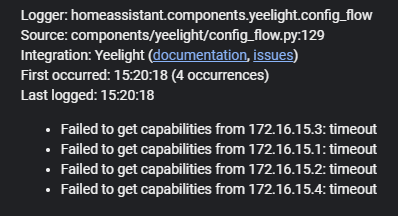
2020-09-13 15:20:18 ERROR (MainThread) [homeassistant.components.yeelight.config_flow] Failed to get capabilities from 172.16.15.3: timeout
2020-09-13 15:20:18 ERROR (MainThread) [homeassistant.components.yeelight.config_flow] Failed to import 172.16.15.3: cannot connect
2020-09-13 15:20:18 ERROR (MainThread) [homeassistant.components.yeelight.config_flow] Failed to get capabilities from 172.16.15.1: timeout
2020-09-13 15:20:18 ERROR (MainThread) [homeassistant.components.yeelight.config_flow] Failed to import 172.16.15.1: cannot connect
2020-09-13 15:20:18 ERROR (MainThread) [homeassistant.components.yeelight.config_flow] Failed to get capabilities from 172.16.15.2: timeout
2020-09-13 15:20:18 ERROR (MainThread) [homeassistant.components.yeelight.config_flow] Failed to import 172.16.15.2: cannot connect
2020-09-13 15:20:18 ERROR (MainThread) [homeassistant.components.yeelight.config_flow] Failed to get capabilities from 172.16.15.4: timeout
2020-09-13 15:20:18 ERROR (MainThread) [homeassistant.components.yeelight.config_flow] Failed to import 172.16.15.4: cannot connect
Additional information
I tried to restart bulbs and router, but nothing changed. I tried to disable firewall, nothing changed. All bulbs are on latest firmware (2.0.6_0065) Bulb model: YLDP06YL I tried to add bulb via ip with integration module, but the error is ‘failed to connect’ HA upgrade procedure was same as many times before, I’m using homeassistant/raspberrypi4-homeassistant image
For now, switching to stable, as latest stable version works fine (0.114.4).
About this issue
- Original URL
- State: closed
- Created 4 years ago
- Reactions: 12
- Comments: 59 (17 by maintainers)
I create a PR (#40251) to fix this issue. Sorry for the inconvenience. We’ll try to merge and release this as soon as possible.
@sysoppl Thanks for the log. I’ve figured out the problem. In 0.144.4, the integration does not check for the result of
get_capabilities. So everything works fine evenget_capabilitiestimed out.get_capabilitiesuses the discovery protocol so when your HA and yeelight devices are not in the same subnet, this may not work. Everything else uses TCP based socket so they work well. I’ll try to fix this tomorrow.I just tested the version of #40251 and it works great. I don’t get why it takes so long to add this to a bugfix release. For anyone who does not know, if you want to temporarily fix the issue using this PR, you can download this repo and copy the contents of
homeassistant/components/yeelightin your install incustom_components/yeelight.Then you can setup up this integration as usual from the frontend. When the bugfix is finally merged, just delete the custom_component and update HA.
15 days since a review of the latest changes in #40251 was requested and still nothing.
#40251 is not yet merged as I see it.
Any workaround for people running multiple subnets? I’m running HA over wireguard, so allowing Multicast traffic is not an option 👎
But demanding it gets fixed doesn’t work either on a project you are not paying for 😃
I’m not experiencing this issue anymore, but I had to make some changes in my setup:
I’m not saying everyone is experiencing the same issues, so these suggestion might not apply to you, but it’s worth a try.
Will be fixed in 0.118 read the PR
https://github.com/home-assistant/core/pull/40251
For anyone looking for a quick workaround on Linux, after hours of looking around for a solution the only thing that worked for me was allowing traffic from the bulb IP via firewall.
sudo ufw allow from 192.168.0.XXXAfter that I easily added my lights via the integrations menu, worked for my lightstrip as well as colour bulb.
Probably not the safest way I assume but it does the job for now.
In my case all the yeelight devices and the server are in the same network, but the problem is with the firewall: yeelight devices send their ssdp response to the same port they received the request from, right? tcpdump shows that the yeelight package(which is used under the hood of the yeelight integration) always uses random ports to send it’s discovery requests. Therefore it’s simply impossible to configure the firewall in a way that allows receiving responses from the devices.
Probably not what you want to hear but if you’re running HA with docker, just revert back to 0.114.2. Personally I just pinned my HA image to home-assistant:0.114.2 and I will update when this issue is resolved. Sorry if this doesn’t apply to you 😃
That’s how you can get ssh access to the host system: https://developers.home-assistant.io/docs/operating-system/debugging/#ssh-access-to-the-host
@t-anjan Do you happen to have HASS running within a Docker Container without Host Networking?
@shenxn - I have the exact same problem described in this issue, with the same error messages. But my HASS and the yeelight bulbs are on the same subnet. So, why do you think the discovery problem may be failing? If I try to manually add the integration via Home Assistant -> Configurations -> + button, and I leave the “Host” field empty, it says that it cannot find any devices.