core: 2FA broken with Synology DSM version 7.0.1-42218 update 2

Checklist

  • I have updated to the latest available Home Assistant version.
  • I have cleared the cache of my browser.
  • I have tried a different browser to see if it is related to my browser.

Describe the issue you are experiencing

Since restarting HA this morning, I have a notification that let’s me know that I need to reconfigure my Synology integration. I follow the steps and use my login/password + 2FA and get success message. However, the integration does not update and show connection. I’ve restarted several times and it’s still showing the same problem.

Describe the behavior you expected

I expect after successfully logging in that it works and the integration refreshes properly.

Steps to reproduce the issue

1.Click Reconfigure button in integration page for Synology 2.Login in with username, password, and then 2FA code

What version of Home Assistant Core has the issue?

core-2021.12.10

What was the last working version of Home Assistant Core?

core-2021.12.10

In which browser are you experiencing the issue with?

Google Chrome Version 97.0.4692.99 (Official Build) (x86_64)

Which operating system are you using to run this browser?

macOS Big Sur 11.6.2

State of relevant entities

No response

Problem-relevant frontend configuration

No response

Javascript errors shown in your browser console/inspector

Logger: homeassistant.config_entries
Source: config_entries.py:327
First occurred: 1:23:40 PM (1 occurrences)
Last logged: 1:23:40 PM

Config entry '192.168.[xxx.xxx]' for synology_dsm integration could not authenticate: reason: Two-step authentication required for account: [myaccountusername]

Additional information

No response

About this issue

  • Original URL
  • State: closed
  • Created 2 years ago
  • Reactions: 26
  • Comments: 90 (31 by maintainers)

Most upvoted comments

There is nothing we can do from HA side, since it is a bug in the API of DSM version “7.0.1-42218 update 2”. Unfortunately there is no (visible) progress in the Synology support ticket, yet (see https://github.com/home-assistant/core/issues/64867#issuecomment-1024963725)

But feel free to open an support ticket on your own with Synology and reference to #3011170 - feel free to use the following as template/blueprint:

[Symptome] when login with OTP and to enable to omit 2-factor verification via SYNO.API.Auth (example 3 on page 15), the response does not have the parameter did anymore, so later login with omitted OTP (example 4 on page 15) is not possible anymore.

This issue was first observed with 7.0.1-42218 Update 2, in prior version 7.0.1-42218 it works as expected

Referenced documentation: https://global.download.synology.com/download/Document/Software/DeveloperGuide/Os/DSM/All/enu/DSM_Login_Web_API_Guide_enu.pdf

[Schritte zum Reproduzieren]

  1. login with OTP and enable to omit 2-factor verification (example 3 on page 15)
  2. logout (example on page 16)
  3. login with omitted OTP (example 4 on page 15)

Further I would kindly ask you to ❗ stop commenting, that you have the same issue, unless have any further helpful information to solve the issue ❗ please use just the 👍 button on the initial post. This will help to keep the overview in this issue, thx.

I have filed a support ticket with Synology, but cannot promis, that they will fix this … further I cannot really do any additional debugging or other checks, which could be requested by Synology within this support ticket, since my NAS is still on the unaffected version.

so cross fingers 🤞

@littletruckman nice finding 👍 so this is definitely a bug in DSM, since it worked well with format=sid (it is also like documented) before “DSM 7.0.1-42218 Update 2” Will cross-chek this later this week and do a proper update of the underlying library

Did someone of you already created a ticket with Synology support, as suggested in #64867 (comment)? If yes, is there any progress visible?

I did and I got the information that they forwarded things to their development team, but can’t give any time frame on when the issue will be fixed. The last update to the ticket was two days ago. If it had been fixed in the beta, the would likely have directed me to download that.

Hi,

2FA in Home Assistant integration stopped working for me after upgrading to DSM 7.0.1-42218 Update 3. On update 2 it worked fine for me. I run HA on a HA Blue, so it is not running on the Synology in Docker or VM.

Thanks again for the solution. It works like a charm!

As agreed, an update from the support from Synology for those who are interested.

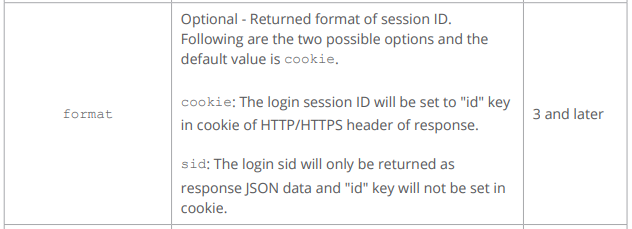
After trying to discuss about: should we use “version=7” or “version=6” they finally agreed that “version=7” is OK (it is given has “maxVersion” in the SYNO.API.info answer.

> https://IP:port/webapi/entry.cgi?api=SYNO.API.Info&version=1&method=query&query=SYNO.API.Auth
> {
>     "data": {
>         "SYNO.API.Auth": {
>             "maxVersion": 7,
>             "minVersion": 1,
>             "path": "entry.cgi"
>         }
>     },
>     "success": true
> }
> 

They also recognized that the issue is due to the tag “format=sid” and this is now an identified problem that will be solved in a future DSM Update…

Dear *****,

Thank you for your feedback.

After a second confirmation, you can also use version=7 but the output will be a little different. It will return “device_id” with version=7.

Regarding the issue you encountered before, it is mainly due to “format=sid”. We have already recorded this issue and will fix it in the future version.

Thank you for bringing this to our attention. Hope this information helps and kindly let us know if further assistance is needed.

Best regards and thanks

I have placed the findings in the ticket I had by the Synology support. I hope it will help to have a move from their side or at least a recognition of the bug/regression.

I would not hold my breath. Their last responses to my ticket came close to satire (they told me to subscribe to their newsletter for any “news and changes” resulting from my ticket 🤡).

On the release notes of DSM 7.1-beta I can not see a proper fixed mentioned

Edit: tested 7.1 beta with a vDSM, unfortunately the issue still persists

And mine: #3043290 BR

@mib1185 I have placed the findings in the ticket I had by the Synology support. I hope it will help to have a move from their side or at least a recognition of the bug/regression. I’ll keep you informed.

Thanks @mib1185

Here are the results:

  1. First try: with &format=sid bash-5.1# curl -vvk https://DS918-IP:port/webapi/entry.cgi?'account=SynoUser&passwd=SynoPassword&enable_device_token=yes&device_name=homeassistant&format=sid&otp_code=908666&api=SYNO.API.Auth&version=7&method=login'
*   Trying AAA.BBB.CCC.DDD:PPPPP...
* Connected to DS918-IP:port (AAA.BBB.CCC.DDD) port PPPPP (#0)
* ALPN, offering h2
* ALPN, offering http/1.1
* successfully set certificate verify locations:
*  CAfile: /etc/ssl/certs/ca-certificates.crt
*  CApath: none
* TLSv1.3 (OUT), TLS handshake, Client hello (1):
* TLSv1.3 (IN), TLS handshake, Server hello (2):
* TLSv1.3 (IN), TLS handshake, Encrypted Extensions (8):
* TLSv1.3 (IN), TLS handshake, Certificate (11):
* TLSv1.3 (IN), TLS handshake, CERT verify (15):
* TLSv1.3 (IN), TLS handshake, Finished (20):
* TLSv1.3 (OUT), TLS change cipher, Change cipher spec (1):
* TLSv1.3 (OUT), TLS handshake, Finished (20):
* SSL connection using TLSv1.3 / TLS_AES_256_GCM_SHA384
* ALPN, server accepted to use h2
* Server certificate:
*  subject: CN=myDomain.com
*  start date: Jan 20 14:44:55 2022 GMT
*  expire date: Apr 20 14:44:54 2022 GMT
*  issuer: C=US; O=Let's Encrypt; CN=R3
*  SSL certificate verify ok.
* Using HTTP2, server supports multiplexing
* Connection state changed (HTTP/2 confirmed)
* Copying HTTP/2 data in stream buffer to connection buffer after upgrade: len=0
* Using Stream ID: 1 (easy handle 0x7f6c0dc85a90)
> GET /webapi/entry.cgi?account=SynoUser&passwd=SynoPassword&enable_device_token=yes&device_name=homeassistant&format=sid&otp_code=908666&api=SYNO.API.Auth&version=7&method=login HTTP/2
> Host: DS918-IP:port
> user-agent: curl/7.79.1
> accept: */*
> 
* TLSv1.3 (IN), TLS handshake, Newsession Ticket (4):
* old SSL session ID is stale, removing
* Connection state changed (MAX_CONCURRENT_STREAMS == 128)!
< HTTP/2 200 
< server: nginx
< date: Tue, 22 Mar 2022 13:40:13 GMT
< content-type: application/json; charset="UTF-8"
< p3p: CP="IDC DSP COR ADM DEVi TAIi PSA PSD IVAi IVDi CONi HIS OUR IND CNT"
< x-content-type-options: nosniff
< x-xss-protection: 1; mode=block
< x-content-type-options: nosniff
< x-xss-protection: 1; mode=block
< cache-control: max-age=0, no-cache, no-store, must-revalidate
< pragma: no-cache
< expires: 0
< strict-transport-security: max-age=15768000; includeSubdomains; preload
< 
* Connection #0 to host DS918-IP:port left intact
{"data":{"account":"SynoUser","device_id":"","ik_message":"","is_portal_port":false,"sid":"v3kCxCbJEKi0DhQyutEw17WucwnfwNqyrDtS16pERrUA-tyJt3kA3lesgyfkIrC4XF-TPYzalSn4qMerhx0ZYs","synotoken":"--------"},"success":true}bash-5.1# 

=> “device_id”:“”

  1. Second try: without &format=sid bash-5.1# curl -vvk https://DS918-IP:port/webapi/entry.cgi?'account=SynoUser&passwd=SynoPassword&enable_device_token=yes&device_name=homeassistant&otp_code=270498&api=SYNO.API.Auth&version=7&method=login'
*   Trying AAA.BBB.CCC.DDD:PPPPP...
* Connected to DS918-IP:port (AAA.BBB.CCC.DDD) port PPPPP (#0)
* ALPN, offering h2
* ALPN, offering http/1.1
* successfully set certificate verify locations:
*  CAfile: /etc/ssl/certs/ca-certificates.crt
*  CApath: none
* TLSv1.3 (OUT), TLS handshake, Client hello (1):
* TLSv1.3 (IN), TLS handshake, Server hello (2):
* TLSv1.3 (IN), TLS handshake, Encrypted Extensions (8):
* TLSv1.3 (IN), TLS handshake, Certificate (11):
* TLSv1.3 (IN), TLS handshake, CERT verify (15):
* TLSv1.3 (IN), TLS handshake, Finished (20):
* TLSv1.3 (OUT), TLS change cipher, Change cipher spec (1):
* TLSv1.3 (OUT), TLS handshake, Finished (20):
* SSL connection using TLSv1.3 / TLS_AES_256_GCM_SHA384
* ALPN, server accepted to use h2
* Server certificate:
*  subject: CN=myDomain.com
*  start date: Jan 20 14:44:55 2022 GMT
*  expire date: Apr 20 14:44:54 2022 GMT
*  issuer: C=US; O=Let's Encrypt; CN=R3
*  SSL certificate verify ok.
* Using HTTP2, server supports multiplexing
* Connection state changed (HTTP/2 confirmed)
* Copying HTTP/2 data in stream buffer to connection buffer after upgrade: len=0
* Using Stream ID: 1 (easy handle 0x7fb809ef3a90)
> GET /webapi/entry.cgi?account=SynoUser&passwd=SynoPassword&enable_device_token=yes&device_name=homeassistant&otp_code=270498&api=SYNO.API.Auth&version=7&method=login HTTP/2
> Host: DS918-IP:port
> user-agent: curl/7.79.1
> accept: */*
> 
* TLSv1.3 (IN), TLS handshake, Newsession Ticket (4):
* old SSL session ID is stale, removing
* Connection state changed (MAX_CONCURRENT_STREAMS == 128)!
< HTTP/2 200 
< server: nginx
< date: Tue, 22 Mar 2022 13:40:49 GMT
< content-type: application/json; charset="UTF-8"
< p3p: CP="IDC DSP COR ADM DEVi TAIi PSA PSD IVAi IVDi CONi HIS OUR IND CNT"
< x-content-type-options: nosniff
< x-xss-protection: 1; mode=block
< set-cookie: id=0vWzOZ1HaoPnXSOwbuX920IS8k9r3lm3Zyke8vTvVE0SiWeaWl_mLpdhT_a_o2c9QP5v2LvJ_M6MG7KhBOyypg;expires=Tue, 29-Mar-2022 13:40:49 GMT;path=/;HttpOnly
< set-cookie: did=10Vf1YIv571HVL2FRQDUiRKTCFcIwa4UIF9U125B3dqDrl8wlfs6ij8lOfoCyL7AeZga8jO3LkHFEIaAX4fKgQ;expires=Wed, 22-Mar-2023 13:40:48 GMT;path=/;HttpOnly
< x-content-type-options: nosniff
< x-xss-protection: 1; mode=block
< cache-control: max-age=0, no-cache, no-store, must-revalidate
< pragma: no-cache
< expires: 0
< strict-transport-security: max-age=15768000; includeSubdomains; preload
< 
* Connection #0 to host DS918-IP:port left intact
{"data":{"account":"SynoUser","device_id":"10Vf1YIv571HVL2FRQDUiRKTCFcIwa4UIF9U125B3dqDrl8wlfs6ij8lOfoCyL7AeZga8jO3LkHFEIaAX4fKgQ","ik_message":"","is_portal_port":false,"sid":"0vWzOZ1HaoPnXSOwbuX920IS8k9r3lm3Zyke8vTvVE0SiWeaWl_mLpdhT_a_o2c9QP5v2LvJ_M6MG7KhBOyypg","synotoken":"--------"},"success":true}bash-5.1# 

=> “device_id” is now set ! As well as did cookie…

Default behavior of the SYNO.API is image

That’s why I had Postman working because my PC was previously connected to DSM Manager and had a “did” cookie that identify the device for SYNO.API…

What do you think about trying to remove the &format=sid in the logon query(ies) ?

@mib1185,

Found some time to do it once 😃

Attached you will find the complete log:

Line 4 to 738: Startup of HA without any DSM integration,

Line 739 -> 743: Addition of a new DSM integration (selecting the first discovered) -> No trace of UI image HA asks then for the username/password/port… image

Line 744 to 758: HA make the connection to the synology with the provided info. It fails because of the 2FA HA asks for the OTP Code image

Line 765 to 780: Once OTP is entered, HA proceed with a new connection that suceed. We see the sid provided as return

Line 787 to 824: HA Proceed with the addition of device and entities. Everything is OK. The success message is displayed closing the addition procedure image

Line 831 to 838: HA issue a new logon request without sid or OTP (according to the displayed parameters) This request fails

END Right after the end of the setup of the new integration, the followings appear in the integration panel: image and image

Neverending Story: If you try to reconfigure the integration, HA asks again for the user, password, ports, then for the OTP following exactly the same schema of logs, presenting the success message again… but rigt after that the 2FA is again broken…

BR

home-assistant - LittleTruckMan.zip

I am assuming device_id should contain a value? It does not for me.

@mundschenk-at this is exact the issue, we are trying to catch here 👍


let me try to summarize the available data

@littletruckman from https://github.com/home-assistant/core/issues/64867#issuecomment-1070888018

  • NAS: DS918+ with DSM 7.0.1-42218 Update 2
  • Request: GET https://my.syno.ip.adresse:sslport/webapi/entry.cgi?api=SYNO.API.Auth&version=7&method=login&account=<user>&passwd=<password>&otp_code=123456&enable_device_token=yes&device_name=postman&format=sid
  • Result:
{
    "data": {
        "account": "user",
        "device_id": "H5ZvWUp2M0VB3YbU38kYV25yZwwc2AJDB9IByFwHy0I5_mNHBNJMh0DCb3G8BAudU1zcpDlxixG1IggkTOSJCA",
        "ik_message": "",
        "is_portal_port": false,
        "sid": "fg97EITQIXhcP5K2MC5hdOqxWCNySoz8fZbGCZkmd5og82O8igrkOAWfj6ZGO97JPRHPDtaWwdy0QmhBsJowZ4",
        "synotoken": "--------"
    },
    "success": true
}

@mundschenk-at from https://github.com/home-assistant/core/issues/64867#issuecomment-1071168707

  • NAS: DS918+ with DSM 7.0.1-42218 Update 3
  • Request: GET https://<IP:port>/webapi/entry.cgi?api=SYNO.API.Auth&version=7&method=login&account=<user>&passwd=<password>&otp_code=<code>&enable_device_token=yes&device_name=postman&format=sid
  • Result:
{
    "data": {
        "account":"<user>",
        "device_id":"",
        "ik_message":"",
        "is_portal_port":false,
        "sid":"<token>",
        "synotoken":"--------"
    },
    "success":true
}

@j6s33m extracted from debug.txt from https://github.com/home-assistant/core/issues/64867#issuecomment-1021638882

  • NAS: DS220+with DSM Version: 7.01-42218 Update 2
  • Request: https://[mysynologyIPaddress]/webapi/entry.cgi?account=********&passwd=********&enable_device_token=yes&device_name=[mySynologyNASname]&format=sid&otp_code=077221&api=SYNO.API.Auth&version=7&method=login
  • Result:
{
    "data": {
        "account":"Jordan",
        "device_id":"",
        "ik_message":"",
        "is_portal_port":false,
        "sid":"XHuIVY2PU07GcJeU4TXnNYYheJVBJ9ZP3Z-Mo0wkok8NbJPEYJ3E4Zq7XULM9D3M0R6t19LezwuJQzlqZNAqmI",
        "synotoken":"--------"
    },
    "success":true
}

based on the summarization @littletruckman may I ask you, to please verify again your results?

When I run GET https://<IP:port>/webapi/entry.cgi?api=SYNO.API.Auth&version=7&method=login&account=<user>&passwd=<password>&otp_code=<code>&enable_device_token=yes&device_name=postman&format=sid, I get the following result:

{
    "data": {
        "account":"<user>",
        "device_id":"",
        "ik_message":"",
        "is_portal_port":false,
        "sid":"<token>",
        "synotoken":"--------"
    },
    "success":true
}

I am assuming device_id should contain a value? It does not for me.

Hello, I am not a developer but a regular user of Synology and Home Assistant. Since I am experiencing the issue, I tried to help and posted a ticket to Synology Support yesterday and got an answer today. They were asking me to share with them the API script and the results.

So I did my first steps in postman and find out that the 3 steps are working correctly and that, at the opposite of what is described in the “step to reproduce” (https://github.com/home-assistant/core/issues/64867#issuecomment-1042862897) the “did” parameter is back, returned by the API 😦

So what can I answer to Synology Support to keep their focus 😃 ?

BR

Postman results:

  1. Login with OTP and to enable to omit 2-factor verification result:
{
    "data": {
        "did": "EjgnNYVsWO6_2ATUXz1BXbpDbLUtq9j8L6ST6MrsXN4T8QbmmOxBHHknTzXKg7CriQQJN6J7obxz0hia8Nw57A",
        "is_portal_port": false,
        "sid": "uCT4qO4M1Bv4JX2xBn58DdN-zTKqb2ryAxYcxDkSvqgATL91BI_0k_Et1RXBEcyhZPeawWz0CMQrliIv-nxw_Y"
    },
    "success": true
}

You will nozice that the “did” parameter is returned

  1. Logout using the returned “sid” result:
 {
    "success": true
}
  1. Login with omitted OTP result:
{
    "data": {
        "did": "EjgnNYVsWO6_2ATUXz1BXbpDbLUtq9j8L6ST6MrsXN4T8QbmmOxBHHknTzXKg7CriQQJN6J7obxz0hia8Nw57A",
        "is_portal_port": false,
        "sid": "UrB0HRKNNTnLP9HrGqa87g3jqV9qx5sO7vYGS6ZgTUAiwH7gDEiGLrWCib2Czv03LN3YlFg0y2dC9grVmBto-o"
    },
    "success": true
}

Seems DSM 7.0.1 Update 3 was released and Update 2 was pulled, from the release notes it doesn’t look like the bug is solved

FYI: https://www.synology.com/en-global/releaseNote/DSM#7_0

Yes I’ve done the above and 2FA works as it’s supposed to. It’s the HA integration that is broken.


From: Michael @.> Sent: Tuesday, January 25, 2022 5:10:40 PM To: home-assistant/core @.> Cc: Jordan @.>; Mention @.> Subject: Re: [home-assistant/core] Synology 2FA Broken Again (Issue #64867)

Could you please do a further test?

  • login with 2FA enabled user via the UI
  • enable the “remember this device” option
  • logout
  • re-login with same user in same browser

The OTA code should not be asked while re-login, since “remember this device” was enabled.

Will you log the bug w/ Synology?

I’m not familiar with the support contact possibilities for developer (API) related issues 🤔 Maybe I find some spare time on upcoming weekend, but cannot promise that.

— Reply to this email directly, view it on GitHubhttps://github.com/home-assistant/core/issues/64867#issuecomment-1021694457, or unsubscribehttps://github.com/notifications/unsubscribe-auth/AEIZISXBP75QKYF7RQ6JRVTUX4UXBANCNFSM5MWLBCLQ. You are receiving this because you were mentioned.Message ID: @.***>

they exceeded the maximum 655536 character limit.

Sorry, forgot to mention that - just save the logs in a txt file and drag&drop it here - so it will be added as attachment

Encoding’, ‘X-Content-Type-Options’: ‘nosniff’, ‘X-XSS-Protection’: ‘1; mode=block’, ‘Cache-Control’: ‘max-age=0, no-cache, no-store, must-revalidate’, ‘Pragma’: ‘no-cache’, ‘Expires’: ‘0’, ‘Content-Encoding’: ‘gzip’} 2022-01-25 14:09:34 DEBUG (SyncWorker_3) [synology_dsm.synology_dsm] Request Method: GET 2022-01-25 14:09:34 DEBUG (SyncWorker_3) [synology_dsm.synology_dsm] Successful returned data 2022-01-25 14:09:34 DEBUG (SyncWorker_3) [synology_dsm.synology_dsm] API: SYNO.API.Auth 2022-01-25 14:09:34 DEBUG (SyncWorker_3) [synology_dsm.synology_dsm] RESPONSE: {‘error’: {‘code’: 403, ‘errors’: {‘token’: ‘[MYTOKENREMOVED]’, ‘types’: [{‘type’: ‘otp’}]}}, ‘success’: False} 2022-01-25 14:09:34 INFO (MainThread) [homeassistant.components.sensor] Setting up sensor.ipp

I removed some of my information (url, NAS name, token, etc)