helix: alt-related key-combination seems not working in macOS.
I tried to use option key combined with other keys to use the command such as alt ` and alt-, but it didn’t work. I am using MacBook Pro 13.3 M1.
About this issue
- Original URL
- State: closed
- Created 2 years ago
- Reactions: 36
- Comments: 25 (7 by maintainers)
Hey guys, thanks for your help. I think I should clarify the problem existing now. For iterm2, we can just set option key as “esc+” in the preferences as the picture shows, and no issue occurs. But for Warp, there are still some of the combinations that cannot work, like A-` A-u A-U , and I don’t know why. I have posted an issue on warp repos and get no reply for now.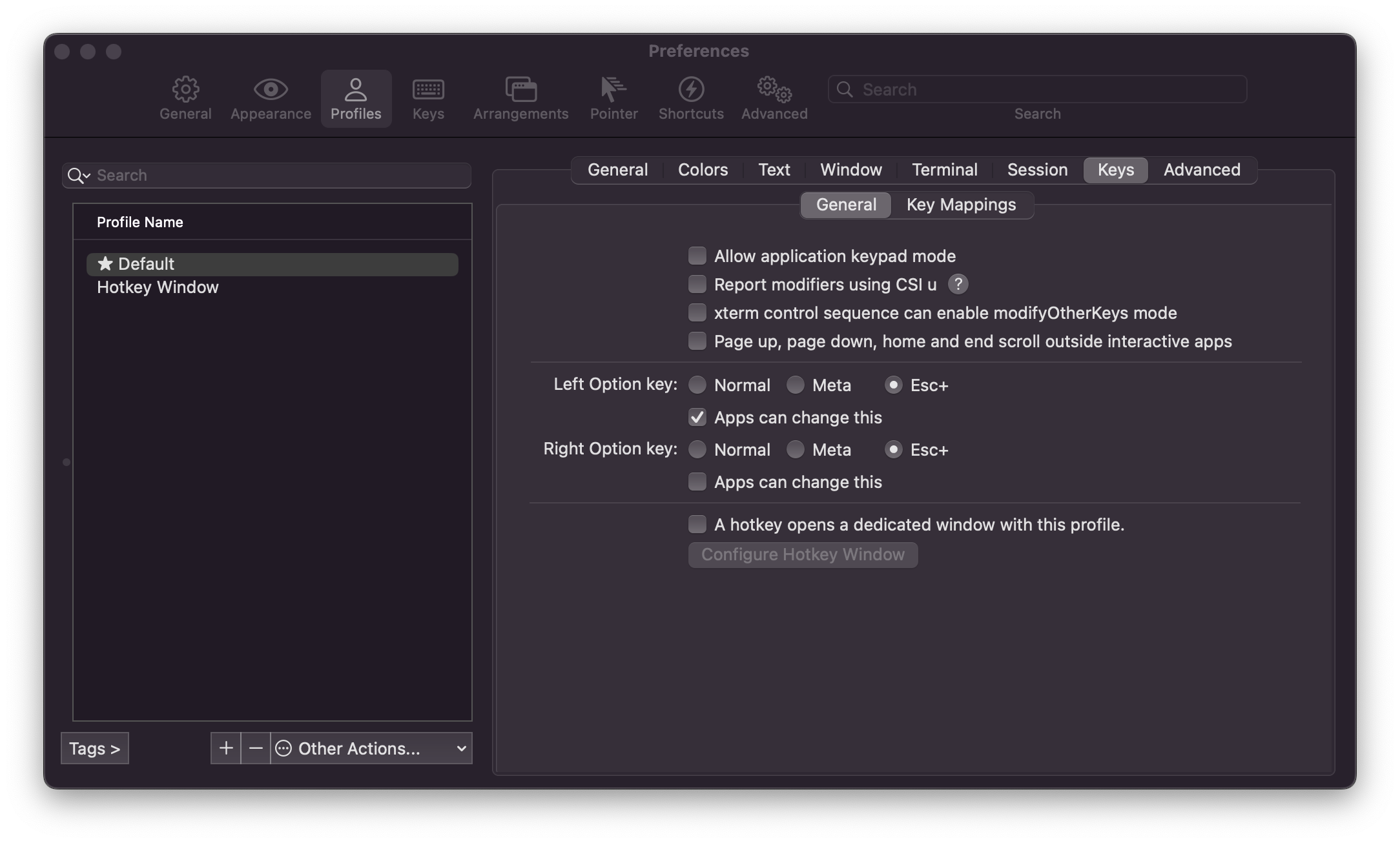
I solved my issue. The problem was with the Kitty terminal. I first tried adding this to my Kitty config but that didn’t seem to work. Then I tried setting the config to
macos_option_as_alt yesand that fixed it for me.This might help for Warp.
I think this is relevant. A six year old issue in Alacritty has just been resolved with an upstream change to winit:
https://github.com/alacritty/alacritty/commit/d9ba129e9e722a551cc0cc4c1899c97593ca26b4
This allows the Option key to behave as Alt. An example
alacritty.ymlwill look like:Not released yet, but ~I’d imagine this will be out in the next version~ this will be included in version 0.12.0. These are the related issues leading to the change:
https://github.com/alacritty/alacritty/issues/62 https://github.com/rust-windowing/winit/pull/2576
I had the same issue (using terminal.app). Checking the box “Use option as Meta key” (see snapshot below) fixed my problem
I also played around with ITerm2 app. This instruction seems to be working for me: https://www.clairecodes.com/blog/2018-10-15-making-the-alt-key-work-in-iterm2/
Are you using iTerm2? You may need to configure it so it doesn’t consume the alt keypresses itself: https://www.clairecodes.com/blog/2018-10-15-making-the-alt-key-work-in-iterm2/
for iterm2 users
go to prefences, profiles, keys, and change these definitions from normal to inclue escaping like in the image.
same for me with Alacritty
Would it be possible to remap the keys directly in helix instead of in the terminal? The option
Use Option as Meta keyin Terminal.app isn’t really an option for me since I am using a Swedish keyboard layout, which means that I would lose access to the symbols@$|[]~which all require using the alt-key to write.The optimal solution for me would be if helix just interpreted the symbol that is generated as the corresponding alt-something key in normal-mode while still giving the generated symbols in insert-mode. So for example, in normal-mode Ç would be interpreted as
Alt-C, while in insert-mode it would insert a Ç symbol.I’m assuming that this would depend on your specific layout though, so either helix would have to detect the layout somehow or it would be a configuration option.
Edit: This comment is a working workaround for me: https://github.com/helix-editor/helix/issues/2280#issuecomment-1165256309
At least when using Alacritty, the config is quite straightforward.
E.g. to make the default keybinding for
switch_to_uppercasework you’d usein the Alacritty config.
See https://github.com/alacritty/alacritty/issues/93#issuecomment-1364783147 for a more or less complete listing.
I set my left option key as meta key. And I find most of the alt-key combinations work, except:
alt-~alt-ualt-U.For anyone wondering how to fix in warp you can bring up the command pallet with cmd-p, and then search
Enable Left Option Key is Meta. Set that and Alt should work in Helix.see also https://github.com/helix-editor/helix/issues/2280
I was going to suggest checking with the Warp Issue queue but it looks like you beat me to it. Just as a heads up, someone added an entry to the Helix wiki if you decide to try a different terminal.