vscode-terraform: Syntax Highlighting Still Broken
The following block of code still breaks syntax highlighting. If I remove the = sign after config syntax highlighting goes back to normal. The same happens if I remove the trailing " here key = "${var.vpc_tf_state_key}/terraform.tfstate". This is happening in version 2.2.0, 2.2.1, 2.2.2, and 2.2.3 as well. The latest fixes seem not to fix this specific case.
// Modify vpc, subnets and security group data

data "terraform_remote_state" "vpc" {
  backend = "s3"

  config = {
    bucket = var.backend_bucket
    key    = "${var.vpc_tf_state_key}/terraform.tfstate"
    region = var.backend_region
  }
}

data "aws_ssm_parameter" "dev_db_username" {
  name = "/testoapp/dev_db_username"
}

data "aws_ssm_parameter" "dev_db_password" {
  name = "/testapp/dev_db_password"
}

locals {
  // Remove `Name` tag from the map of tags because Elastic Beanstalk generates the `Name` tag automatically
  // and if it is provided, terraform tries to recreate the application on each `plan/apply`
  // `Namespace` should be removed as well since any string that contains `Name` forces recreation
  // https://github.com/terraform-providers/terraform-provider-aws/issues/3963

  name_prefix = "${var.name}${var.delimiter}${var.environment}${var.delimiter}${var.namespace}"
  tags = merge(
    map("Environment", var.environment),
    map("DeployedBy", "terraform"),
    map("Namespace", var.namespace),
    var.tags
  )
}
- Syntax Highlighting Broken

- Syntax Highlighting Not Broken (After removing
=sign right afterconfig)

About this issue
- Original URL
- State: closed
- Created 4 years ago
- Reactions: 18
- Comments: 15 (1 by maintainers)
I was having this problem, but then I realized that I have two vs code extensions that were trying to syntax highlight my terraform. HCL extension and the official HashiCorp Terraform extension. VS Code was prioritizing the HCL extension (which has not been updated in a very long time) and when I disabled it this issue was no longer appearing. I recommend that everyone double check that they only have one extension trying to syntax highlight their terraform.
Im getting bear ninimum syntax highlighting, no autocomplete and no code validation 😕
Tried to download the latest
terraform-lsandterraform-lspand using them as language servers instead, but no changesNever got this plugin to work… Sad that i have to use IntelliJ as an edtitor for Terraform
Thank you all for your feedback, and thank you @pjmiravalle for your contributions.
Apologies, I am coming to this ticket after significant time has elapsed since it was created. I’ve tried to recreate some of the examples here and think that most of them have been covered in releases since this ticket was created and we haven’t circled back to this ticket.
I’ll try to itemize some of the issues here, but if your report isn’t covered please open a new issue with example text I can copy and a screenshot of the syntax highlighting that appears for you.
For everyone watching this ticket, please note @fishfood34’s observation about multiple extensions claiming support for Terraform and/or HCL files. VS Code has a non-deterministic evaluation of which extension ‘wins’ at highlighting a given text file. If you have multiple extensions that claim support for a specific file extension, then it’s an almost random chance which one will activate first. The extension that activates first will be able to provide features like syntax highlighting, intellisense and more while the other extensions are either not used at all or will only be able to provide minimal features. You can choose which extension activates for each file by using the
files.associationssetting in VS Code to help decide which extension controls which file.The original post from @rodrigoechaide I can’t reproduce with the current extension, everything after
confighighlights correctly. However I notice there is an incorrect tokenization for"${var.name}${var.delimiter}${var.environment}${var.delimiter}${var.namespace}"which I’ll create a new issue for.@murillio4 I’m sorry the extension didn’t work for you back then. From your screenshot and your explanation, it sounded like you either had a bad install or multiple extensions were claiming support for Terraform files and competing. Can you please install the latest and try again? If you continue to see issues, please open a new issue and let us know.
@rhanger-halo I tried typing out your screenshot, but obviously didn’t have all of the text to copy. In your example,
localis tokenized as aconstant, so it is highlighted. Bothvarandlocalare highlighted similarly because they’re both language constants. I also couldn’t reproduce the array list behavior you describe. Can you please install the latest and try again? If you continue to see issues, please open a new issue and let us know.I’m going to close out this ticket for now. If you have any feedback or encounter any issues, please open a new ticket and we’ll address.
I was struggling with this problem for months and I confirm that disabling the HCL extension solves the problem (if your case was similar) 👏
@cmamigonian I unfortunately have not yet, it’s been an extremely busy few weeks. 😦 I’ll keep you posted once I have some free time to dig into this deeper!
@cmamigonian thank you for bringing this up. I’ll try to replicate this issue when I have some free time next week. I’ll keep you posted!
@rhanger-halo just spent another lunch break working through the remaining issue I brought up yesterday, and I got that working for you as well.
I’m pushing the following features into v1.2.0 of the Terraform Advanced Syntax Highlighting extension now, and I encourage you to check it out! https://github.com/pjmiravalle/vscode-terraform-advanced-syntax-highlighting/releases/tag/v1.2.0
Here is how your code looks in v1.2.0: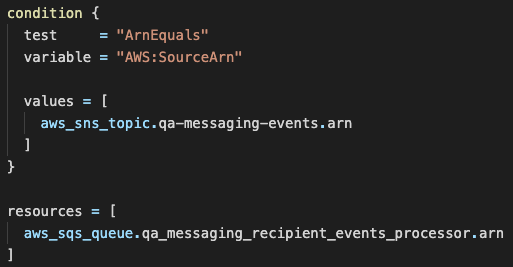
While I don’t have an immediate fix for the official Terraform vscode extension, I went ahead and created a vscode extension a while back to solve some syntax highlighting issues of my own: https://marketplace.visualstudio.com/items?itemName=pjmiravalle.terraform-advanced-syntax-highlighting.
I actually just spent my lunch break working through y’alls issues, and wrapped it into v1.1.0 of my extension (which is now live!). I’m working on integrating my code into the official Terraform extension, but in the meantime I highly recommend trying out my extension to see if it solves your syntax highlighting problems. 😃
I’ll be fairly active on here, and can offer further assistance if you still run into any problems! Please note that the fixes below are using the Dark+ Visual Studio Code Theme.
@rodrigoechaide here’s how your code looks with my fixes in place:
@murillio4 here’s how your code looks with my fixes in place:
and finally @rhanger-halo here’s how your code looks with my fixes in place: