terraform-provider-vsphere: vApp properties not being set with OVF deployment with provider 1.24.1 and 1.24.2
Terraform Version: 0.13.4
vSphere Provider Version: 1.24.2
Affected Resource(s)
vsphere_virtual_machine
Terraform Configuration Files
terraform {
  required_version = ">= 0.13"
  required_providers {
    vsphere = {
      source  = "hashicorp/vsphere"
      version = "1.24.2"
    }
  }
}

variable "vsphere_user" {
  type = string
}

variable "vsphere_password" {
  type = string
}

variable "vsphere_server" {
  type = string
}

variable "vsphere_insecure" {
  type = bool
  default = true
}

variable "vsphere_datacenter" {
  type = string
}

variable "vsphere_datastore" {
  type = string
}

variable "vsphere_resource_pool" {
  type = string
}

variable "vsphere_host_system" {
  type = string
}

variable "vsphere_network" {
  type = string
}

variable "vsphere_ovf_url" {
  type = string
}

provider "vsphere" {
  user                  = var.vsphere_user
  password              = var.vsphere_password
  vsphere_server        = var.vsphere_server
  allow_unverified_ssl  = var.vsphere_insecure
}

data "vsphere_datacenter" "dc" {
  name = var.vsphere_datacenter
}

data "vsphere_resource_pool" "pool" {
  name          = var.vsphere_resource_pool
  datacenter_id = data.vsphere_datacenter.dc.id
}

data "vsphere_host" "host" {
  name          = var.vsphere_host_system
  datacenter_id = data.vsphere_datacenter.dc.id
}

data "vsphere_datastore" "datastore" {
  name          = var.vsphere_datastore
  datacenter_id = data.vsphere_datacenter.dc.id
}

data "vsphere_network" "network" {
  name          = var.vsphere_network
  datacenter_id = data.vsphere_datacenter.dc.id
}

resource "vsphere_virtual_machine" "docker-hosts" {
  name             = "vsphere-provider-test01"
  resource_pool_id = data.vsphere_resource_pool.pool.id
  datastore_id     = data.vsphere_datastore.datastore.id
  datacenter_id    = data.vsphere_datacenter.dc.id
  host_system_id   = data.vsphere_host.host.id

  num_cpus = 4
  memory   = 4096
  guest_id = "other3xLinux64Guest"
  hv_mode  = "hvOff"

  disk {
    label = "disk0"
    size  = 20
  }

  network_interface {
    network_id = data.vsphere_network.network.id
  }

  ovf_deploy {
    remote_ovf_url       = var.vsphere_ovf_url
    disk_provisioning    = "thin"
    ovf_network_map = {
      "nat" = data.vsphere_network.network.id
    }
  }

  vapp {
    properties = {
      "guestinfo.hostname" = "vsphere-provider-test01",
      "guestinfo.dns1" = "8.8.8.8",
      "guestinfo.dns2" = "8.8.4.4",
      "guestinfo.nic1.name" = "ens33",
      "guestinfo.nic1.ipaddress" = "192.168.0.10",
      "guestinfo.nic1.netmask" = "255.255.255.0",
      "guestinfo.nic1.gateway" = "192.168.0.1",
    }
  }
}
Debug Output
https://gist.github.com/blakewade/b9874daed1732d27008558b7f09d034a
Expected Behavior
The OVF is deployed and the values for the vApp properties are set
Actual Behavior
No values for the vApp properties have been set
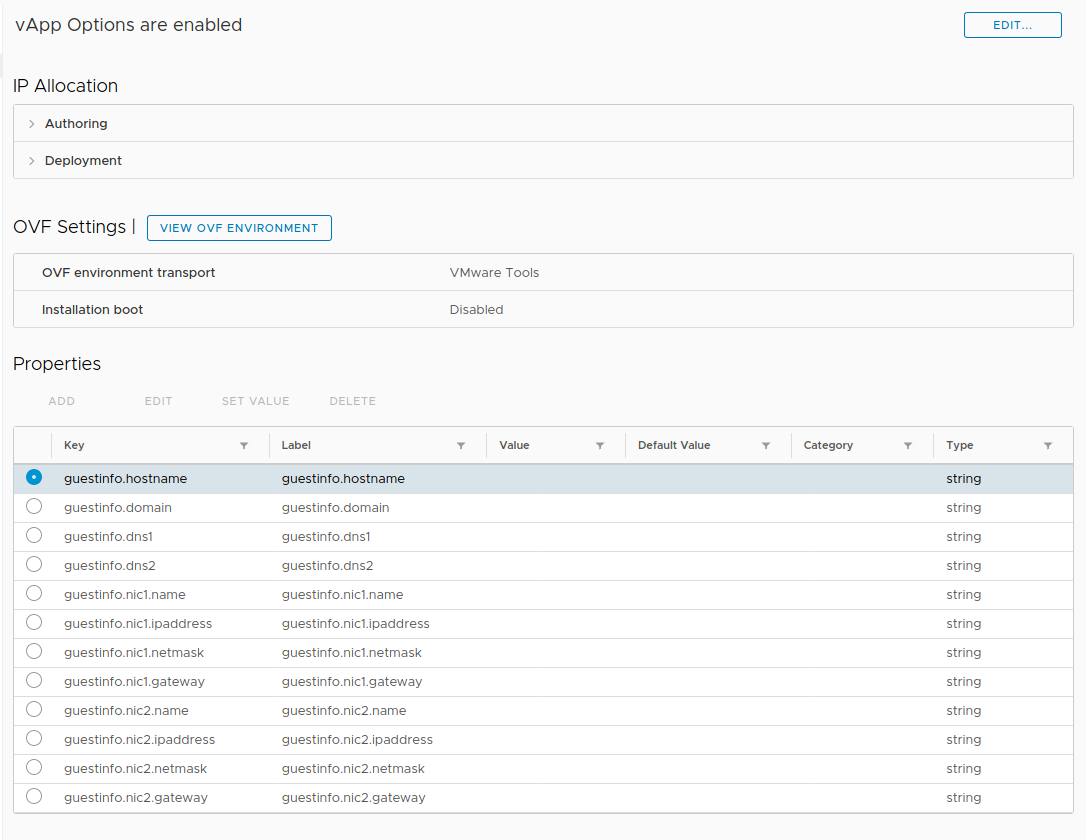
Steps to Reproduce
terraform apply
Important Factoids
This is currently working for vSphere Provider 1.24.0
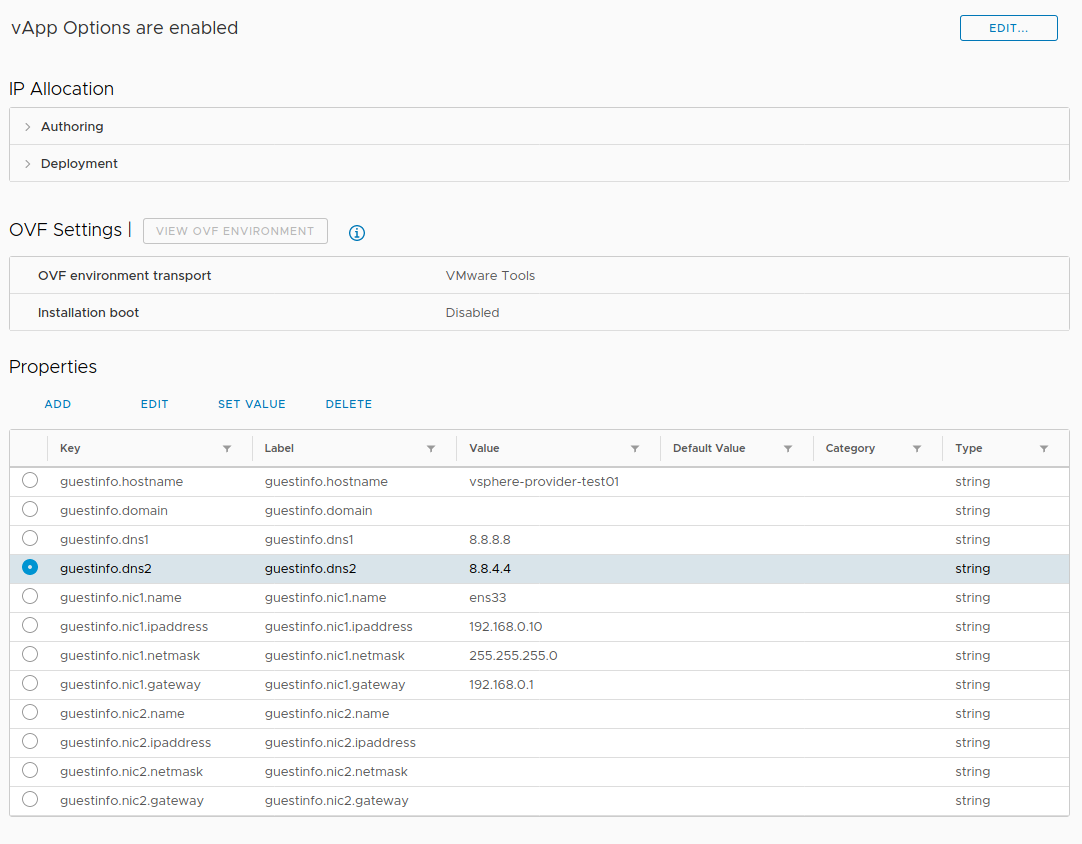
Community Note
- Please vote on this issue by adding a 👍 reaction to the original issue to help the community and maintainers prioritize this request
- Please do not leave “+1” or other comments that do not add relevant new information or questions, they generate extra noise for issue followers and do not help prioritize the request
- If you are interested in working on this issue or have submitted a pull request, please leave a comment
About this issue
- Original URL
- State: closed
- Created 4 years ago
- Reactions: 6
- Comments: 18
I’ve recently run into this same issue and have narrowed it down to the
resourceVSphereVirtualMachinePostDeployChangesfunction within theresource_vsphere_virtual_machinecode. Here’s the resource i’m trying to create:My vapp properties are properly configured initially but then somewhere in this block of code they get erased:
If i comment out that code and build/use the provider using dev_overrides the vapp properties persist as expected.
Otherwise they are removed and i see a bunch of entries in the logs about vapp properties vanishing.
Confirming, got the same issue. Using 1.24.0 works fine.
@ron4all 100% agree, however, it’s worth mentioning the deployment option capability within this issue as a case for why it doesn’t seem to make sense to call
resourceVSphereVirtualMachinePostDeployChangesin its current form at the end ofresourceVsphereMachineDeployOvfAndOvasince it ultimately wipes the hardware configuration defined within the OVA/OVF along with all of the vApp properties (which is what this issue is referring to).Thanks!
If passing a “deployment-option” isn’t possible right now, shouldn’t an “enhancement”-request get filed to distinguish it from this topic? //[IMHO - I’m setting up virtual Cisco-Routers and face the same issue not being able to pass the needed “Deployment”-Option (here:
Small,Medium,LargeorLarge + DRAM Upgrade) Blog: OFV-OVA-Properties - when my setup might move to production, I’ll need more horsepower than the (default=)“Small”-Environment.//just re-read the “issues”-list, there are already 2 threads addressing this: https://github.com/hashicorp/terraform-provider-vsphere/pull/1215 https://github.com/hashicorp/terraform-provider-vsphere/issues/1209
For my opinion i’ll proceed the discussion at 1209
@ron4all I believe this is due to the multiple
Reconfigurecalls on the virtual machine. If you skip theresourceVSphereVirtualMachinePostDeployChangescall after the OVA/OVF deploys then the network interfaces will exist along with the hardware outlined by the deployment option (if using). Otherwise that secondReconfigureseems to wipe out all of the hardware config defined in the OVA/OVF.This is all a guess on my part though so i’ll leave it to the maintainers of the provider to chime in.
Thanks!
@seohs7
I’ve not seen the issue with the URL but this seems to be related to your setup. The URL doesn’t look like it’s pointing to an OVF / OVA file but to a html page but it’s hard to tell just from the URL. However, the issue here seems to be that the VAPP properties are not set. So the deploy part works. I was testing with a local OVA file and saw the same result (VAPP properties empy). I created another issue here https://github.com/pulumi/pulumi-vsphere/issues/144 but the pulumi issue seems to be related to this issue here.
Also while I was researching this issue I saw that vAPP properties will be applies if no config change is performed (e.g. change CPU from what is defined in the OVA & OVF). Once deployed you can change the config and it will work. But it seems like you can’t change the hardware AND set VAPP properties in the first run at once.