harvester: [BUG] Uploading qcow2 image from local file fails with Context Canceled
Describe the bug
Trying to convert VMs from VMware ESXi to Harvester by converting vmdk-files to qcow2 and upload the disk images to Harvester
To Reproduce
- Shut down VM in VMware
- scp vmdk-files to local Linux machine
qemu-img convert -f vmdk -O qcow2 image_name.vmdk image_name.qcow2 -p- Go to Images tab
- Click Create button
- Upload image file from a local file


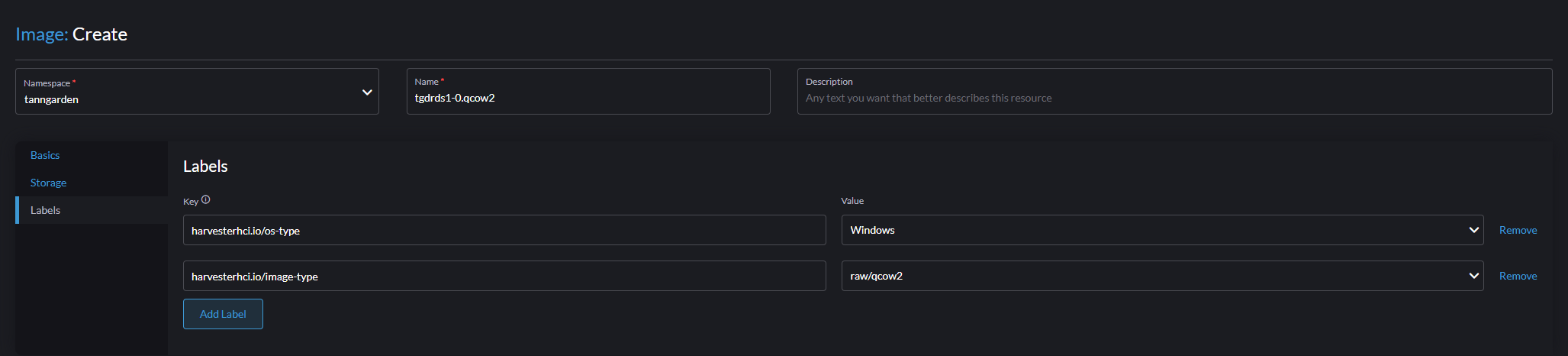
- Wait for it to complete…
- Stops with following error

Expected behavior
The qcow2 files should upload successfully
Environment
- Harvester ISO version: v1.1.1
- Underlying infrastructure: Baremetal with Dell PowerEdge R450
Support bundle Have created a support bundle and can provide it if needed
Additional context Add any other context about the problem here. The system is running in a semi-restricted environment and can only access internet-resources through a proxy that I have no control over.
About this issue
- Original URL
- State: closed
- Created a year ago
- Comments: 59 (27 by maintainers)
Status Update This issue has been resolved by PR #3910, we could check it with self-build ISO including PR #3910 or master release since 2023/5/19
Root Cause and Solution This issue is brought about by the following reason:
Verification Steps
It seems, when WebUI shows
99% Context cacelled, thebackingimageis still moving, and it reachs 100%, but there arehttps proxy errorin longhorn-manager-6df7d log, it is the root cause at the moment.@mwilberg Please do not try at the moment, there is a long path between:
Web Browser ----------------Harvester/Rancher/NGINX ---- LH ---- datasourceI will check how & where to adjust the NGINX param.
When it is tested, will let you know how to play with the workaround.
@ChanYiLin I would suggest you to setup an reproducable ENV first, it will help both debugging and coding fix. thanks.
A short update: the root cause comes from the combination of
NGINXanddatasource-manager,Harvester cluster (with embedded Rancher) uses a NGINX to forward/proxy user request to backend, e.g., the UPLOAD action. NGINX will trigger timeout when READ/WRITE (two continous packet) interval > 60s.
The backimg-image-manager sets below Handler.
router.HandleFunc("/v1/files", service.UploadFromRequest).Methods("POST").Queries("action", "upload")Following code, for BIG image, the
GetFileChecksumworks more than 60 seconds,LH (sf *SyncingFile) finishProcessingNoLockthat’s why, the WEBUI shows
context cancelled, but LH backend is still working, and it finally reachs 100%, it is blocking waiting the checksum computing, but NGINX thinks it’s dead. the code comment said// This operation may be time-consuming.…and, the issue is always hitted by BIG image uploading, failed at 99%.
the log here (https://github.com/harvester/harvester/issues/3450#issuecomment-1438256484) also tell us, the datasource did not print all logs in function
finishProcessingNoLocksolution: simply speaking, the
GetFileChecksumshould run in a go routine, to avoid block the current go routine, and cause NGINX proxy time out.workaround: increase the timeout in NGINX param
more details will be added later
Hi @w13915984028 thanks for all the logs
From Longhorn perspective, according to the log, the backing image was uploaded successfully and became ready as you can see from manager, it fetched the file from temp to final path
and also cleanup the data source pod after the transfer was finished
the BackingImage CR status also showed 100% ready
Can you check from longhorn UI to see if the image is ready?
longhorn-manager showed
meant the client connecting to longhorn-manager was gone.
Could it be that the virtual machine image controller in harvester tried to get the info from longhorn manager and somehow broke the connection?
So the state in harvester is not sync with longhorn?
Tested in
v1.2.0-rc1, verified as fixed.Test Environment
v1.2.0-rc1v1.4.2102.11.0esrVerification Steps
Get into Images tab and test step 1~4 for twice
Upload a 70G qcow2 via Create button
Wait and confirm status becomes Active ✔️
Upload a 75G qcow2 via Create button
Wait and confirm status becomes Active ✔️
1st Round
2nd Round
Longhorn’s Backing Image
Note
We can reproduce the upload fail due to gate way timeout mentioned in this ticket in Harvester
v1.1.2Another known case of upload fail is due to ERR_NETWORK_CHANGED on Chromium based browers, but it goes beyond the Harvester scope, so notes here. Ref. https://stackoverflow.com/questions/44854296/neterr-network-changed-on-chrome-on-https-socket-connection
After discussion with @FrankYang0529 to further understand Harvester system, there is more finding about Why Harvester UI still showed
Failedwithcontext cancelwhen BackingImage became ready in the end ?It is because there is an defer function for error handling in Harvester api code https://github.com/harvester/harvester/blob/ce5aff93c04740723244f83c527d1297a97877e3/pkg/api/image/formatter.go#L143-L149 This line will update the
virtualMachineImageImported condition status toFalsewith messagecontext cancelAnd in
virtualMachineImagecontroller where it syncs status fromBackingimagehttps://github.com/harvester/harvester/blob/ce5aff93c04740723244f83c527d1297a97877e3/pkg/controller/master/image/backing_image_controller.go#L40 If the Imported condition status isFalseit will not sync with Backingimage and consider it as final statusSo even BackingImage kept calculating the checksum and update status to ready after the timeout broke the connection, Harvester had no chance to update the status back to ready because it already considered it failed when api broke.
cc @w13915984028 cc @innobead @shuo-wu
@mwilberg please make sure you change & reload NGINX master process in all
rke2-ingress-nginx-*POD with workaround step(4.2) notify master to relad worker : kill -HUP 32, which is executed inside the POD.The following logs show: start checksum computing at
2023-02-26T18:54:12finish checksum computing at2023-02-26T18:57:45Z, it is about213sin your environment, and thehttp: proxy error: context canceledstill happend at18:56:21, it is129safter checksum computing.As per several reverse proxy are used internally, I am not sure, after you set proxy-read/write-timeout to
360sin NGINX, which one in the communication path first timedout. needs further investigation.In my Env, the
120stimeout works for the 45Gb img file cheksum computing, the computing takes about 70s.Sorry didn’t see this one before my previous post 😃
Hi @mwilberg I am also surveying the issue. According to your
backing-image-ds-*pod, the last few lines areIf there is any error during the uploading, the handler will mark the BackingImage failed and clean up the temp files
However,
failed to get the checksum fromthis line means the file is uploaded to the tmp folder, the tasks left forbacking-image-dsfrom this point areso the problem didn’t happen during the uploading
After
backing-image-dssucceeds to process file, thebacking-image-managerwillLastly,
2023/02/15 17:28:54 http: proxy error: context canceledmeans client is gone during the whole upload request maybe the browser breaks the connectionrelated issue: https://github.com/harvester/harvester/issues/3155
@mwilberg What’s the size of the converted vm image? and what is the available disk size of the cluster (of each NODE)? it is viewable from the WebUI dashboard, thanks.