harvester: [BUG] Installation failed: "Could find partition device path for partition 6"
Describe the bug
Installer reports fatal error during installation:
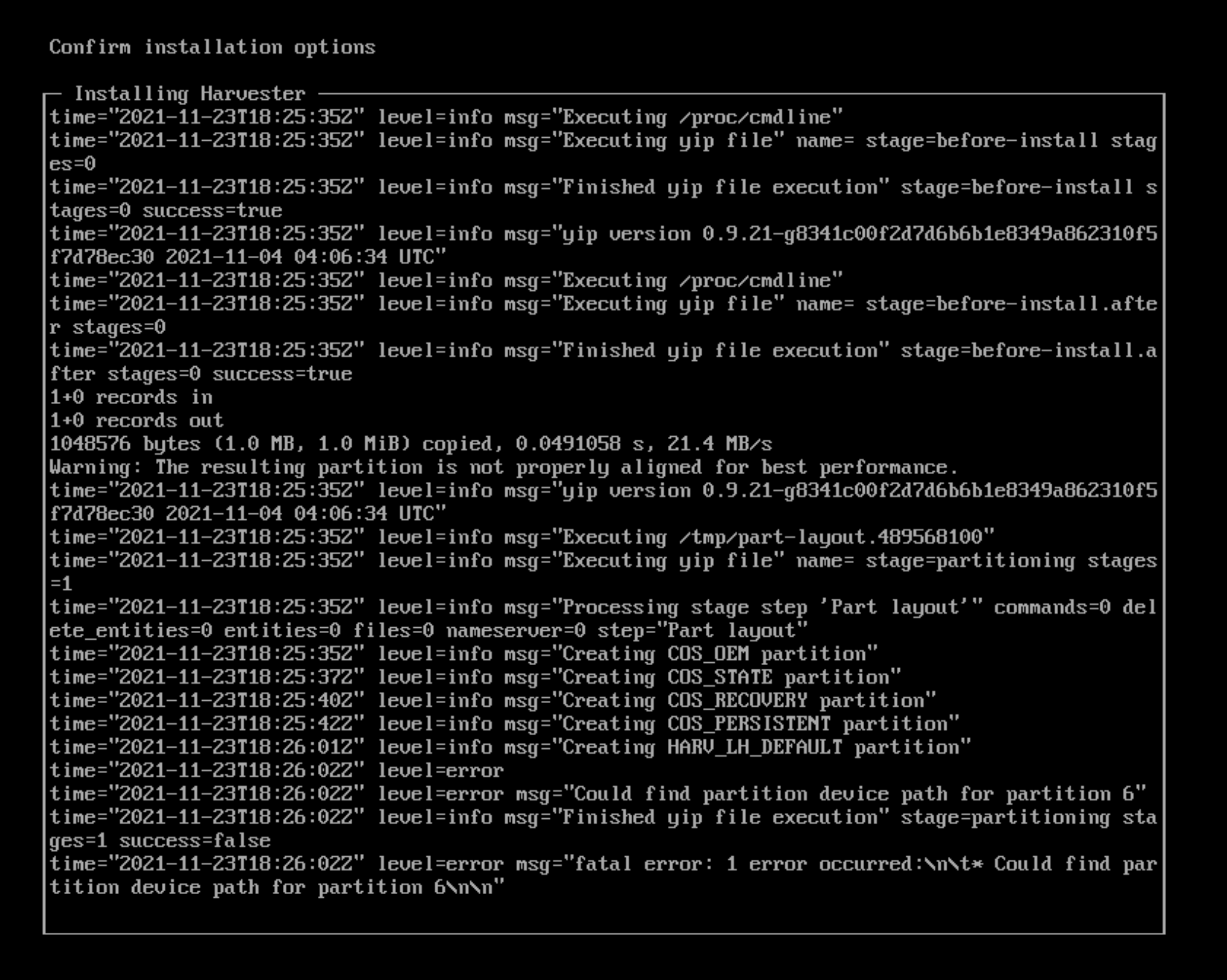
To Reproduce Steps to reproduce the behavior: Install Harvester with all default options. This issue is easier to reproduce on bare-metals.
Expected behavior
Support bundle
Environment:
- Harvester ISO version: master
- Underlying Infrastructure (e.g. Baremetal with Dell PowerEdge R630): Fremont
1.46
Additional context
This is the error message from the installer saying that it failed to partition the storage device. The main reason is the tool for performing disk partitioning “yip” sometimes can’t synchronize the latest disk partitioning layout, and the inconsistency is detected and thus stops the whole process.
To verify this issue, you could solely run yip to see if it could properly and consistently partitioning the device:
-
Boot the Harvester ISO and proceed with the installation until you finished configuring networking. Having network access to the machine would make things easier.
-
SSH into the machine with credential
rancher/rancher. You could also switch to another virtual terminal usingCtrl-Alt-F2, but it would make things a bit harder, as we later need to copy data into the machine. -
Switch to root user
sudo -s -
Copy the following data into a file named
part-layout.yaml. It’s a partitioning layout foryipto execute:stages: partitioning: - layout: add_partitions: - fsLabel: COS_OEM size: 50 pLabel: oem filesystem: ext4 - fsLabel: COS_STATE size: 15360 pLabel: state filesystem: ext4 - fsLabel: COS_RECOVERY size: 8192 pLabel: recovery filesystem: ext4 - fsLabel: COS_PERSISTENT size: 102400 pLabel: persistent filesystem: ext4 - fsLabel: HARV_LH_DEFAULT pLabel: longhorn filesystem: ext4 device: path: /dev/sda # Change this line if you have different disk name: Part layout -
Run this command to wipe the disk
/dev/sdafirst, then partition the disk withyipusing the layout from last step:# wipefs -af /dev/sda && yip -s partitioning part-layout.yaml -
If partitioning succeeds, you should see messages like this:
INFO[0007] Finished yip file execution stage=partitioning stages=1 success=trueIf failed, you would see messages similar to the screenshot.
-
You could repeatedly run the command from step 5, or write a bash script to try to reproduce the issue.
About this issue
- Original URL
- State: closed
- Created 3 years ago
- Comments: 16 (11 by maintainers)
positive test: yip version
0.9.25, verified 30 times, all succeed negative test: yip version0.9.18, verified in 6th timesTest Information
Verify Steps:
follow the Additional Context in https://github.com/harvester/harvester/issues/1583#issue-1062085248
Please check this possibility:
In short: if the partition is not found after creation, try delay a few seconds and read again.
The main process of creating a new partition :
sgdisk,partprobe,lsblkhttps://github.com/mudler/yip/blob/master/pkg/plugins/layout.goAll of them are run in the same go routine, no delay.
For
partprobe, it has a silent return when dev is not ready, but we don`t know.https://github.com/bcl/parted/blob/master/partprobe/partprobe.c
Notice, if
!ped_device_open (dev), it does not return an error. The new device may not be ready at the kernel side.https://unix.stackexchange.com/a/521858
Talked a similar case:
The author said:
@lanfon72 Please see the Additional Context in the description.
@johnliu55tw as we can’t reproduce this on Provo’s bare metals, would you please provide positive/negative test cases so that we can verify this bug is fixed.
if there is nothing in the udev queue it will be an instant return of 0 if there is something in the queue it will wait until those events are handled. In this case until partitions are refreshed probably. Shouldn’t take long if there are events, I tested this about 700 times in an automated script and there was no appreciable difference against an un-patched version. The margin of udev events being handled should be pretty fast, thus why this is difficult to reproduce and happens about 1 out of 5 times in a specific machine (we could not reproduce it in qemu or vbox with both slow and fast HDDs!)
yip 0.9.25 has been released which hopefully fully resolves this! https://github.com/mudler/yip/releases/tag/0.9.25