hammerspoon: Unable to bind to certain function keys
I’m running into a strange issue where some hotkeys are not being registered when bound to certain function keys - specifically just F10 and F11. Here’s an example:
# doesn't work
hs.hotkey.bind({}, "f10", function() hs.alert("pressed f10") end)
hs.hotkey.bind({}, "f11", function() hs.alert("pressed f11") end)

# works
hs.hotkey.bind({}, "f12", function() hs.alert("pressed f12") end)
The above config seems valid and the Hammerspoon console shows them being parsed at least:
hotkey: Enabled hotkey F10
hotkey: Enabled hotkey F11
But the keys are never actually captured. They just act like normal function keys.
As far as I can tell these keys are not bound to anything in the OS and they don’t appear to be special as other apps (e.g. Quicksilver, Alfred) can use them without issue.
Any idea what I’m doing wrong?
About this issue
- Original URL
- State: closed
- Created 8 years ago
- Comments: 17 (9 by maintainers)
@asmagill @pyrmont and those coming here from your favorite search engine: the same issue of being unable to use an assigned and disabled keyboard shortcut (in particular
F11, and possibly other Mission Control shortcuts?) in Hammerspoon still exists on macOS Catalina (10.15.7).While a workaround is to set the shortcut to a set of key combinations that you hopefully won’t need, there is a way to set “Show Desktop” (and probably many other shortcuts) to “none” by writing to
com.apple.symbolichotkeys.To set the keyboard shortcut for “Show Desktop” to “none”, run the following in a terminal and then reboot:
After rebooting, System Preferences → Keyboard → Shortcuts → Mission Control: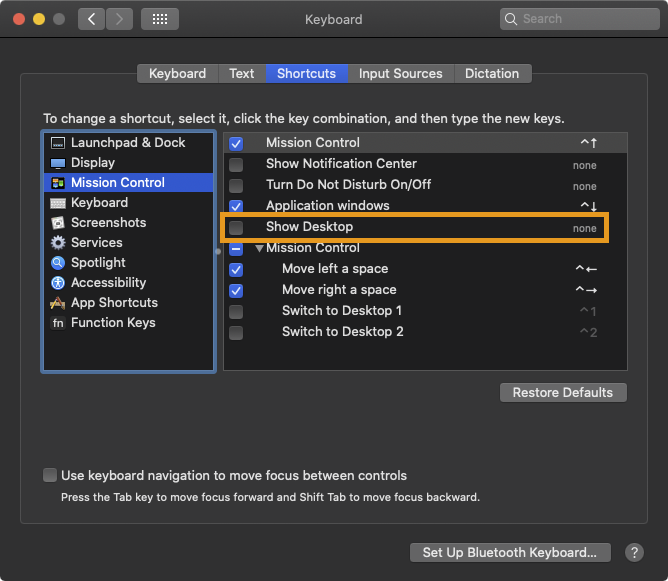
background
Reading
com.apple.symbolichotkeysviadefaults read com.apple.symbolichotkeysis a bit of a pain, and I haven’t discovered the complete mapping of shortcuts to their respective keys: disabling (or enabling) “Show Desktop” and reading the defaults shows the corresponding keys of36and37.The parameters to pass are
(65535, 65535, 0), with the latter two indicating a keyboard shortcut of “none”.A lot of information was helpful from the following:
other relevant issues
I just ran into the same problem trying to set
F11as a shortcut. @asmagill’s solution of reassigning the ‘Show Desktop’ shortcut solved it for me. (It was the same situation for me: although the ‘Show Desktop’ shortcut wasn’t enabled, simply having it set caused Hammerspoon not to be able to register the shortcut.)FWIW, in case this issue comes up again, I found that if a key is automatically assigned via the OS X Keyboard shortcuts, it may not be sufficient to just uncheck the keyboard shortcut… I couldn’t assign F11 by itself until I actually changed the “Show Desktop” shortcut to something else – simply unchecking it was not enough (though I didn’t try a reboot after unchecking it). I’d love to know a way to simply set it to “none” in the keyboard shortcuts panel, but that’s a quest for another day…