graphene-django: 404 Not Found after upgrade to 2.3
Just upgraded to 2.3. Then cannot open graphql site anymore. It shows graphiql.js file not found.


#683 looks similar to my issue, but I can’t pull up the site with what @brandonmbanks did.
About this issue
- Original URL
- State: closed
- Created 5 years ago
- Comments: 17 (7 by maintainers)
@evanheckert @Ouradze @dacevedo12 when running Django with
DEBUG=Falseit will not host static files for you (ref). You will need to run a server to host the static assets or use something like whitenoise to get the python process to host them. Once you have that setup it should work fine.The reason this changed in v2.3 is that we moved the graphiql javascript bundle into a separate file: https://github.com/graphql-python/graphene-django/pull/508
@danielcwj16 have you added
graphene_djangoto yourINSTALLED_APPSlist insettings.py?django.contrib.staticfilesalso needs to be in that list.Have you ran
python manage.py collectstatic?@mmitsui Yes, of course.
And…
This is still present in 2.5 😃 You can reproduce it with https://gitlab.com/eclar/django_deploy but only with the production image.
@jkimbo We’re experiencing the same problem. Here’s what our static settings look like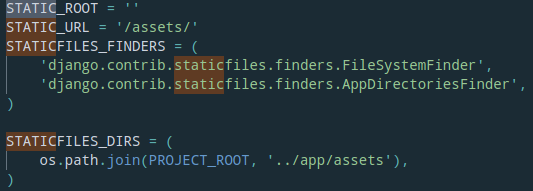
It works in the local development server but then fails after the app is deployed and served through wsgi
Still not works
Could this be related to #508?
Our project pulled in 2.3.0 and we observed the same 404, both FF and Chrome render a blank page at the /graphql/ path, and observed the following printed to our service log:
We’ve rolled back and pinned to 2.2.0 for now.