nexus-plugin-prisma: Cannot find name 'NexusPrisma'
when running type check on my project I get the following:
$ tsc
generated/typegen.ts:29:11 - error TS2304: Cannot find name 'NexusPrisma'.

29     crud: NexusPrisma<TypeName, 'crud'>
             ~~~~~~~~~~~

generated/typegen.ts:30:12 - error TS2304: Cannot find name 'NexusPrisma'.

30     model: NexusPrisma<TypeName, 'model'>
              ~~~~~~~~~~~
Should these be imported from somewhere? or am I missing a step?
About this issue
- Original URL
- State: closed
- Created 5 years ago
- Reactions: 3
- Comments: 20 (1 by maintainers)
@radicand thanks, but it didn’t work for me. I temporarily fixed it by generating the types again to the folder, where
nexus.tslives.I had to adjust
nexusPrismaPluginlike this:I ended up here after googling the same type error and I would like to mention that when NODE_ENV is set to production, type files are not generated. In the case where you need to compile typescript on production environment, you need to specify shouldGenerateArtifacts option like below.
I had to run the following to get this solved:
Run application so makeSchema(…) gets called again which takes care of updating the typegen.ts file
Wait for VSCode to pick up the changes … this sometimes takes a few seconds (restart may help)
@jorgenskogas ok, changed that to
And it seems to be working fine now.
@bogdancss this fixed it for me (if you test this locally, clean/delete your node_modules first)
@cypcz I ran into this because I had added in my
tsconfig.jsona definition fortypes: ["node"]. After removing thetypeskey, it compiled fine. If you need yourtypesdefined there, there is likely a way to make this work too - but that’s a pointer in the right direction at least.I’m experiencing the same issue.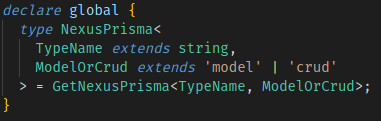
NexusPrismatype should be coming fromnode_modules/@types/nexus-prisma-typegen/index.d.ts. It is there:But generated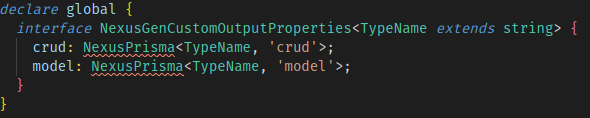
nexus.tsstill can’t find it.Any suggestion, please?